Pause. Reflect. Trade Smarter with Take a Break

In trading, discipline is the ultimate key to success. Yet, emotions often drive decisions, leading to over-trading—where you take more trades than planned, often with poor outcomes. Over-trading can erode profits and deepen losses, leaving traders frustrated and regretful.

To help traders stay in control, we’ve introduced the Take a Break feature—a tool designed to prevent impulsive trades and promote smarter trading habits.

The Problem: Why Over-Trading Happens

Over-trading is a common issue among traders:

  • After hitting a profit target, the temptation to chase “just one more trade” often arises.
  • When facing losses, the urge to recover quickly can lead to impulsive and poorly timed trades.

In both cases, emotions override strategy, turning potential wins into losses or making a manageable loss, much worse.

Recognizing this challenge, we developed the **Take a Break **feature—a simple solution to help traders pause for the day when needed.

What Does the Take a Break Feature Do?

The Take a Break feature allows you to temporarily disable trading for the rest of the day with just one click. While it halts all new trades, your existing holdings remain unaffected. This ensures:

  • You can lock in profits without succumbing to overconfidence.
  • You avoid chasing losses in emotionally charged moments.

Once enabled, the feature stays active until 11:59 PM, giving you the space to regain focus and recalibrate your strategy for the next trading day.

How Can It Help You?

1. Secure Profits and Avoid Greed

Take the example of Raj, a Bangalore-based intraday trader.

  • Morning trade: Raj identifies a clear breakout in a mid-cap stock and buys 1,000 shares at ₹220. The stock rises to ₹230, and he sells, making a profit of ₹10,000—meeting his daily target.
  • Afternoon temptation: The market shows signs of further momentum, and Raj decides to re-enter the same stock, expecting another breakout. Unfortunately, the stock dips instead, and he loses ₹6,000 in the second trade.

Had Raj activated Take a Break after hitting his profit target, he could have secured his gains and avoided unnecessary risk. The feature gives traders like Raj a way to step back and prevent greed from erasing their hard-earned profits.

2. Stop Emotional Trading During Losses

Consider Neha, a full-time trader from Mumbai.

  • Morning trade: Neha trades a volatile IT stock but misreads the trend and incurs a loss of ₹8,000. Frustrated, she feels compelled to “win back” her losses.
  • Chasing recovery: She places three more trades in quick succession, doubling down on positions and ignoring her stop-loss limits. By the end of the day, her losses spiral to ₹20,000.

If Neha had used the Take a Break feature after the first loss, she could have avoided emotional trading and preserved her capital. The feature provides a cooling-off period, enabling traders to reassess and return with a clear mind the next day.

Key Features at a Glance

  • Single-click activation: Quickly pause trading for the rest of the day.
  • No impact on existing holdings: Your investments remain untouched.
  • Active until midnight: Once enabled, the feature stays on until 11:59 PM.
  • Improved discipline: Helps you avoid over-trading after gains or losses.
  • Smarter decision-making: Encourages mindful trading by giving you time to pause and reflect.

How to Enable the Take a Break Feature

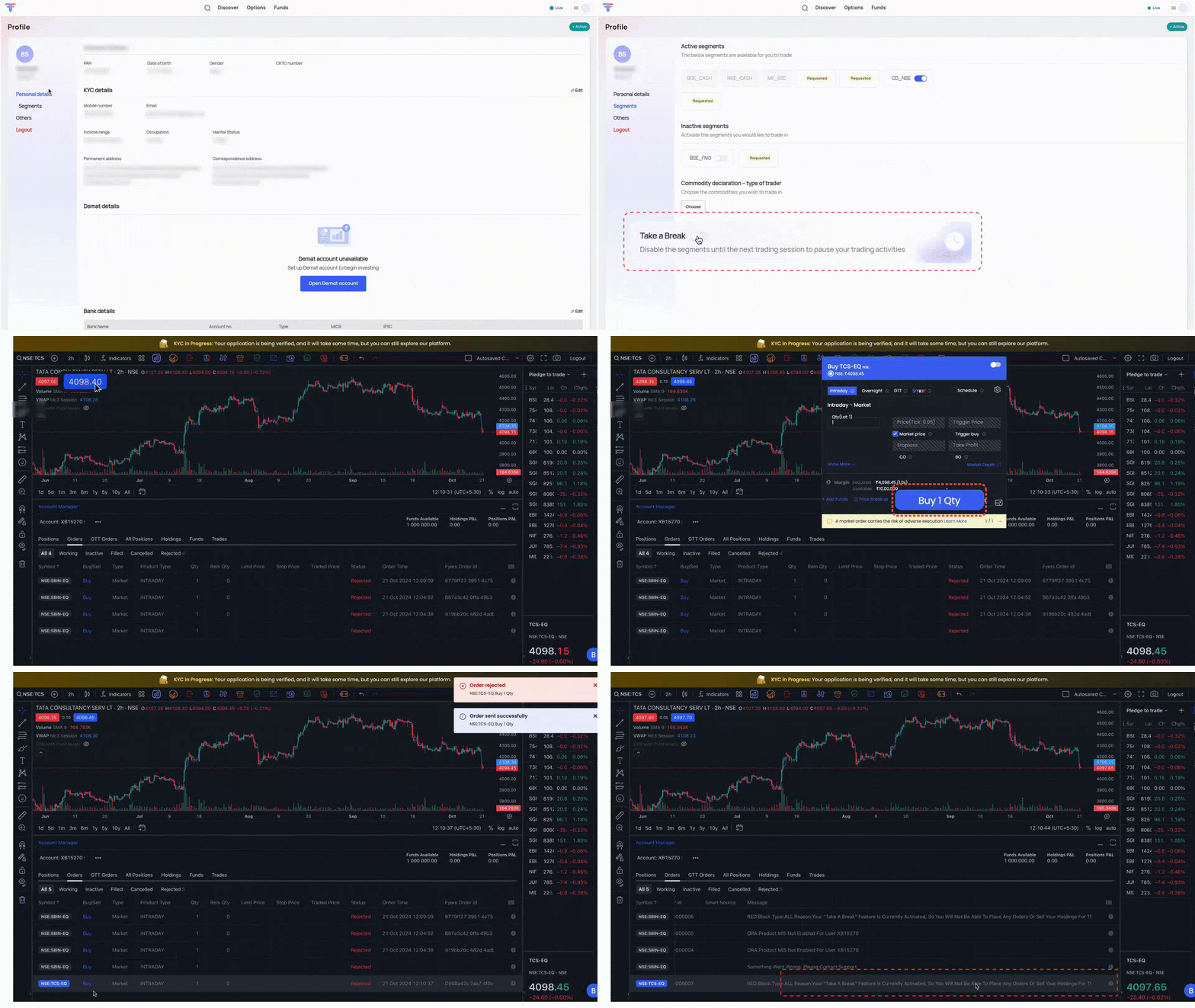
You can activate this feature in just a few steps:

  • Log in to app.fyers.in.
  • Click on your profile photo and go to the Profile section.
  • Find the Take a Break toggle under the Segments tab.

For a visual guide, check out the GIF below:
Things to Keep in Mind

  • All open positions must be closed before activating this feature.
  • The feature doesn’t block access to IPOs or mutual fund investments.
  • You won’t be able to sell existing holdings while Take a Break is active.

Stay in Control with Take a Break

The Take a Break feature is a practical tool for improving trading discipline. By helping you secure profits and limit losses, it promotes smarter decision-making and long-term success.

Ready to trade smarter? Download the FYERS App now and give the Take a Break feature a try. Share it with your trading community to help them benefit from better trading habits!
15 Likes

can we get this features in Python Docs . Can we look forward to get options Greeks , in upcoming updates of Fyers Python Docs

@communications_team an option to disable the segments of our choice and an option to disable this take a break feature during a day should also be given.

While I greatly appreciate the features currently available, I believe there’s an essential functionality missing from FyersWeb that could significantly enhance the trading experience. I personally use a mix of algorithmic trading and discretionary trading, and I have found that implementing a Mark-to-Market (MTM) stop-loss would be highly beneficial.
Specifically, I would appreciate if there were options like a ‘maximum loss for the day limit’ or a ‘maximum profit for the day limit’. These features would help prevent over-trading and mitigate the risks associated with bad slippage that are sometimes encountered with algorithmic trades.

I do use the Fyers App’s alert & exit feature, which has been quite helpful on several occasions. However, I strongly believe integrating this MTM stop-loss functionality into FyersWeb for PC would be invaluable, as it is a crucial component for managing trading strategies effectively.

1 Like

I prefer changing this options position from segments to somewhere easily accessible and visible … I hope you guys will fix this

And also can you guys give an option for number of trades per day that can be fixed .. and after that number of trades automatically break turn on

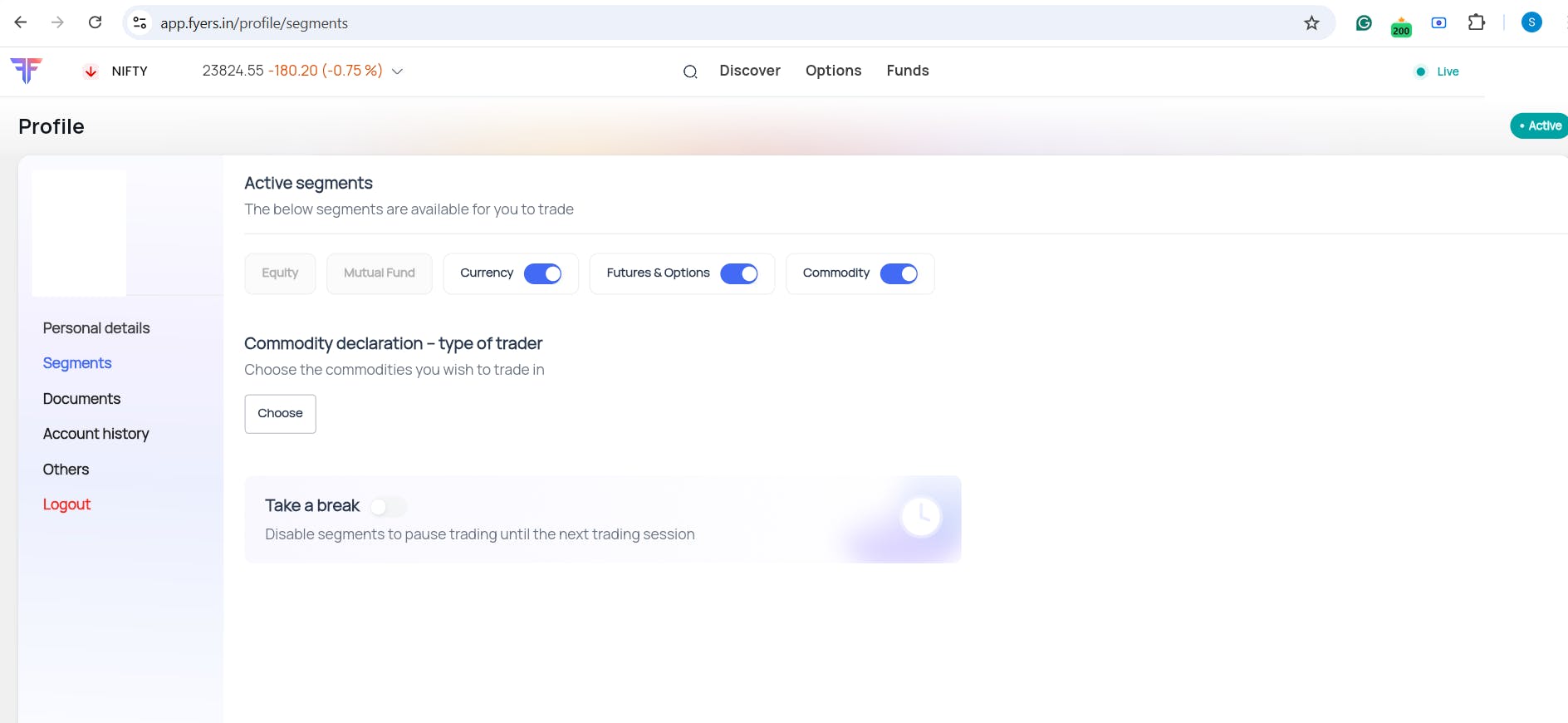
Hi @a7mxqMLDnd, you can enable and disable your preferred segments as well in the segment section. I have attached the screenshot for your reference.

@shruthi_shetty but it is lengthy process to activate the segment again. It needs bank proof verification, otp etc., After requesting for activation, it will take 2-3 working dys to get segment activated which means loss of opportunities. So this is not at all an alternative to the segment-wise take a break feature..

If you could introduce segment wise take a break feature, it will be more useful. I am requesting this because we can stop over trading for that particular day in the fno segment and concentrate on investing in equity if required.

Secondly, one or two chances should be given during the day to deactivate the take a break feature.

Thirdly, can you tell me why the equity & mutual fund segments are greyed out?

Kindly make it available under the mobile app.

2 Likes

Can we do it from app itself it takes us to website then otp little hectic process.

“You won’t be able to sell existing holdings while Take a Break is active.”

This can be a deal breaker. I think the temp block feature should only be limited to buying new intraday / CNC positions. It should not impact any selling .

Hi Sagar,

This feature will be available in the FYERS API very soon.

Regarding option Greeks in the API, we will consider including this in future enhancements.

@shruthi_shetty @naresh_janagam requesting to clarify above 3 points.

Thank you for sharing the reference, @109305315999318757257.

While I agree with your perspective, we can not overlook the fact that humans tend to make irrational decisions under stress.

This feature is intended to restore that cool by stepping away from the market for the day.

We don’t want anyone to make an impulsive sell on their holdings just because their trading day did not go as planned.

I trust this makes sense.

2 Likes

Can’t agree more, @111224649490793041508 .

You will have it in the next application update, that is planned for the end of January.

Hi @112124295040566369513,

You will have it in the next application update, that is planned for the end of January.

Sure, @110174362970088225288 ,

Your feedback is acknowledged, and we will explore this further.

Hey @e6HWQE3kQ8

This is a much needed feature and a welcome addition to the Fyers Platform. My one suggestion/feedback as a user would be to add one optional functionality here, to add a Rupee Value of Maximum Daily Loss here, which triggers the Pause directly. E.g. if a person keeps 20k as max daily loss limit, whether it hits in 1 trade or 5, the system should go on pause as soon as -20k gets hit on the P&L.

This would be an industry first (atleast in the Indian Market) if you guys are able to implement it along with the pause.

Great work, Cheers!

Shruthi Shetty Naresh Janagam @communications_team requesting to clarify above 3 points.

Hi Srikanth,

Could you please confirm which three points you are referring to?