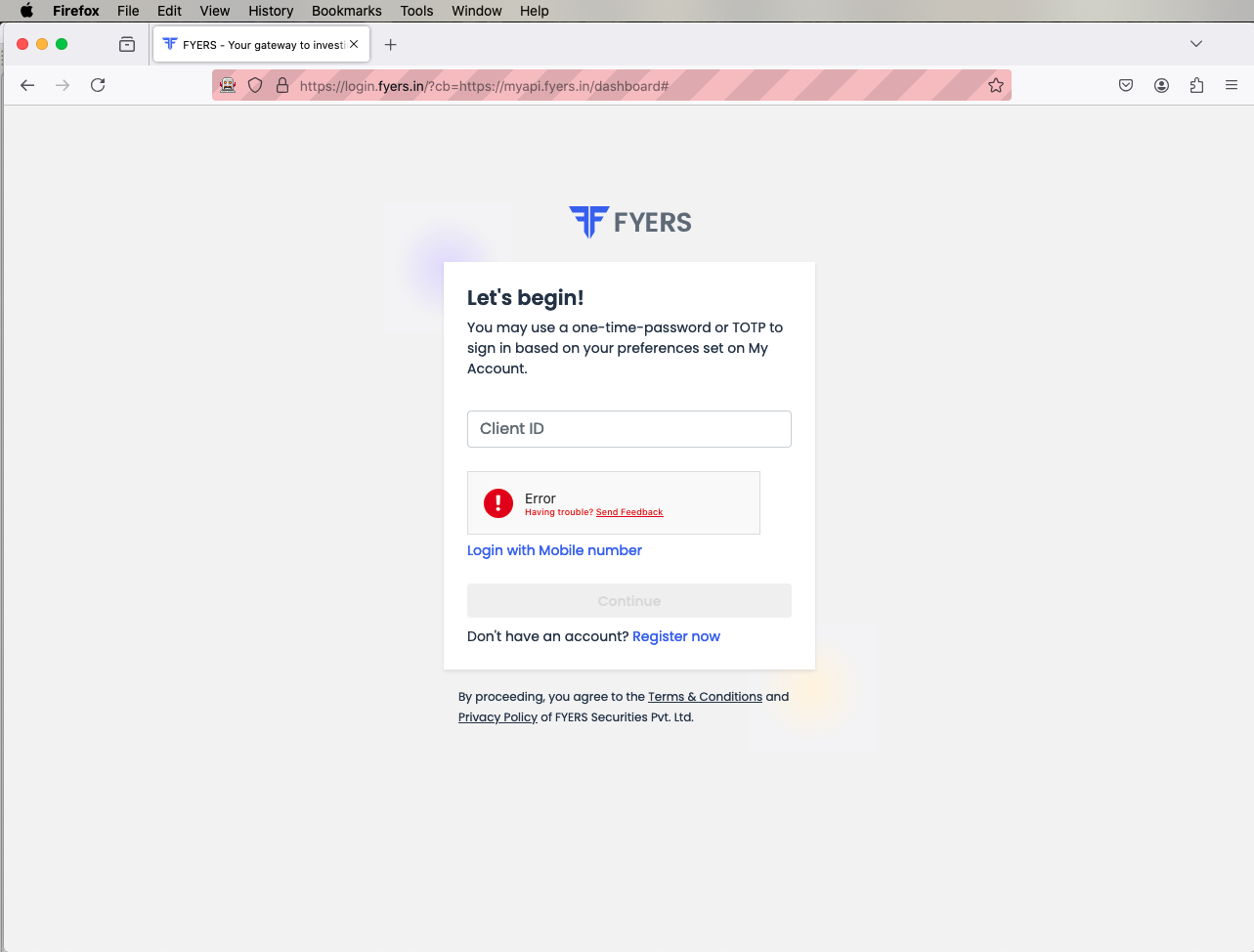
Thank you for responding. I appreciate it. Before contacting support team, I did this troubleshooting but it didn’t help in resolving the issue. The Fyers API is using selenium automation which is recognised by the Fyers login page and doesn’t allow it to progress saying it is not human, rightly so.
I tried with Mozilla Firefox and Google Chrome and couldn’t get it to work.
The Fyers API is using selenium automation which is recognised by the Fyers login page and doesn’t allow it to progress saying it is not human, rightly so.
Did you mean Fyers APIYOU are using Selenium Automation to bypass the human login detection ?
Fyers Web uses Cloudflare Human Verification.
If you are using Selenium, use **undetected-chromedriver **instead of regular chromedriver.
Oh okay. Let me cross check that and get back to you. Thanks for the guidance. I seem to be using a library which is seemingly using selenium in that case.
Just to make sure we are on the right page and there is no confusion, this is what I’ referring to implement my own system using FYERS API.
Can you help me with this one other thing please? This also seem like one of the issue. My app (named _tfsystem) is still being shown as Inactive. How do I get it activated?
Could not find any screenshot that shows your app being inactive.
But App being inactive is NOT the reason for the original issue posted for Cloudflare Human Verification Captcha failing. Once you validate browser auth_code and generate access_token (means basically when you successfully login to the Fyers API app) for the first time and refresh the dashboard page, it will show active on the Fyers API Apps Dashboard.
Note : Refrain from sharing app_ids/user_ids/tokens anything as such here on public platform. Also, I am NOT from Fyers Team.
I researched a bit on this. As per my understanding, it is VERY DIFFICULT to bypass the Cloudflare Human Verification Captcha Challenge. It may work sometimes with an add-on like undetected-chromedriver options / selenium-stealth / rotating proxy agents / mouse action movements & delays / etc but is NOT a reliable solution longterm as they use any random strategy anytime to detect bots and block the access.
Not sure if Fyers guys have any solution to this which they might tell you personally on support call, but I would recommend you to manually verify the browser login with regular manual browser + TOTP entering WITHOUT automation (as this is more secured way) and then further continue with the automation after you extract the auth-code from the redirected_url.
You may also use Refresh Token further which is valid for 15 days, so that this MANUAL process of login needs to be done only once in 15 days !
Thanks a lot brother for checking it out further. Yes the captcha system is in fact made to stop any automated system to login. It is there for the same purpose and it works very well.
Bypassing that isn’t correct solution. Ideally Fyers must have a way to authenticate through the api, but I am not able to figure it out yet or they don’t have it.
I haven’t heard anything from the support guys yet. Hopefully they’ll be able to confirm the correct way.
Thanks again for digging into this. The alternate options sounds great and I will go through them.
Any suggestions on how to extract the auth-code after manual login ? I suppose it’s from interceptor, but I can’t find it working (probably I am picking up something else). Does it show up on the url? If you can give a pointer it would be really helpful.
You need to manually login using your Auth_URL on a browser by entering your login credentials with TOTP and verify human captcha.
Upon success, your browser will be redirected to the Redirect_URL which you had mentioned while creating your API App on the Fyers API Apps Dashboard.
At this redirected page now, the URL on the browser address bar will consist of the query_parameter called auth_code.
Copy this value as your auth_code which further needs to be passed to the SDK to generate access/refresh tokens.
Remember, auth_code (token for your human login verification) is valid for ONE-TIME USAGE ONLY.
If you are using an active server (like Flask/Spring Boot/NodeJS) listening on the endpoint of your Redirect_URL, you can simply extract the request.args and look for auth_code key in the dictionary, upon the redirect_url route trigger.
@naresh_janagama if there is any option to disable Human verification from fyres side ?
i had this issue earlier then bypassed it with some plugin so I’m not feeling it that much secure if fyers provide an alternative solution will much better and secure
I like better the other option that @su_yaSSH suggested to get the auth code manually and then generate the access token from it which stays active for two weeks. Once a two weeks manual refresh isn’t a big deal for a start.
You are asking to disable Human Verification OR you want a stronger validation check for Human Verification ?
Human Verification is part of OAuth2 standard and it is for security purpose only. Also, why to use any random plug-in if NOT feeling secure enough. Better NOT to expose OWN security by sharing any credentials / TOTP fingerprint key to such plug-in tools or cloud spaces where the code/db sits.
Automation is convenient BUT just automating ALL the flows with single click is RISKY !
Absolutely @nsuyash11-m18 !Thank you for raising the awareness.
@G6XZcJckyW@tejas Chachcha it is always recommended to follow the flow suggested in the documentation. This ensures reliability and avoids the risks associated with relying on third-party tools.
This approach has been working fine so far but generated token (using auth code) doesn’t really stay valid for 15 days, I have to refresh it every 2 days. Isn’t this supposed to stay valid for two weeks? I would appreciate if you can provide any pointers towards getting this sorted.