I am using fyers web (https://trade.fyers.in). To take trade in option I click on the + sign and buy. Is there a way to specify fix number of lot say 4 lots instead of 1 while buying.
Currently I have to click + sign then increase the lot size manually and then buy. That takes time when we are taking a breakout trade.
Hello @shyam.cqj9mxeg, you can utilize the Quick Trade Feature, where you can place orders in a single click. You can even customize Quick Trade settings. In your case, you can change the fixed number of lots to 4 in the settings.
To update your Quick Trade settings, please follow these steps:
- Click on User Settings
- Select Quick Trade
- Change the fixed number of lots to 4
- Click on Save
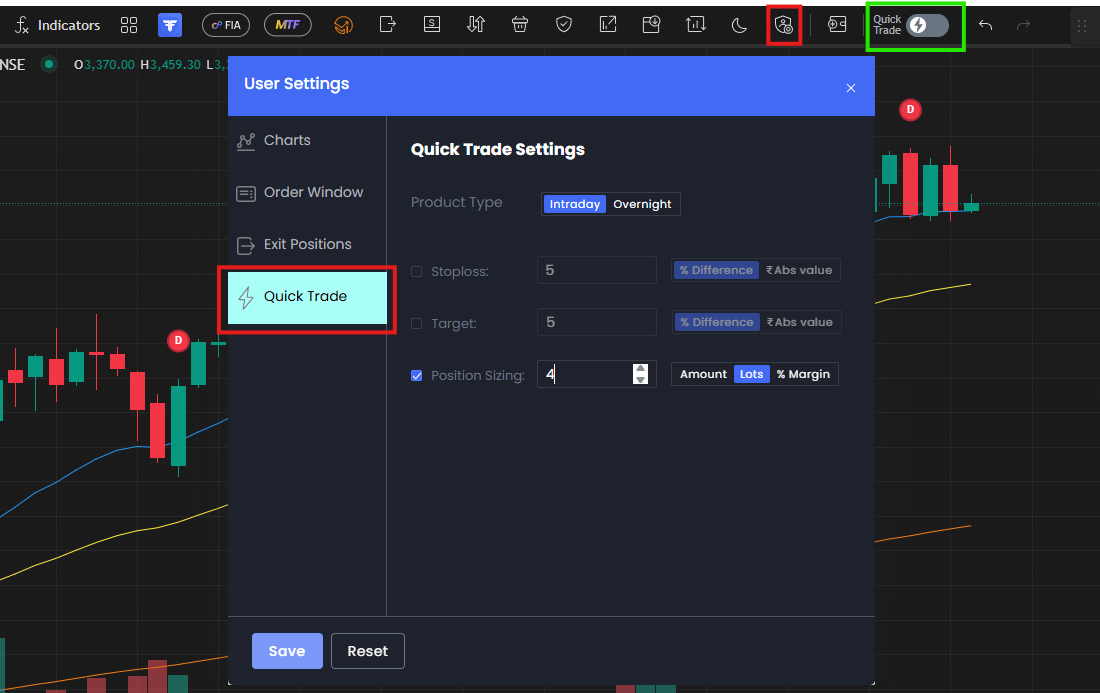
You can even refer to this article for more details.
Thanks a lot Adhiraj