Quick Trade: One-Click Order Placement for Swift Execution

In trading, a few seconds can make all the difference between capturing profits or missing opportunities. Many of us have experienced the frustration of spotting the perfect entry point only to lose it while navigating multiple clicks to place an order. To address this, FYERS introduces Quick Trade – a feature that streamlines trade execution with one-click order placements. With pre-configured Stop Loss, Target, and flexible position sizing options, Quick Trade lets you react instantly, without compromising on risk management.

Available for both Intraday and Overnight trades, Quick Trade is built to enhance trading efficiency. Here’s a closer look at how this feature works and how it can help you stay ahead of market moves.

The Problem: Missing Out on Timely Trades Due to Multiple Clicks

Imagine this: You’re tracking a stock that’s showing a strong breakout signal. You’re ready to enter, but the usual order setup – selecting order type, quantity, and setting Stop Loss or Target – requires multiple clicks. By the time you’re done, the stock has already moved, and you’ve missed your ideal entry.

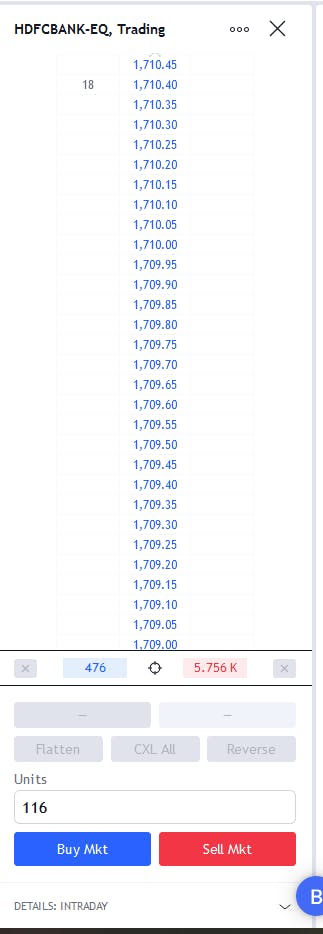
With FYERS Quick Trade, you can configure all settings in advance. By simply toggling on Quick Trade, you’re ready to place the order with a single click directly from the chart, Depth of Market (DOM), or the Buy/Sell button. Let’s walk through how to set this up.

How to Configure Quick Trade Settings

  • Navigate to Quick Trade Settings: Log in to FYERS Web and go to User Settings > Quick Trade.

  • Select Product Type: Choose between Intraday and Overnight. Your selection determines the availability of Stop Loss and Target options.

  • Set Stop Loss and Target (for Intraday only): Define your risk and reward levels as a percentage or an absolute INR value.

  • Normal Intraday Order: If you do not select both Stop Loss and Target, a regular intraday order will be placed.

  • Cover Order (CO): If only a Stop Loss is set, Quick Trade will place a CO.

  • Bracket Order (BO): If both Stop Loss and Target are enabled, Quick Trade will place a BO.

  • Position Sizing Options:

  • Amount: Enter the capital allocation per trade.

  • Lots: For equity, set the number of shares, and for F&O, specify the number of lots.

  • % Margin: Set a percentage of your total funds to be used for each trade.

Once these settings are configured, Quick Trade is ready for action. Let’s see it in practice.

Capturing Intraday Moves with a Single Click

Scenario: You’ve identified an intraday trading opportunity in a volatile stock but often miss out due to the time taken for manual setup. Quick Trade helps you capture the move as it unfolds, without delay. Here’s how:

  • Activate Quick Trade: Go to the Quick Trade button on the toolbar and toggle it on.
  • Pre-Configure Order Settings: Define your Stop Loss, Target, and Position Sizing in Quick Trade Settings as described above.
  • Place the Trade with One Click: As soon as you spot the opportunity on the chart, place the order instantly.

In this setup:

  • Without selecting both Stop Loss and Target, a normal Intraday order will be placed.
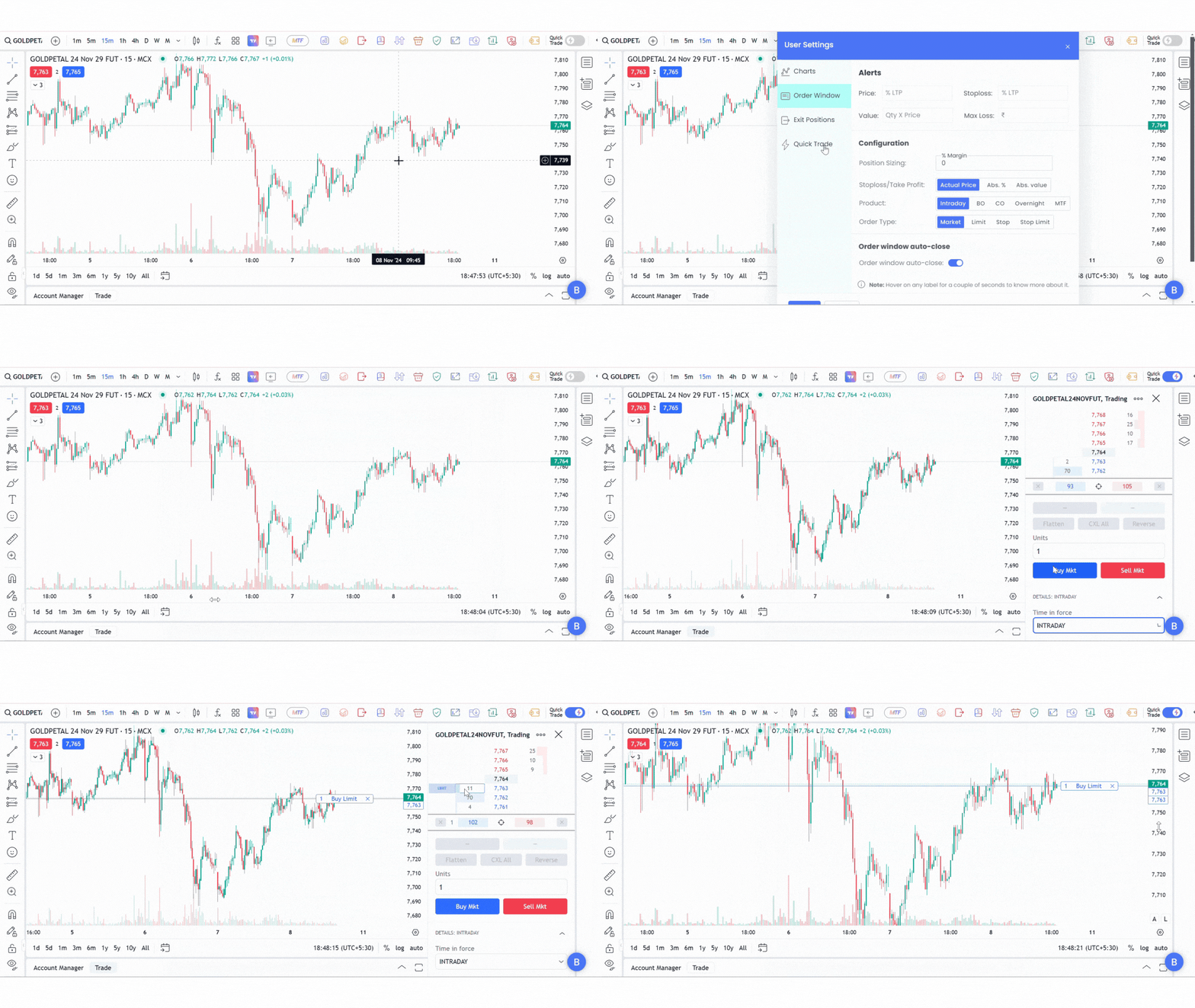
  • With only a Stop Loss enabled, Quick Trade will place a Cover Order (CO).
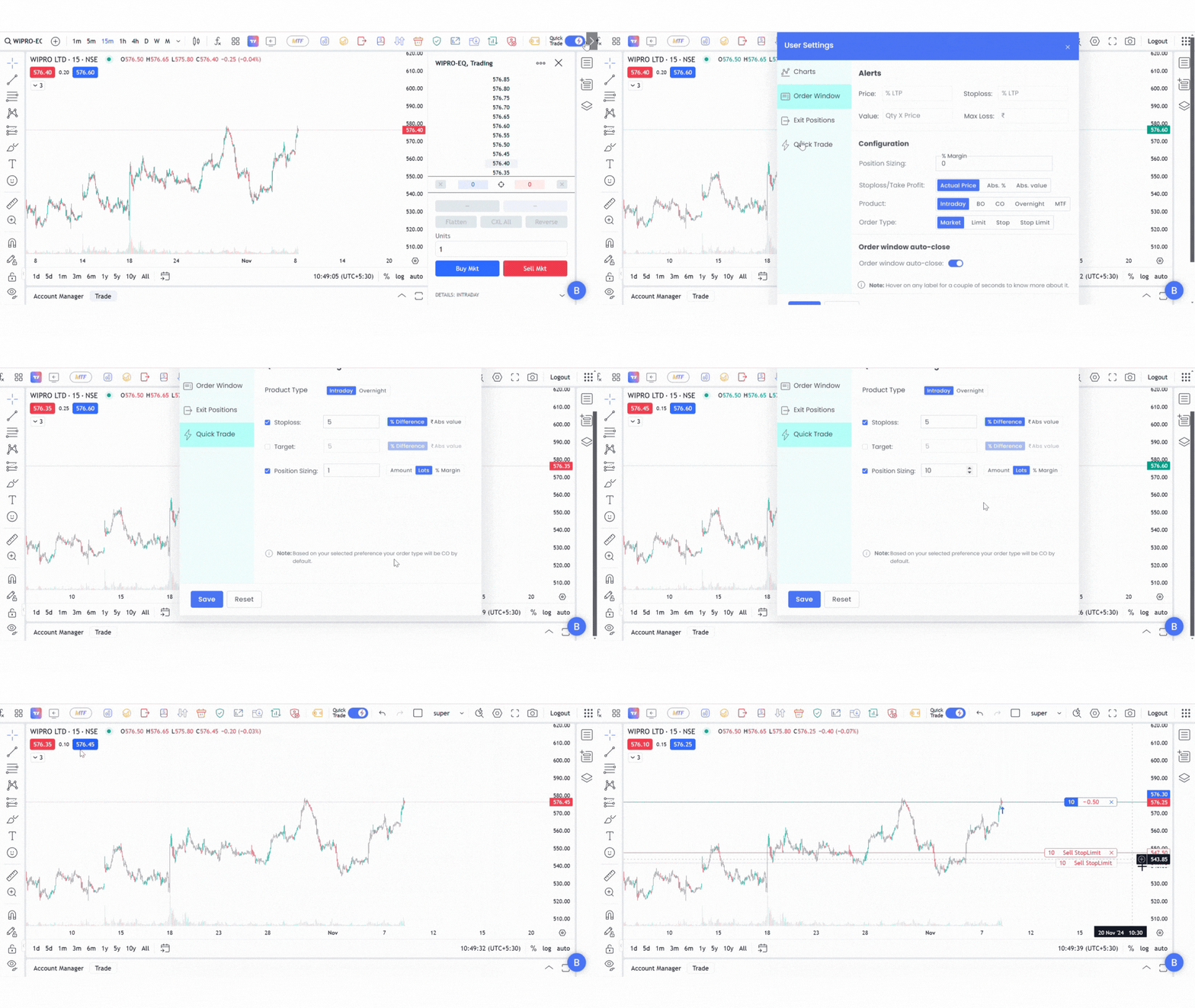
  • With both Stop Loss and Target set, a Bracket Order (BO) is placed, providing you with a predefined exit point.
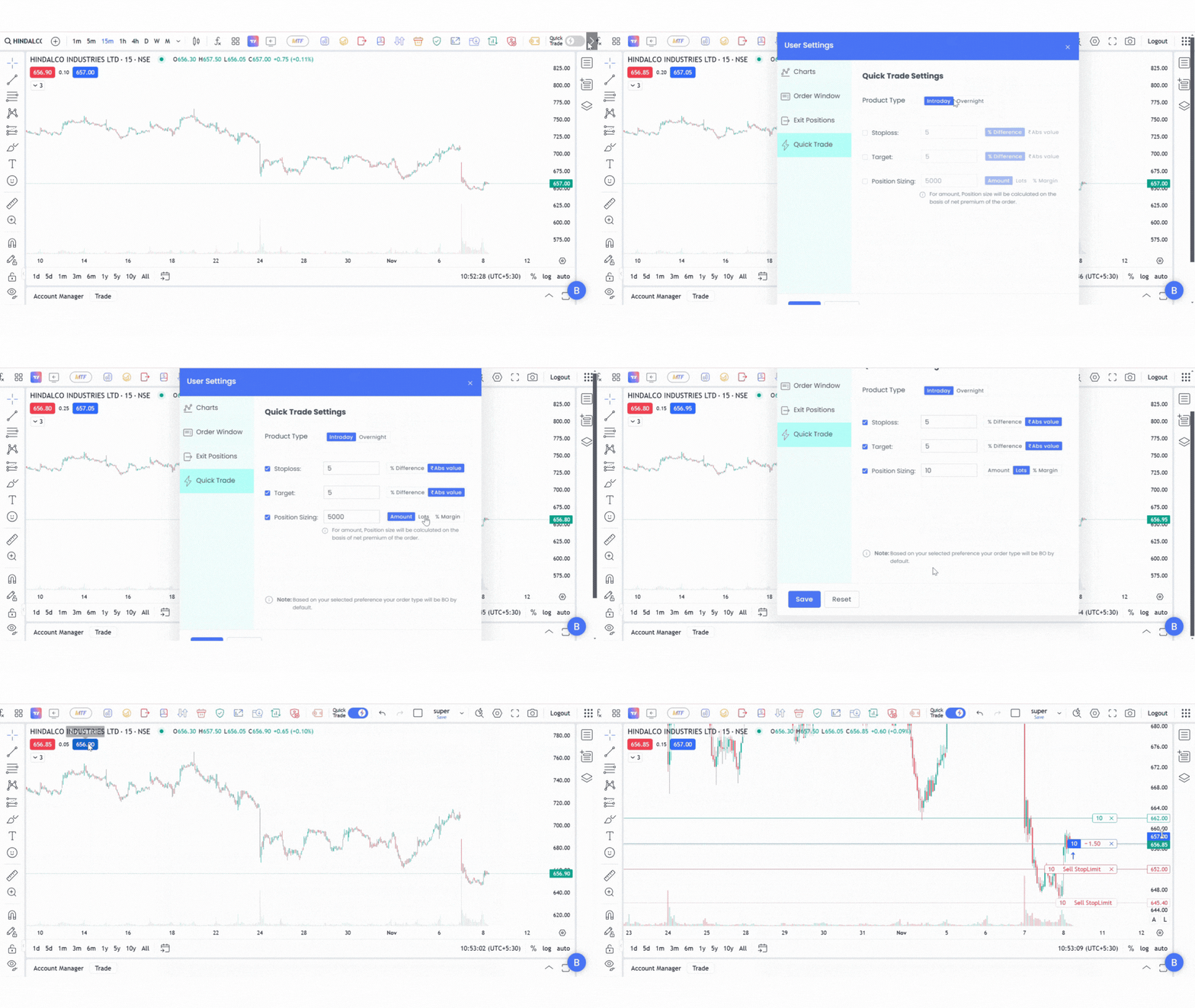
This approach not only speeds up order placement but also ensures that your trade has built-in risk management from the start, letting you focus on the market, not the mechanics.

Quick Trade for Overnight Trades: Simple Position Sizing

Overnight trades generally don’t require immediate exit levels, so Quick Trade simplifies this with position sizing only (Stop Loss and Target settings are not available for Overnight trades). This allows you to predefine the quantity or amount to be traded without any additional setup, helping you focus purely on timing your entry.
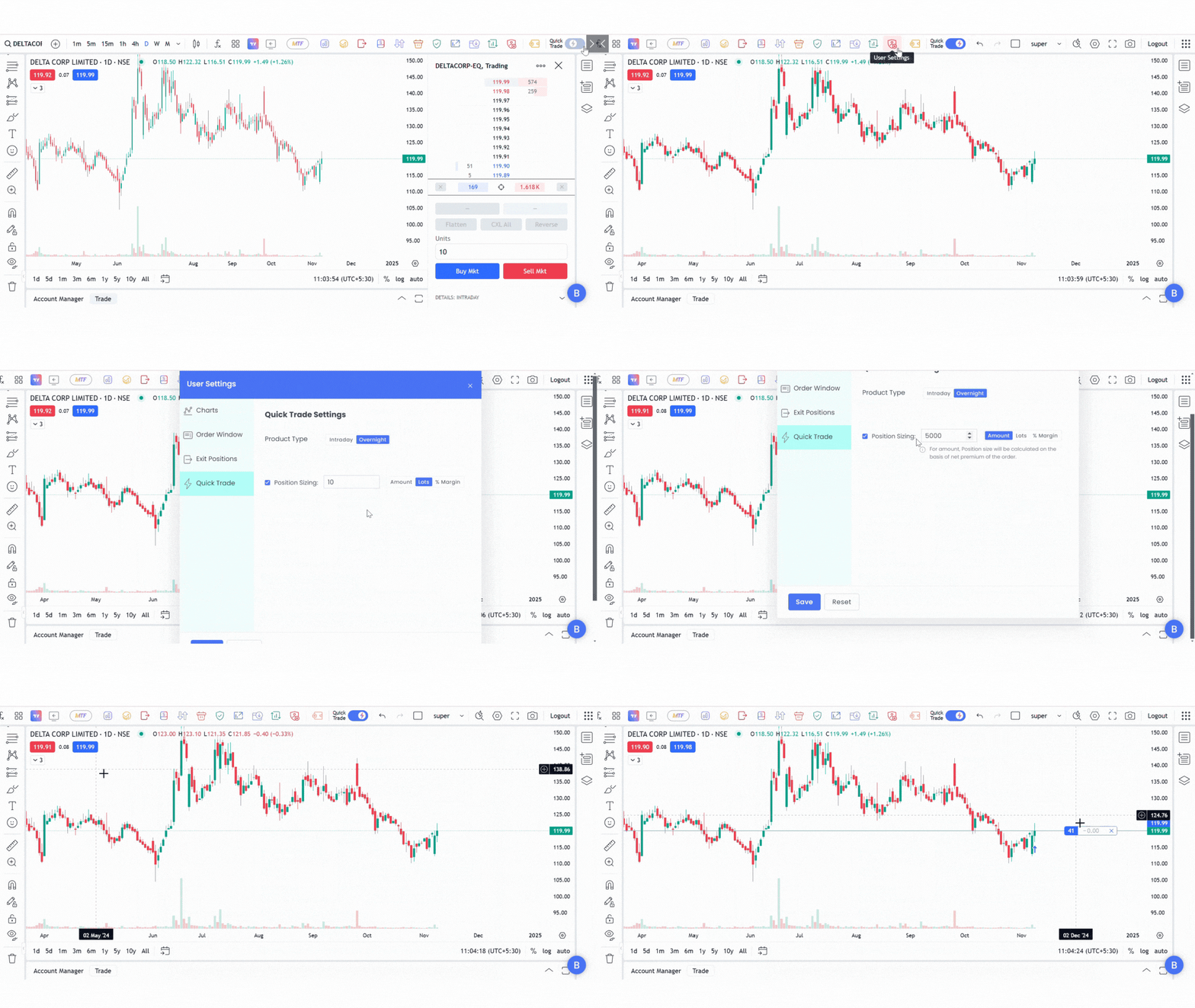
Additional Features for Enhanced Flexibility

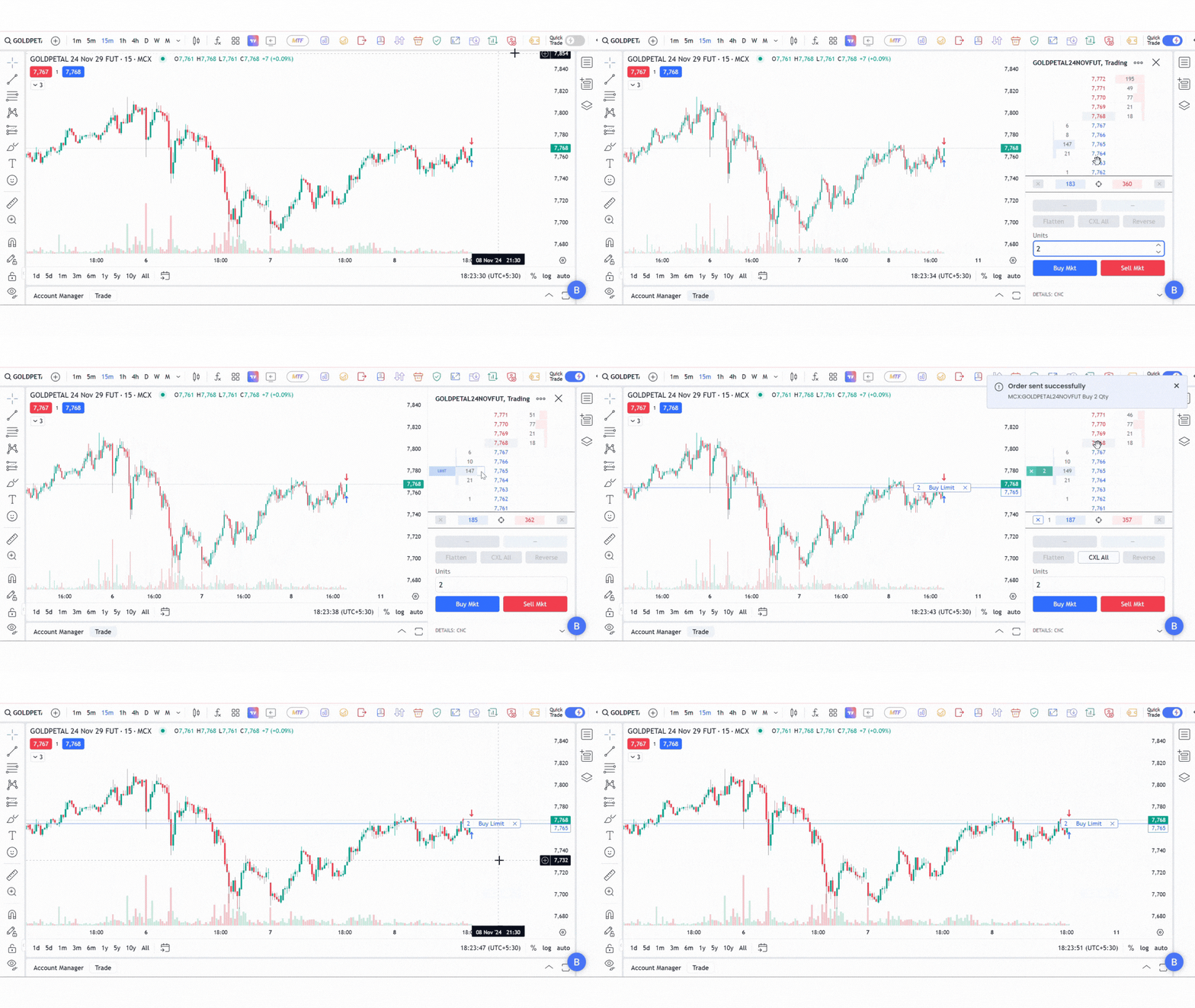
Placing Limit Orders: If you want to place a Limit order rather than a Market order, you can do so directly on the chart or through the DOM, offering you greater control over your entry price.
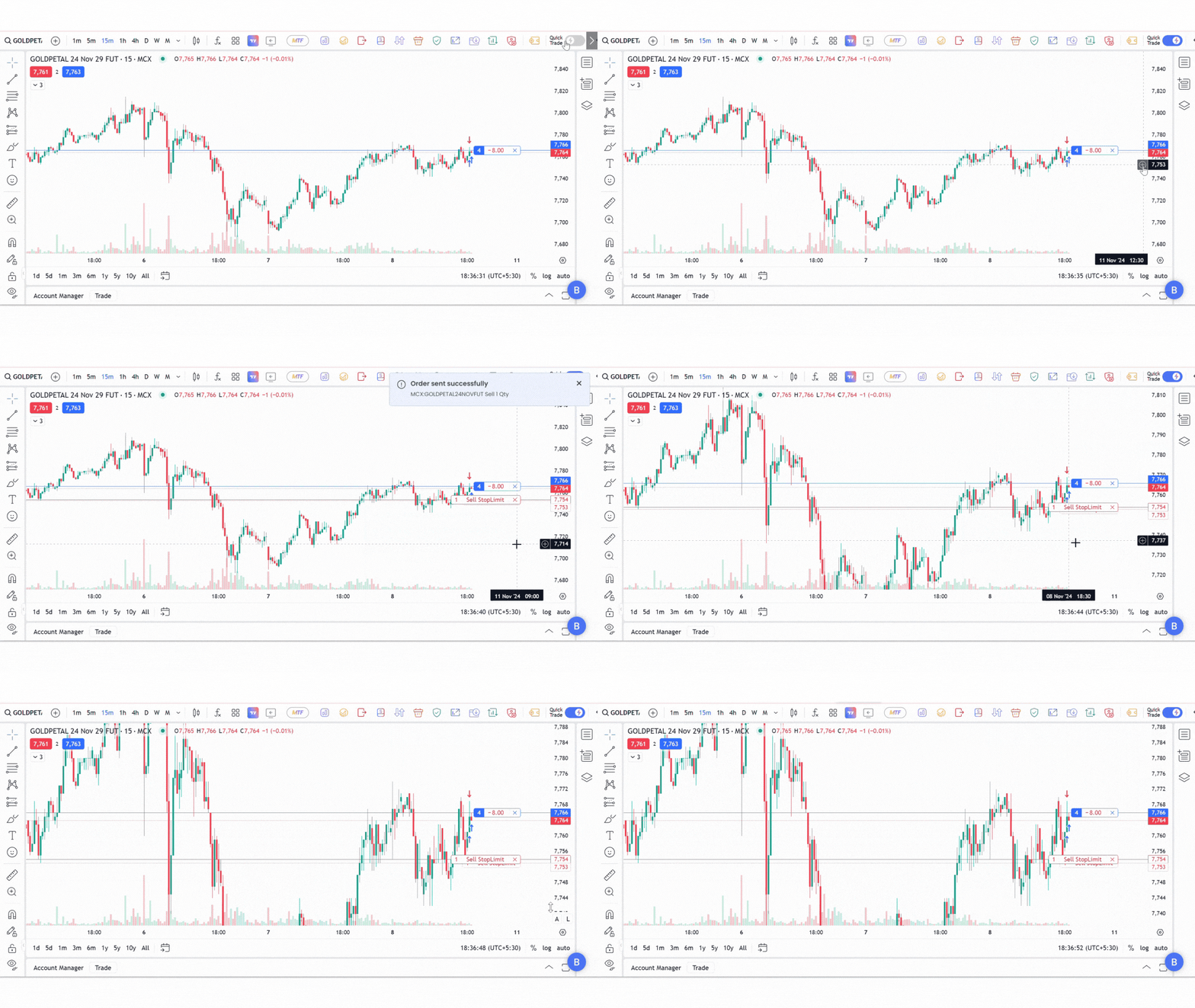
  • Setting SL-L and SL-M: You can place Stop Loss Limit (SL-L) and Stop Loss Market (SL-M) orders directly from charts. This flexibility lets you quickly adjust your order type without needing to go back into settings.
  • Modifying Quantity: If you need to adjust the order quantity for a specific trade without altering your predefined settings, you can do so in the DOM under Units. This adjustment will only apply to the current trade, but remember that this quantity will remain the default for closing that position.
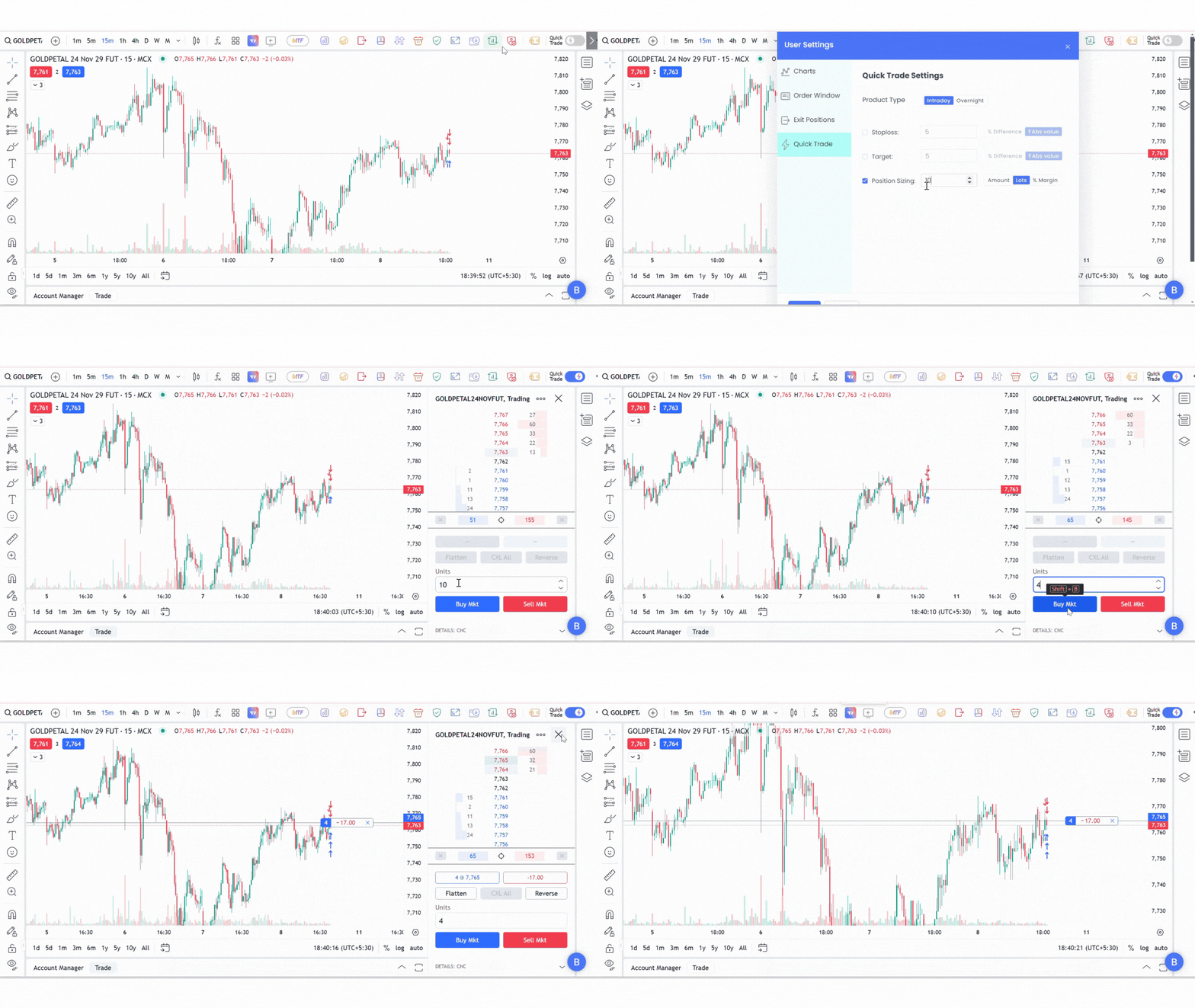
Note : Remember, refreshing the FYERS platform will disable Quick Trade. If you refresh or navigate to another page, you’ll need to reactivate Quick Trade.

For further details and specific queries on using Quick Trade, visit our support portal.

Conclusion

Quick Trade addresses a core need for speed in order execution, particularly for fast-moving markets. By enabling one-click trading with pre-configured risk and position settings, Quick Trade helps you act instantly on market opportunities, reducing delays and enhancing trading precision.

Ready to boost your trading efficiency? Log in to FYERS Web, enable Quick Trade, and experience the power of rapid, controlled trades at your fingertips. If you’re not with FYERS yet, join us in embracing the future of trading by opening an account.


18 Likes

Keep up the good works @communications_team team Thank you for ur efforts :sparkles:

7 Likes

Quick Trade is a very good feature. The location of the tab on the web is hindering to other functionality. If it is placed next to MTF tab or top of the “B/S button on the right bottom corner” or where DOM ladder was earlier present that would be great. Appreciate if the button is realigned in the middle.

Reason why is, it is very close to the expand all button and accidentally it gets clicked. Right corner in the computer is the place where notifications and other alerts arrive. When we hover and

click the mouse to close the notifications this "quick trade: gets activated accidentally. Its painstaking to go close it off. Appreciate a better location for “quick Trade feature”

1 Like

Great, can’t wait to try it out tomorrow.

2 Likes

Hi FYERS team,

Great to see these efforts to constantly improve the platform, it is really valuable and I appreciate it a lot.

At the same time, I would like to point out that I feel these are one of the most fundamental features that all traders need, and should have been there from day 1 (and I believe many serious traders would agree. If you are one, and if you agree, let everyone know by upvoting this comment or sharing your own comment)

I speak not regarding FYERS specifically, but in general regarding all Indian Brokers. I have used multiple Indian Brokers over time, and quick and easy order placement never seemed to be a priority for most brokers even though the technology of our times can easily handle this. (Maybe there are difficulties or risks at the testing and verification phase for these features? Pardon my ignorance, and please enlighten me if that’s the case)

Regarding things I noticed with FYERS,

  1. before these updates, having to type in multiple numbers every time before entering a trade was inefficient, and if instant order placement option is activated that totally disables modifying anything other than quantity which limits the trader too much.
  2. GTT stop loss for MTF orders would fail (which a trader doesn’t expect by default)
    Having an easy way to have a stop loss for swing traders is a valuable convenience for swing traders. GTT infrastructure is already present for FYERS, but MTF trades don’t seem to support GTT based stop losses (One only gets to realize this when the GTT Stop Loss gets hit and fails with an error, and by the time the trader comes to know of this, he/she could be already in a big loss because he/she is still in the trade due to the failed GTT stop loss, which is very bad).

Also, I have faced effectiveness, efficiency, and safety related issues with InstaOptions platform that FYERS provides for options trading. (InstaOptions is feature rich, which is a good advantage but most important is correct information and effective, efficient and safe order placement and management which needs some work)

I feel that effective, efficient, and safe order placement/management interface/system/methodology is a fundamental need for a serious trader. I have even familiarized myself with the API of more than one broker, and have wrote a bit of code myself just to be able to have the order placement and management more effective, efficient, and safe.

Recently, another popular and mainstream broker revamped their option trading “trade-on-chart” feature for mobile and they really nailed it. It felt effective, efficient, and safe — how it was always supposed to be from the beginning. From the way the IT sector has been flourishing in India, these features definitely feel like they could have come earlier (Please correct me if I am wrong), but I guess better late than never.

Really happy to see good competition and growing efforts across broker platforms in India towards bringing up these valuable features. Once again, thank you for the efforts! And thank you for the awesome API!

5 Likes

reduce the no of TF fav.

Great features.. but also please add screener in fyers like trading view it would be more helpful!

2 Likes

Hey @101945968519909361416, I’m glad you like it. Will do more for you! Stay tuned.

Happy trading, Nisha :slightly_smiling_face:

Thanks, @vpS0MFcFrJ

1 Like

You are most welcome sir

1 Like

Thank you for the feedback! We’re glad Quick Trade is valuable to you. I understand how its current placement can interfere with other functions, especially near notifications. Placing it by the MTF tab or B/S button for better accessibility is a great idea—I’ll share this with our team. Thanks for helping us improve the user experience!

2 Likes

Dear @tejas_khoday

Price ladder should be stable in middle at LTP price,… with Good Bid and Ask price, with respectively

1 Like

Hello @communications_team @tejas_khoday this is very good. I want to highlight one BUG in system. whenever I place BO order lets say CMP is 30rs in option and BO is placed with Limit of 25 and SL 15 and target 100 then it doesnt work like that. the Take profit of 100 will be automatically set to somewhere around 35 to 40rs only. Why our target price gets changed ? this is really not good as when I trade in big qty then I need to move all the orders for bigger targets. please please please fix this.

BO is the best thing that you have!

2 Likes

Hi Sourabh, we will be adding the feature to adjust all SL and Tgt in one go soon. Thanks for your valuable feedback.

1 Like

Hi @bhupen_a , This is an update from TradingView. If you wish to lock the DOM in the center, please switch to legacy version.

Thanks

Hope to see this soon. while placing BO order I am entering target value as 100 but it takes somewhere 20-25% more than LTP. not the desired or entered target value and gets difficult to change the number of legs for higher targets. Please have a look soon. Thank you.

@FYERS @kishore_krishna @tejas_khoday

Hi Sourabh, The target can be currently set for Abs value (how many Rs away should be the target) or % difference (how much % away should be the target). Giving a value of 100 Rs means your target will be 100 Rs away. Let’s say you entered into a contract of Rs 150, Your target will now be Rs 250.

@kishore_krishna thank you for quicky reply .& sorry to say but it looks like bug to me.

I understand there should be limit to place orders (OI limit & upper circuit and lower circuit etc)

but here while placing BO orders target gets changed automatically and SL as well. interesting thing is that I can manully change my orders later. if this is to ensure order stays within the system’s parameter then manually i should be blocked as well.

Please have a look at this request because option prices moves from 10-100% in a minute.

it will help a lot of traders who dont want to manually exit orders.

looking forward to see the change. Thanks!!

use case - LTP is 25rs in options and I go for BO order with SL 10rs points and target 100rs then it doesnt take 100rs as target price it takes based on current logic. If you can allow me to change values later why not in BO itself?