As a trader, managing multiple positions at the same time is not easy. Each position has its own target, its own stop-loss, its own risk. And while you are watching one, the others are moving.
This is where most traders start making mistakes. Not because they lack knowledge, but because there is only so much you can track manually when the market is open.
Smart Exit solves this by letting you manage your overall risk in one place, instead of position by position.
https://www.youtube.com/watch?v=xa2i-PPdhG8

What is Smart Exit
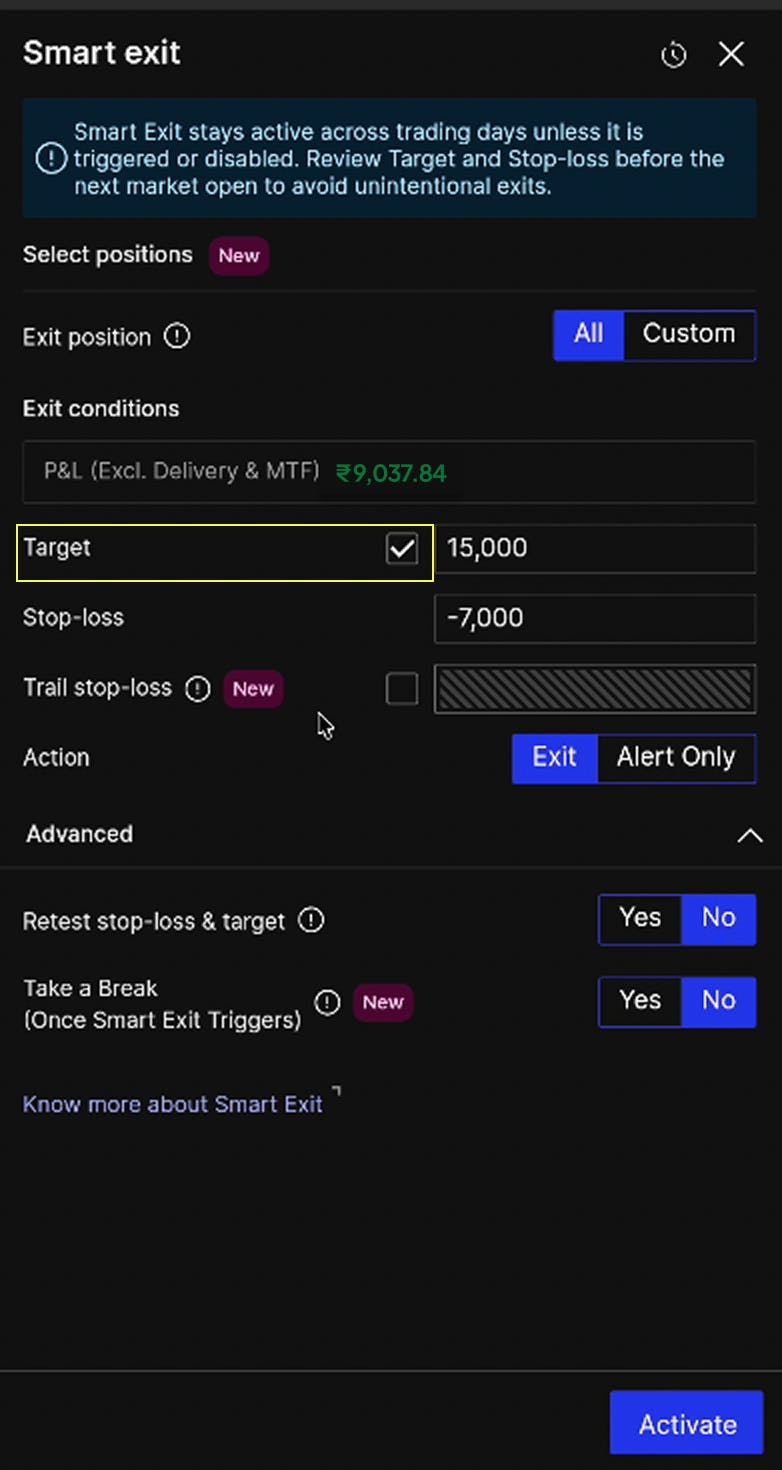
Smart Exit monitors your overall account-level P&L across all open positions. You set one target and one stop-loss. When your total P&L hits either level, Smart Exit squares off all open positions automatically.
The shift here is important. Most risk management tools work at the individual position level. Smart Exit works at the portfolio level, which is closer to how traders actually think about their exposure when they are running multiple trades at once.
Features
Beyond the core functionality, Smart Exit has a set of features that make it useful across different trading styles.
1. It works across trading days
Earlier, Smart Exit only stayed active for the current session. If you held overnight positions, you had to set it up again the next day. Now it stays active across trading days until it is triggered or you turn it off. Intraday traders and positional traders can both use it without workarounds.
2. Target is optional
You do not have to set both a target and a stop-loss. The target is optional. If you only want Smart Exit to protect you on the downside, you can set just a stop-loss and leave the target off. This gives you more flexibility depending on how you want to manage a particular trading session.
3. Trailing stop-loss at the portfolio level
Trailing stop-loss is a well known concept at the position level. Smart Exit brings the same idea to your overall P&L. As your total P&L rises, your stop-loss moves up with it. You lock in more as you make more, without having to adjust anything manually. If the market reverses sharply, the trailing stop-loss kicks in and protects what you have already made. This is especially useful in volatile sessions where P&L can swing quickly in either direction.
4. Retest stop-loss and target
Fast markets can trigger stop-losses on brief spikes that reverse just as quickly. To avoid getting stopped out prematurely, Smart Exit has a retest option. When you enable this, you select a wait time, for example 5 seconds. When your P&L touches the stop-loss or target, Smart Exit waits for that duration and then re-checks the condition. If the level is still breached, positions are exited. If the P&L has recovered, Smart Exit continues monitoring. It is a small but useful buffer against noise in volatile markets.

5. Take a Break
Booking your target for the day feels good. Re-entering out of habit or boredom and giving it back does not. This is a pattern that affects a lot of traders, and it is harder to avoid than it sounds. Take a Break addresses this by automatically pausing your trading for the rest of the day once Smart Exit triggers. No new orders can be placed. You step away with your gains intact.
6. Exclude specific positions
Not every position needs to be part of your Smart Exit setup. If you have a trade you want to manage separately, you can exclude it. Its P&L will not count toward your Smart Exit levels, and it will not be squared off when Smart Exit triggers. A common use case: you are running a Nifty expiry straddle and a commodity position at the same time. You can put the Nifty legs under Smart Exit and let the commodity position run independently.
Smart Exit view in Positions Grouping
When you exclude positions from Smart Exit, your positions screen automatically splits into two sections: positions covered by Smart Exit and positions that are not. Each group shows its own P&L separately, giving you a clean view of both sides without any manual sorting.
For a full look at how Positions Grouping works on FYERS, read: Group Your Positions Easily on FYERS.
Alert only
By default, Smart Exit exits your positions when the condition is met. But if you prefer to be notified first and decide for yourself, you can switch the action to Alert Only. Smart Exit will send you an alert when your target or stop-loss is hit, without placing any exit orders. Useful if you want the monitoring without the automatic execution.
For any specific questions on positions or smart exit, kindly refer to our FAQ section.
Try Now
The more trades you have open at the same time, the harder it is to monitor all of them without missing something. Smart Exit takes that monitoring off your plate, so you can focus on your next decision rather than your current positions.
It is available on FYERS Web and App under the Positions module. Try it out now and let us know what you think in the comments below.