Managing multiple positions can be overwhelming, especially when you have to track each one separately. Instead of constantly monitoring every trade, Smart Exit simplifies the process by focusing on your overall positional P&L, allowing you to stay on top of your portfolio without getting bogged down by the details.
The Problem: Manual P&L Management Is Stressful
Let’s say you’re an options trader deploying a hedging strategy like Iron Condor, which involves several positions. Manually tracking and managing each trade’s profit and loss can quickly become exhausting. One misstep in oversight could lead to missed opportunities or unexpected losses. This constant need for supervision adds stress and complexity to your trading routine.
The Solution: Smart Exit – Set Your Overall P&L Targets
This is where Smart Exit comes to your rescue. Rather than focusing on each position, you can set an overall P&L threshold for your entire portfolio. For instance, if you want to secure ₹15,000 in profits while limiting your downside to ₹5,000, Smart Exit automates the process. Once your portfolio hits either limit, all positions are closed, giving you peace of mind and allowing you to focus on your strategy.
Beating Volatility with Wait and Recheck
Volatility can make trading futures and options (F&O) particularly stressful. You may find that reversals happen just after your stop-loss is triggered, leaving you frustrated and second-guessing your decisions. That’s where the wait and recheck feature in Smart Exit steps in to protect your trades.
Example: How Wait and Recheck Saves Your Trades
Imagine you’ve entered an options position and set a max loss limit at ₹5,000 and a profit target at ₹10,000. With the Smart Exit advanced module, you can set a wait time of 1 to 60 seconds. This ensures the system doesn’t close your position prematurely due to a brief dip or spike. The wait time gives the system a chance to confirm if the loss is sustained, preventing stop-loss hunting and allowing you to stay in the trade longer for potential recovery.
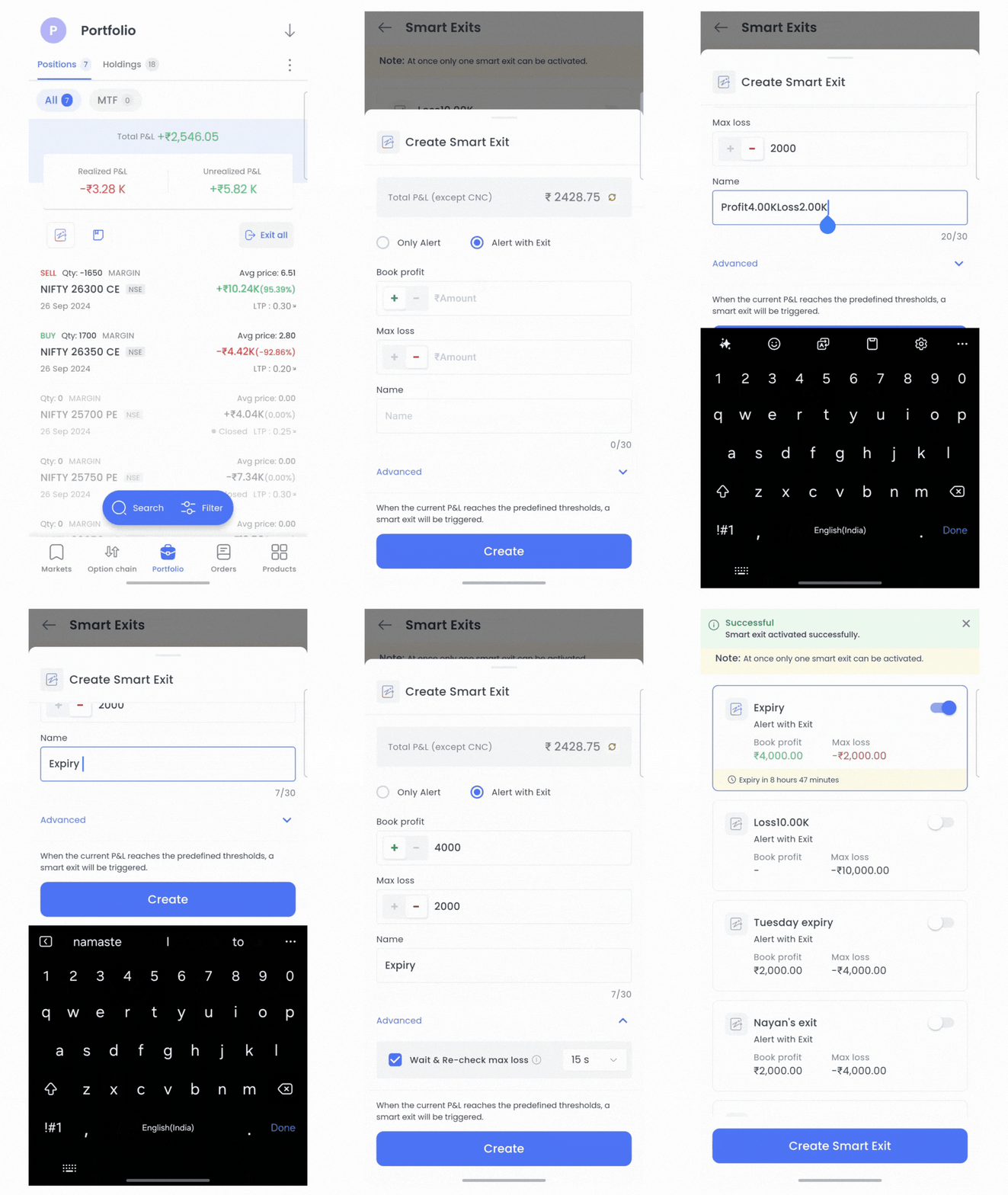
As shown in the GIF, once you set your overall P&L thresholds and enable the wait and recheck feature, Smart Exit will manage your positions, ensuring smoother exits during volatile market conditions. The wait time becomes crucial in avoiding unnecessary exits caused by market noise.
Why Smart Exit Helps You Stay Ahead in Volatile Markets
Here’s why Smart Exit offers a better way to manage your trades in fast-moving markets:
- Focus on Overall P&L: Rather than juggling multiple trades, you can manage your overall profit and loss easily, letting the system handle your exits when the set targets are hit.
- Wait and Recheck: The wait and recheck feature ensures your stop-loss isn’t triggered by temporary market movements, allowing your positions to remain open until confirmed by the market.
- Less Stress, More Control: With automated P&L management, you can reduce the emotional stress of constant monitoring and focus on your trading strategy.
Exit Smarter with FYERS Smart Exit
With Smart Exit, you have full control over your trades without the hassle of manual tracking. Set your overall P&L thresholds, activate the wait and recheck feature, and let the system handle the rest. Ready to experience smarter exits? Download the FYERS app today and start using Smart Exit to manage your trades with confidence.
 it.
it.