Please explain how to use stop order and stop-limit order for stop loss in Fyers android platform
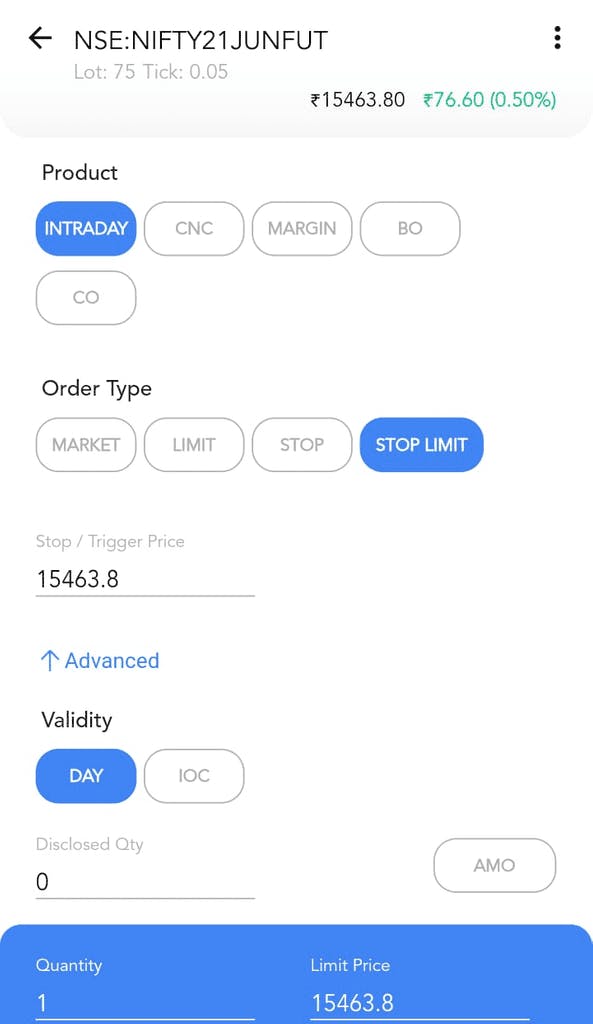
For Stop Loss Market orders, use the STOP option button under Order Type and enter only the Stop / Trigger Price value.
For Stop Loss Limit orders, use the STOP LIMIT option button under the Order Type and enter the Stop / Trigger Price value as well as your Limit Price value in the blue box at the bottom of the screen.
Thanks a lot
suppose i buy xyz at 1000 and current price is 990, now if i place SL(market) at 950 than what happen??
will it wait for price to be 950 or it will be execuated at 990 or LTP.??
why stop-limit order with the CNC option is not allowed in fyers?
This has stopped working since 27th September 2021
Dont know how to put stop loss now.
@devvrat_arya we have to use SLM ORDER.
SL market order is disabled because of previous free freak trade.
So use slm order.