My PC received API Bridge update today from fyers and after the update ,system detects APIbrdge.exe as VHO:Trojan-spy.MSIL.Bobik.gen virus. So I removed the new version and installed old version and checked ,everything is fine no Virus in folder but offcourse when i opened it ,It received update again and BAM, same notification. It seems to be serious threat (https://www.microsoft.com/en-us/wdsi/threats/malware-encyclopedia-description?Name=TrojanSpy:MSIL/Bobik.A!MTB&ThreatID=2147754045) Because this not the case with old version.Why after update it turns BAD ? Is Fyers team aware of this ?
even I updated it, but no issues at my end.
Kaspersky raises false alarm; you can ignore it. To make sure file is not infected you can scan it with Windows Defender, Avast, Avira, Bitdefender, Panda, McAfee, TrendMicro, Symantec or any other antivirus… it should pass the test.
Scan the file using https://www.virustotal.com/gui/
Windows defender flags it too.
Trojan:Win32/Zpevdo.B
I have opened support ticket. You need to look into it asap. Apibridge.exe file has been deleted as a part of cleanup by windows defender.
YA, even my API bridge is not working now …
Even Avast, McAfee, AVG, Windows defender all detects as virus. I also found algoji in chrome policies able to manage my browser
Hi, the api bridge from their partner algoji is deemed infected by so many reputed anti-virus software in the market. I also found algoji policies in my chrome browser, monitoring and able to manage my chrome activities. Didn’t proceed further with them, as chrome management was final confirmation of suspicion raised by anti-virus software.
6 months back I was a happy customer, I liked trading using Tradingview and Fyers Api bridge, but after this update, Mcafee in my system generating a Virus Alert, hence I am in two minds whether to change the settings of Mcafee to allow the APIbrdge.exe file to run or not. Currently, I am not trading directly from Tradingview because of this issue, but I wish to do so in the near future.
Any suggestions on any other software which we can use to trade from Tradingview platform in Fyers
Hi!
APIBridge extension follows ExtensionInstallSources policy of Google Chrome. Setting this policy specifies which URLs may install extensions, apps, and themes. You can read more about it here https://chromeenterprise.google/policies/?policy=ExtensionInstallSources
APIBridge extension adheres to the policy. Google Chrome earlier didn’t use to display this message, with their Chrome 73 update in 2019 they have started stating group policies configured for the browser.
Malware can also use Chrome policies to force install a malicious extension, disable Safe Browsing, or configure other unwanted behavior. It does this by configuring the ExtensionInstallForcelist and adding a list of extension IDs and the location they should be installed from or any other way. This does not happen with the APIBridge extension.
If Chrome is saying it is “Managed by your organization”, you should go to the chrome://policy page to see what policies are configured on your computer.
On this page, Chrome will display all configured policies, which when clicked on, go to a support page that explains what that policy does. If you find that the policy is being used for malicious purposes or you do not need it, you can go to the Registry keys and look for the associated policy.
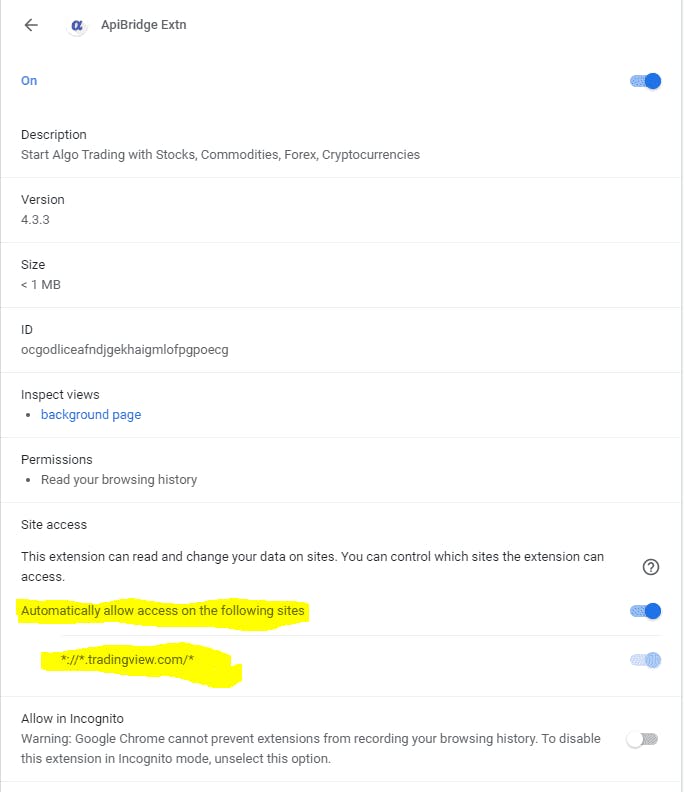
APIBridge extension is not malicious, it follows Chrome policy. It can also be noticed that APIBridge extension only accesses tradingview.com, which can also be managed by you.
@uaJ133R0k5 APIBridge extension follows ExtensionInstallSources policy of Google Chrome. Setting this policy specifies which URLs may install extensions, apps, and themes. You can read more about it here Chrome Enterprise Policy List & Management | Documentation
APIBridge extension adheres to the policy. Google Chrome earlier didn’t use to display this message, with their Chrome 73 update in 2019 they have started stating group policies configured for the browser.
Malware can also use Chrome policies to force install a malicious extension, disable Safe Browsing, or configure other unwanted behavior. It does this by configuring the ExtensionInstallForcelist and adding a list of extension IDs and the location they should be installed from or any other way. This does not happen with APIBridge extension.
If Chrome is saying it is “Managed by your organization”, you should go to the chrome://policy page to see what policies are configured on your computer.
At this page, Chrome will display all configured policies, which when clicked on, go to a support page that explains what that policy does. If you find that the policy is being used for malicious purposes or you do not need it, you can go to the Registry keys and look for the associated policy.
APIBridge extension is not malicious, it follows Chrome policy. It can also be noticed that APIBridge extension only accesses tradingview.com, which can also be managed by you.
@UmCOwo0FQ1 Currently the main problem I am facing is my PC has Mcafee and Mcafee is quarantining the APIbrdge.exe file during the download itself.