issue in subscribing symbol

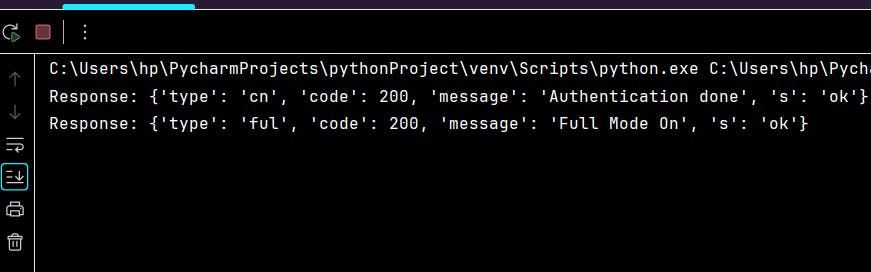
I copied the same code from URL https://pypi.org/project/fyers-apiv3/. when running the code, looks like it is not subscribing the symbol and no further logs(only below 2 response lines are printed in logs) and no data return from websocket. I tried with stock and MCX both. I have installed fyers-apiv3 3.0.5 SDK. Do anyone know what could be the issue?

Appreciate your help in advance!

Hi @shobha.l.elchfbdt ,

Can you please share your code, so we can check properly ?

Also use Github code for the same: Github Code

Hi Vinay,

Thanks for the response.

I am using exact code as mentioned in https://github.com/FyersDev/fyers-api-sample-code/blob/sample_v3/v3/python/websocket/data_socket/symbolUpdate.py

Looks like the symbol is not subscribing. i tried with MCX and stock but same issue. Not sure what i am missing.

Appreciate you help in advance!

from fyers_apiv3.FyersWebsocket import data_ws

def onmessage(message):
    """
    Callback function to handle incoming messages from the FyersDataSocket WebSocket.

    Parameters:
        message (dict): The received message from the WebSocket.

    """
    print("Response:", message)

def onerror(message):
    """
    Callback function to handle WebSocket errors.

    Parameters:
        message (dict): The error message received from the WebSocket.

    """
    print("Error:", message)

def onclose(message):
    """
    Callback function to handle WebSocket connection close events.
    """
    print("Connection closed:", message)

def onopen():
    """
    Callback function to subscribe to data type and symbols upon WebSocket connection.

    """
    # Specify the data type and symbols you want to subscribe to
    data_type = "SymbolUpdate"

    # Subscribe to the specified symbols and data type
    symbols = ['MCX:CRUDEOIL23NOVFUT']
    fyers.subscribe(symbols=symbols, data_type=data_type)

    # Keep the socket running to receive real-time data
    fyers.keep_running()

# Replace the sample access token with your actual access token obtained from Fyers
access_token = "*********************"
# Create a FyersDataSocket instance with the provided parameters
fyers = data_ws.FyersDataSocket(
    access_token=access_token,       # Access token in the format "appid:accesstoken"
    log_path="",                     # Path to save logs. Leave empty to auto-create logs in the current directory.
    litemode=False,                  # Lite mode disabled. Set to True if you want a lite response.
    write_to_file=False,              # Save response in a log file instead of printing it.
    reconnect=True,                  # Enable auto-reconnection to WebSocket on disconnection.
    on_connect=onopen,               # Callback function to subscribe to data upon connection.
    on_close=onclose,                # Callback function to handle WebSocket connection close events.
    on_error=onerror,                # Callback function to handle WebSocket errors.
    on_message=onmessage             # Callback function to handle incoming messages from the WebSocket.
)

# Establish a connection to the Fyers WebSocket
fyers.connect()

Using below API to generate the token:
https://api-t1.fyers.in/api/v3/generate-authcode?client_id=KQ4H8NJJX1-100&redirect_uri=https%3A%2F%2Ftrade.fyers.in%2Fapi-login%2Fredirect-uri%2Findex.html&response_type=code&state=sample

tried with below as well but no luck.

grant_type = “authorization_code”
response_type = “code”

Hi Vinay,

Thanks for the response.

I am using the exact code as mentioned in https://github.com/FyersDev/fyers-api-sample-code/blob/sample_v3/v3/python/websocket/data_socket/symbolUpdate.py

I tried with Stock and MCX both. Looks like issue in subscribing the symbol.

Appreciate your help in advance!

from fyers_apiv3.FyersWebsocket import data_ws def onmessage(message): “”" Callback function to handle incoming messages from the FyersDataSocket WebSocket. Parameters: message (dict): The received message from the WebSocket. “”" print(“Response:”, message) def onerror(message): “”" Callback function to handle WebSocket errors. Parameters: message (dict): The error message received from the WebSocket. “”" print(“Error:”, message) def onclose(message): “”" Callback function to handle WebSocket connection close events. “”" print(“Connection closed:”, message) def onopen(): “”" Callback function to subscribe to data type and symbols upon WebSocket connection. “”" # Specify the data type and symbols you want to subscribe to data_type = “SymbolUpdate” # Subscribe to the specified symbols and data type symbols = [‘MCX:CRUDEOIL23NOVFUT’] fyers.subscribe(symbols=symbols, data_type=data_type) # Keep the socket running to receive real-time data fyers.keep_running() # Replace the sample access token with your actual access token obtained from Fyers access_token = “*****”

Create a FyersDataSocket instance with the provided parameters fyers = data_ws.FyersDataSocket( access_token=access_token, # Access token in the format “appid:accesstoken” log_path=“”, # Path to save logs. Leave empty to auto-create logs in the current directory. litemode=False, # Lite mode disabled. Set to True if you want a lite response. write_to_file=False, # Save response in a log file instead of printing it. reconnect=True, # Enable auto-reconnection to WebSocket on disconnection. on_connect=onopen, # Callback function to subscribe to data upon connection. on_close=onclose, # Callback function to handle WebSocket connection close events. on_error=onerror, # Callback function to handle WebSocket errors. on_message=onmessage # Callback function to handle incoming messages from the WebSocket. ) # Establish a connection to the Fyers WebSocket fyers.connect()

from fyers_apiv3.FyersWebsocket import data_ws

def onmessage(message):
    """
    Callback function to handle incoming messages from the FyersDataSocket WebSocket.

    Parameters:
        message (dict): The received message from the WebSocket.

    """
    print("Response:", message)

def onerror(message):
    """
    Callback function to handle WebSocket errors.

    Parameters:
        message (dict): The error message received from the WebSocket.

    """
    print("Error:", message)

def onclose(message):
    """
    Callback function to handle WebSocket connection close events.
    """
    print("Connection closed:", message)

def onopen():
    """
    Callback function to subscribe to data type and symbols upon WebSocket connection.

    """
    # Specify the data type and symbols you want to subscribe to
    data_type = "SymbolUpdate"

    # Subscribe to the specified symbols and data type
    symbols = ['MCX:CRUDEOIL23NOVFUT']
    fyers.subscribe(symbols=symbols, data_type=data_type)

    # Keep the socket running to receive real-time data
    fyers.keep_running()

# Replace the sample access token with your actual access token obtained from Fyers
access_token = "******"
# Create a FyersDataSocket instance with the provided parameters
fyers = data_ws.FyersDataSocket(
    access_token=access_token,       # Access token in the format "appid:accesstoken"
    log_path="",                     # Path to save logs. Leave empty to auto-create logs in the current directory.
    litemode=False,                  # Lite mode disabled. Set to True if you want a lite response.
    write_to_file=False,              # Save response in a log file instead of printing it.
    reconnect=True,                  # Enable auto-reconnection to WebSocket on disconnection.
    on_connect=onopen,               # Callback function to subscribe to data upon connection.
    on_close=onclose,                # Callback function to handle WebSocket connection close events.
    on_error=onerror,                # Callback function to handle WebSocket errors.
    on_message=onmessage             # Callback function to handle incoming messages from the WebSocket.
)

# Establish a connection to the Fyers WebSocket
fyers.connect()

Hi Ajay,

I am using the same code which is available in https://github.com/FyersDev/fyers-api-sample-code/blob/sample_v3/v3/python/websocket/data_socket/symbolUpdate.py

looks like symbol is not subscribing. I tried with both stock and MCX.

Hi @shobha.l.elchfbdt

is this issue fixed for you now ?

Hi Pankaj,

Yes, today it was resolved. Nihal and Ajay helped in it.
I was missing to Generate the access token for WebSocket.

Thanks All

Welcome @shobha.l.elchfbdt

Hi Pankaj,

I have one query. I am using below to get the market depth(5level) but I cannot see LTP in the response.

data_type = “DepthUpdate”

Do you know if there is anyway I can have the ltp with market depth(with 5 depth levels)?

Do I need to create 2 fyerdatsocket instance? One to fetch the 5 level depth and other to fetch the LTP?

Appreciate your help!

Both are different in V3
@shobha.l.elchfbdt

Hi @Z4PBvkQGyF,

thanks for the above. Do you know why we receive error **ConnectionResetError: [WinError 10054] An existing connection was forcibly closed by the remote host **? I have subscribed multiple symbols. The WebSocket connection works proper and gives the data but after sometime, the error is thrown.

below complete logs:
n in thread Thread-19:

Traceback (most recent call last):

File “C:\Users\hp\AppData\Local\Programs\Python\Python39\lib\threading.py”, line 980, in bootstrapinner

[self.run](http://self.run)()

File “C:\Users\hp\AppData\Local\Programs\Python\Python39\lib\threading.py”, line 917, in run

self._target(*self._args, **self._kwargs)

File “C:\Users\hp\PycharmProjects\pythonProject\venv\lib\site-packages\fyers_apiv3\FyersWebsocket\data_ws.py”, line 1625, in __ping

self.__ws_object.send("ping")

File “C:\Users\hp\PycharmProjects\pythonProject\venv\lib\site-packages\websocket_app.py”, line 249, in send

if not self.sock or self.sock.send(data, opcode) == 0:

File “C:\Users\hp\PycharmProjects\pythonProject\venv\lib\site-packages\websocket_core.py”, line 283, in send

return self.send_frame(frame)

File “C:\Users\hp\PycharmProjects\pythonProject\venv\lib\site-packages\websocket_core.py”, line 311, in send_frame

l = self._send(data)

File “C:\Users\hp\PycharmProjects\pythonProject\venv\lib\site-packages\websocket_core.py”, line 525, in _send

return send(self.sock, data)

File “C:\Users\hp\PycharmProjects\pythonProject\venv\lib\site-packages\websocket_socket.py”, line 170, in send

return _send()

File “C:\Users\hp\PycharmProjects\pythonProject\venv\lib\site-packages\websocket_socket.py”, line 147, in _send

return sock.send(data)

File “C:\Users\hp\AppData\Local\Programs\Python\Python39\lib\ssl.py”, line 1174, in send

return self._sslobj.write(data)

ConnectionResetError: [WinError 10054] An existing connection was forcibly closed by the remote host

Hi @Z4PBvkQGyF,

Can you please help in fixing the below error ?

error ConnectionResetError: [WinError 10054] An existing connection was forcibly closed by the remote host
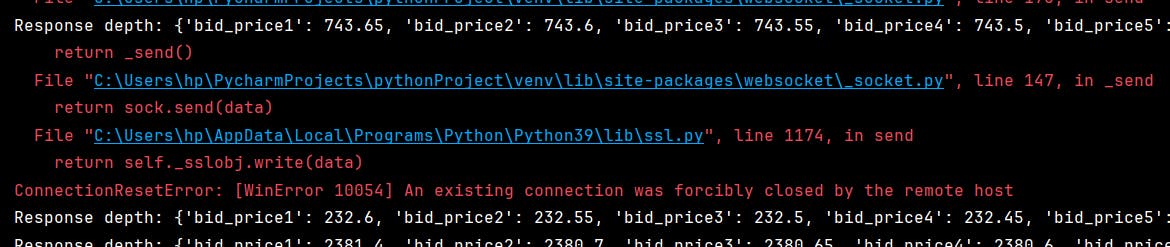
I am fetching market depth data via websocket. This error comes in between of the response.