Every trader looks for something different in the market. You may be looking for a fundamentally strong company, a stock seeing a breakout, a technical crossover, a Futures contract showing a long buildup, or fresh writing activity in Options.
Finding these opportunities usually means looking at different data points, going through instruments one by one, and bringing the pieces together yourself.
For traders who wanted to create custom screeners, FIA already gave you a way to describe what you are looking for and let AI build the screener for you. But some traders also wanted a more structured way to build screeners themselves, where they could directly select the conditions, see exactly what was being applied, and refine them step by step.
We are launching Smart Screener on FYERS Web with Quick Mode, which lets you screen stocks and derivatives using ready-to-use conditions that match your trading setup.
Build the stock screener you want
With stocks, one condition is rarely enough. You may want a company with low debt, but only if the stock is also showing a bullish price breakout and a technical setup you follow. Smart Screener lets you bring these different parts of your analysis into the same screener instead of checking them separately.
For example, start with Debt to Equity under Fundamentals and select Very Low Debt. Then move to Price & Volume and add a condition under Price Breakout - Bullish. If you also want technical confirmation, switch to Technicals and add a condition under SMA - Bullish. Smart Screener combines these conditions and shows you the stocks that match them under Screening Results.
This is where screening across different kinds of parameters becomes useful. Instead of maintaining a fundamental shortlist, checking price action separately, and then going through charts for your technical setup, you can bring those conditions together and screen for the combination you actually care about. You can also select a Universe to run the screener only on a particular group of stocks.
The data is updated based on the type of parameter you are screening. Fundamental data is updated as the latest reported information becomes available. Price & Volume data is refreshed every hour, while Technicals use real-time market data.
Spot the Futures activity you care about
Smart Screener also lets you screen Futures based on the activity you want to track. Switch to Derivatives and select Futures, then choose the underlying type, timeframe and expiry before applying your conditions. This lets you narrow the contracts first and then screen them using the parameters relevant to your setup.
For example, you can look at index-based Futures on a 1-minute or 5-minute timeframe and select the expiry you want to track. If you are looking for a Long Build-up, select it under Buildups, and Smart Screener shows you the contracts where price and Open Interest are increasing.
You can use the same approach to screen for Short Build-up, Long Unwinding, or Short Covering. You can also screen Futures using parameters such as price movement, Open Interest, OI change, premium and Cost of Carry.
Futures data is updated in real time as the market moves, so the screening results reflect the latest available activity.
Cut through hundreds of Options contracts
With multiple strikes and expiries, finding the Options activity you care about can take even more work. Smart Screener lets you narrow the universe before applying your conditions by choosing the underlying type, timeframe and expiry. You can also choose whether you want to screen Calls, Puts or combined.
From there, you can screen for the Options activity you want to follow. For example, if you are looking for fresh call writing, select Fresh Call Writing under Call Writing. Smart Screener then shows you the contracts matching the selected conditions, so you can focus your analysis on a smaller and more relevant set of contracts.
There are different kinds of Options parameters you can work with, including Open Interest, OI change, buildups, Implied Volatility, Greeks, writing activity and other contract-level activity. Options data is updated in real time as the market moves, helping the results reflect changing activity across contracts.
Instead of going through strikes and expiries one by one, you can define what you want to track first and then work with the matching contracts.
Make every screener your own
As you build your screener, every condition you select appears under Criteria, while the matching instruments appear under Screening Results. If the results are too broad, you can add another condition. If you want to widen the screener, modify or remove one.
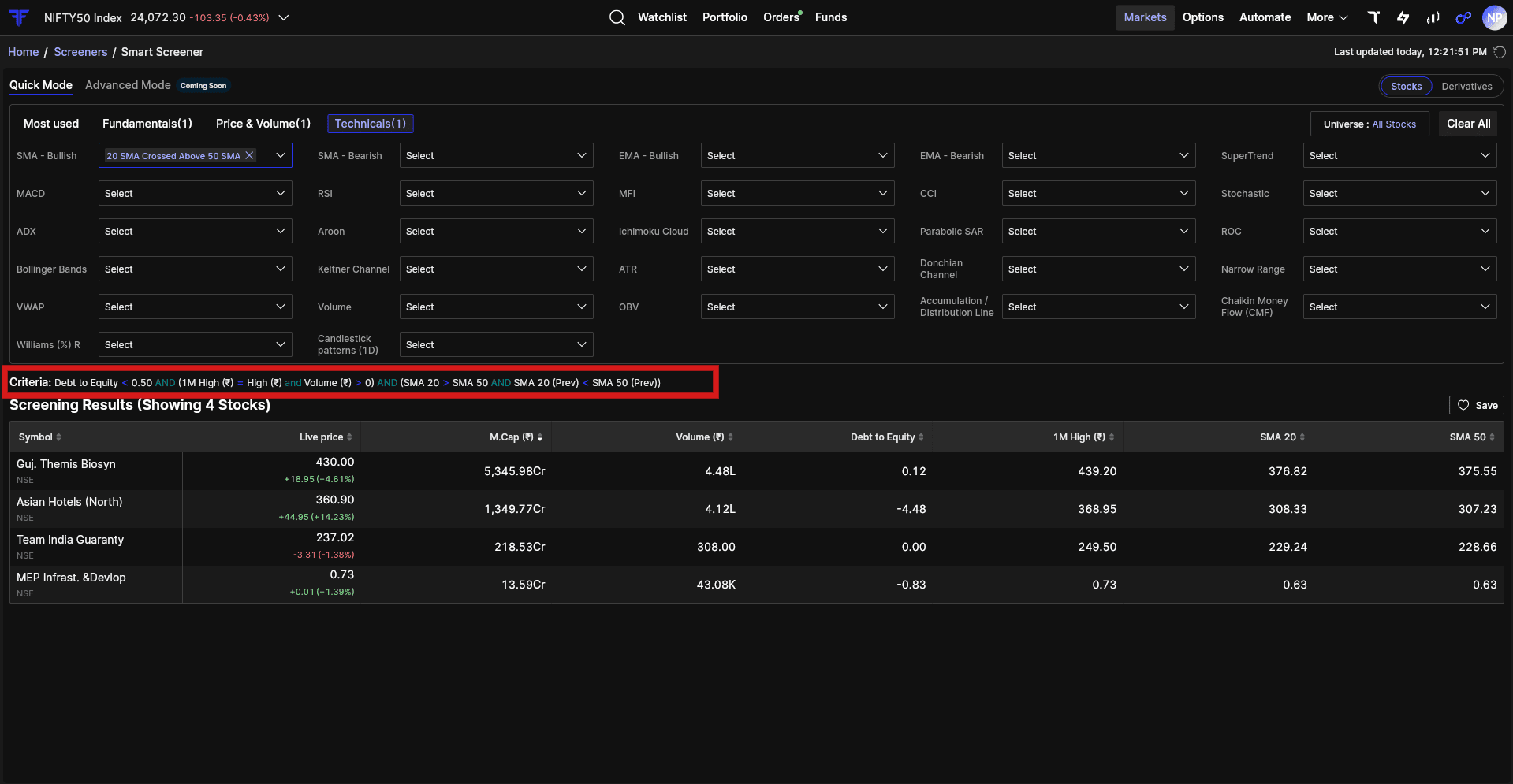
Once you have a screener that works for you, save it and access it anytime under My Screeners. You can also access the stocks and derivatives from your saved screener through Smart Watchlist, so you can continue tracking the instruments.
How to access Smart Screener
-
Log in to FYERS Web.
-
Go to Markets.
-
Open Screeners.
-
Select Smart Screener from the top right.
-
Choose Stocks or Derivatives and start screening.
Have questions about Smart Screener? Check out the FAQ section for more details.
Access your Saved Screeners on FYERS App
Create your screener on FYERS Web and save it. Once saved, you can access your saved screeners on the FYERS App.
Quick Mode is only the beginning
Quick Mode gives you a structured way to build a screener using ready-to-use conditions. You choose the parameters, combine the conditions you need, and refine the screener based on the results.
But we know that many traders want to go beyond predefined conditions. You may want to define your own logic, create more specific relationships between conditions, or build a screener around a setup that is unique to the way you trade.
That is what we are building Advanced Mode for.
Advanced Mode is coming soon and will let you build your own screening logic with greater control over how conditions are defined and combined. Together, Quick Mode and Advanced Mode are intended to give you a choice between starting with ready conditions and analysing deeper when your screening process demands it.
Try Smart Screener on FYERS Web and tell us what you are screening for and what you would like to build with Advanced Mode.