Hi Team,
Appreciate the continuous addition of new features in Fyers Web—really impressive. The much awaited PnL calendar table showing net profits and, most importantly, the automation feature for creating conditional strategies are immensely useful.
Regarding automation, I had a question: is there an option to square off an individual option strike? For example, if I have five open option positions, I would like to exit only one specific strike instead of squaring off all positions.
I couldn’t find an option to configure this in the automation nodes. Is this feature currently available? If yes, could you please guide me on where and how this can be set up while creating the node?
Thanks in advance for your help.
Hi Bala, Thanks for your valuable feedback
To square off individual positions. You can do any of the options
- Place the counter order
Ex: You have five open poistions, But you need to square off the following option
BUY NIFTY 26000 CALL QTY
You can place a counter order such that
SELL NIFTY 26000 CALL 150QTY
- The position to square off if is opened by a certain automation:
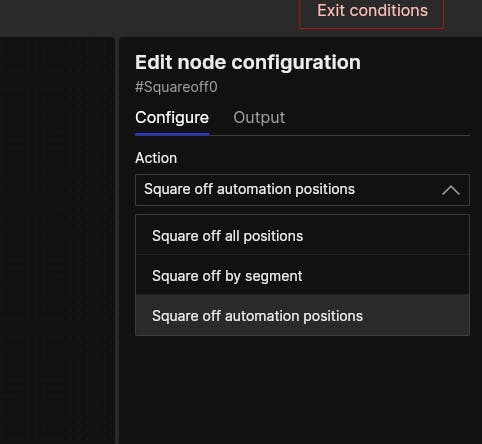
use square off positions block and check the select ‘square off automation positions’
Also, Please share your client ID so that I can connect with you regarding any features you wish to see in the automate platform.
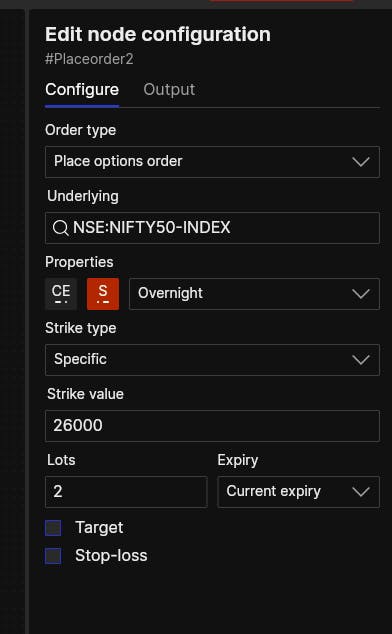
Thank you for the response. That worked perfectly—I used “Place Options Order” under the Action tab to trigger an individual exit.
I really appreciate you delivering this conditional exit feature. I had requested it a few months ago, and as promised, it has now been implemented by your team—thank you for that.
One improvement I’d like to suggest: it would be very helpful if we could select directly from the currently open positions for square-off within the node. At the moment, we have to manually select the strike, CE/PE, and lot size. This increases the chance of input errors, and even a small mistake can cause the execution to fail. If this could be simplified, it would significantly improve usability.
Additionally, it would be great to have this functionality available on the mobile app as well. Currently, it seems to be accessible only on Windows. Mobile support would be extremely useful when I’m away from my system and need to make quick adjustments.
Thanks again for the feature and for considering this feedback.