Hi, Pre-defined watchlist like Nifty 50 stocks are not available. Please restore them ASAP.
2 Likes
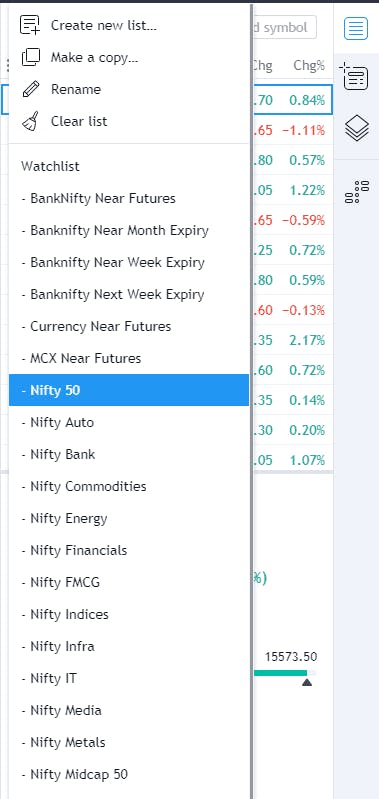
I tested this now and It is showing on my fyers web terminal, and even tried loading the Nifty 50 list and it did work.
Try the hard refresh option to see if it makes any difference, CTRL + SHIFT + R
1 Like
It is working. Thanks.
1 Like
It Disappears Sometimes.
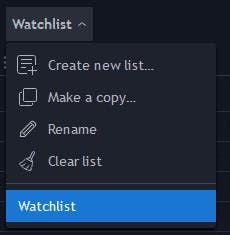
The watchlist keeps on disappearing intermittently. Please see today’s snapshot. Even doing hard refresh sometimes does not fix it. @P5riXHjRDF @HqikyjkG9o Can you fix it permanently ?
2 Likes
Yes It Happens With Me Also Randomly.
Hey Smit,
If it still doesn’t work after trying for hard reload, you can raise a ticket at [email protected]. We’ll get it checked. Thanks!
Ticket 508639 has been created
what is the point of hard refresh, did not it getting handle in code ? if you see there is need of hard refresh better take with tech team and fix it. my problem as well. many times i need to refresh the tab and then watch list get;'s loaded. @P5riXHjRDF do you have your CTO here on community ?
1 Like
@P5riXHjRDF Any update on this issue?
1 Like
Having the same problem, all watchlist not showing
have to keep reloading , thats annoying
1 Like
@P5riXHjRDF the support guys closed the ticket. Shall I ask them to reopen ?
@P5riXHjRDF in my case I’ve change browser and try clear cookies clear history, but same problem in every browser and also after clear cookies clear history, also i try hard reload, some time also hard reload not work, after that i create ticket but after 3 to 4 days my ticket close and says our side zero error check your browser, my ticket number is 506560.
1 Like
Same With MEe.
Watchlist is a core and heavily used function. Please ensure that the core functionalities are working prior to releasing updates.
1 Like
Even this problem is not solved. Pls look into it
@P5riXHjRDF This is not working and hard refresh does not solve the issue.Any updates ?
1 Like
That’s surprising! Did you try re-login to the platform?
Ok relogin solved the issue. Thanks.
Just logout and login, the watchlist will appear. Better to **login once daily **so that we don’t face this issue.