Last month was a big one for us. We launched FIA for building and automating trading strategies with AI, brought Order Flow to FYERS for a deeper view of market activity beyond candlesticks, and introduced Smart Screener to help you find stocks and derivatives using the criteria that matter to you. These were some of the bigger releases, along with several other updates across the platform. You can catch up on everything we shipped in our August 2026 Product Recap blog.
We focused on improving the journey around the products and workflows you already use. That meant making features easier to find, reducing steps in order placement, and bringing useful information closer to where you need it. We also added a few new capabilities, including Seasonality Screeners and Government and Corporate Bonds. Here’s what’s new in September.
Smart Order Enhancement
We’ve made Smart Orders easier to access from where you actually use them. Here’s what has new across the order flow:
Trailing Stop-Loss with Smart Stop-Loss and Target

Trailing Stop-loss is now available directly while setting up Smart Stop-Loss and Target. You can set your Stop-Loss, Target, and trailing conditions from the same flow, instead of accessing trailing separately.
Smart Limit

Smart Limit is now available within the Limit order flow as an extension of order validity. This makes it easier to use Smart Limit while placing the order, without having to access it through a separate Smart toggle.
Smart Step & Smart SIP

Smart Step can now be accessed directly from the Symbol Details page. Smart Step orders can also remain valid across multiple days and are visible on the chart, making it easier to track your planned orders against price movements. Smart SIP can now be accessed directly from the Symbol Details page on FYERS Web and FYERS App. This gives you quicker access to setting up a Smart SIP for the symbol you are already viewing.
Simplified Single Order Window

The Single Order Window has also been simplified with updated toggles and quicker quantity entry. When you open the Order Window, the quantity field is automatically selected with the keypad open, reducing an additional step while placing an order.
Read more in our Smart Orders blog or check the Smart Orders guide.
CAS Data in Market Depth
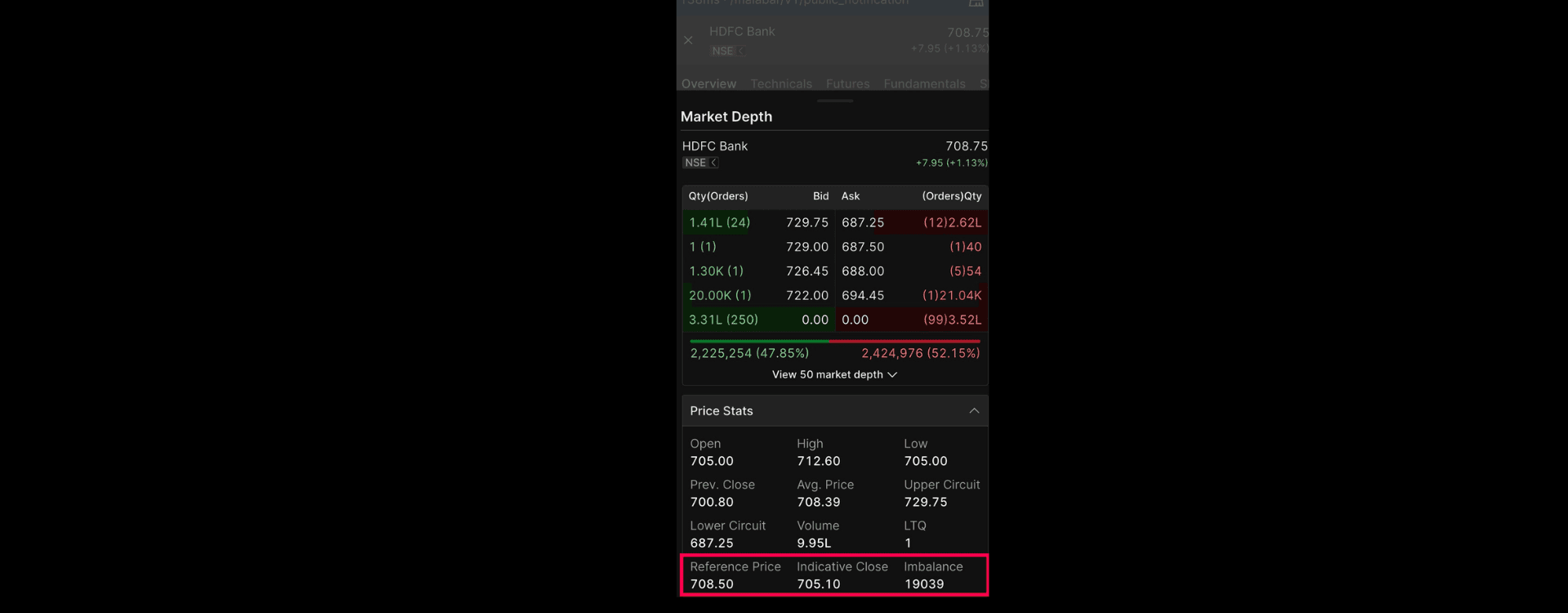
Market Depth now shows additional Closing Auction Session data for CAS symbols. During an active CAS session, you can see Reference Price, Indicative Price, and Imbalance directly within Market Depth. These values update while the CAS session is active, giving you more information to follow price discovery during the closing auction.
Learn more about CAS Insights in Market Depth.
Seasonality Screeners
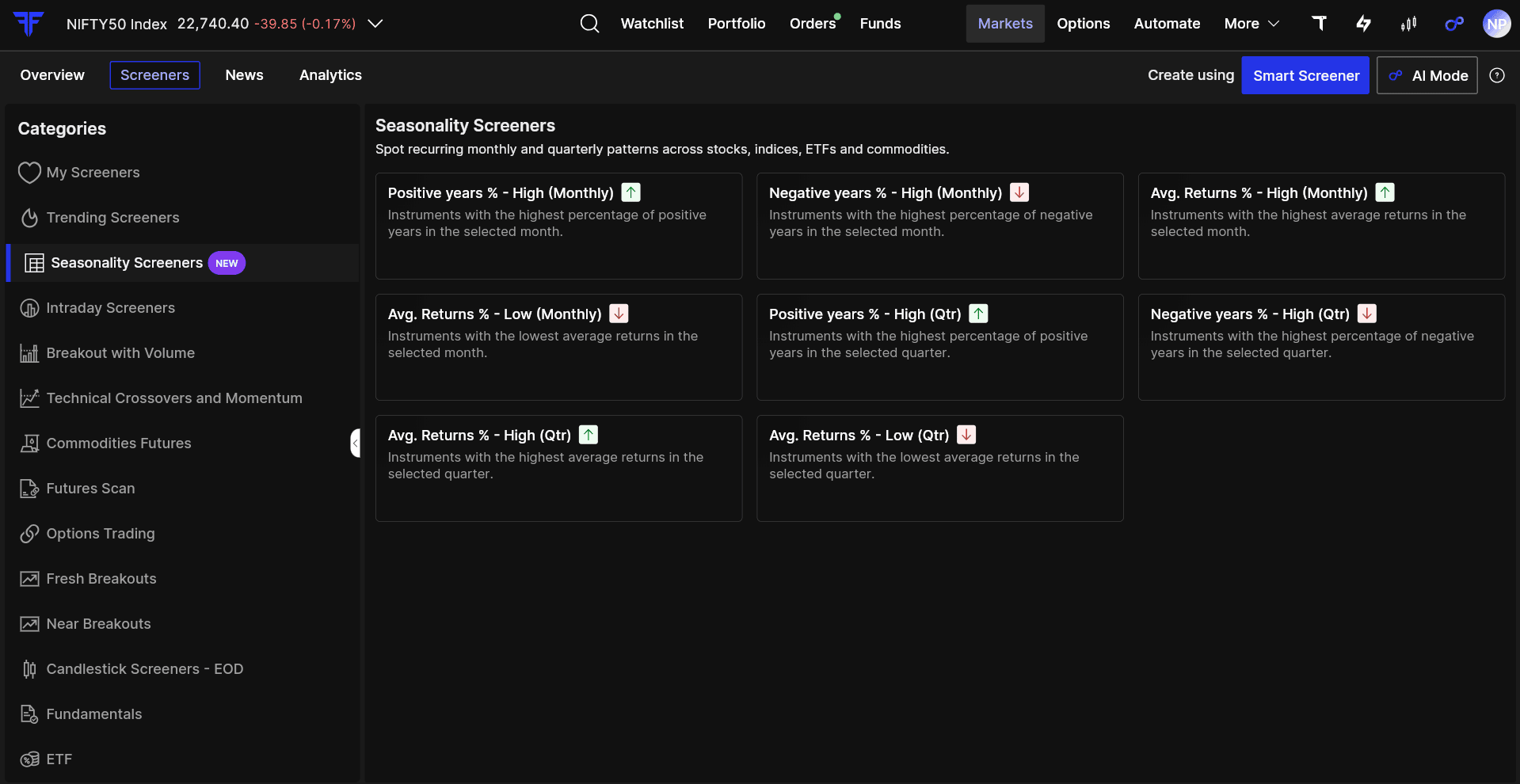
We introduced Seasonality Screeners to make it easier to study how stocks, ETFs, commodities, and indices have behaved during specific periods historically. You can look at monthly and quarterly patterns, compare positive and negative years, and check average historical returns.
For example, if a stock has ended September positively in 7 out of the last 10 years, you can see that pattern directly instead of going through ten years of charts manually. Historical seasonality does not tell you what will happen next, but it can give you another useful data point while doing your research.
Learn how to interpret Seasonality Screener results.
Enhanced Strategy Builder Experience
We’ve updated Strategy Builder to make building and reviewing options strategies easier. You can add or edit individual legs and move between Summary, Payoff, P&L and Greeks, and Charts to review different aspects of your strategy.
You can also see the required funds, available balance, and applicable charges before placing the strategy. If you need additional funds, you can access Add Funds from within Strategy Builder itself. For example, while setting up a Bank Nifty spread, you can review the payoff, check the Greeks and funds required, make changes to individual legs, and then proceed with the order from the same flow.
Learn more about Strategy Builder on FYERS.
Invest in Government and Corporate Bonds
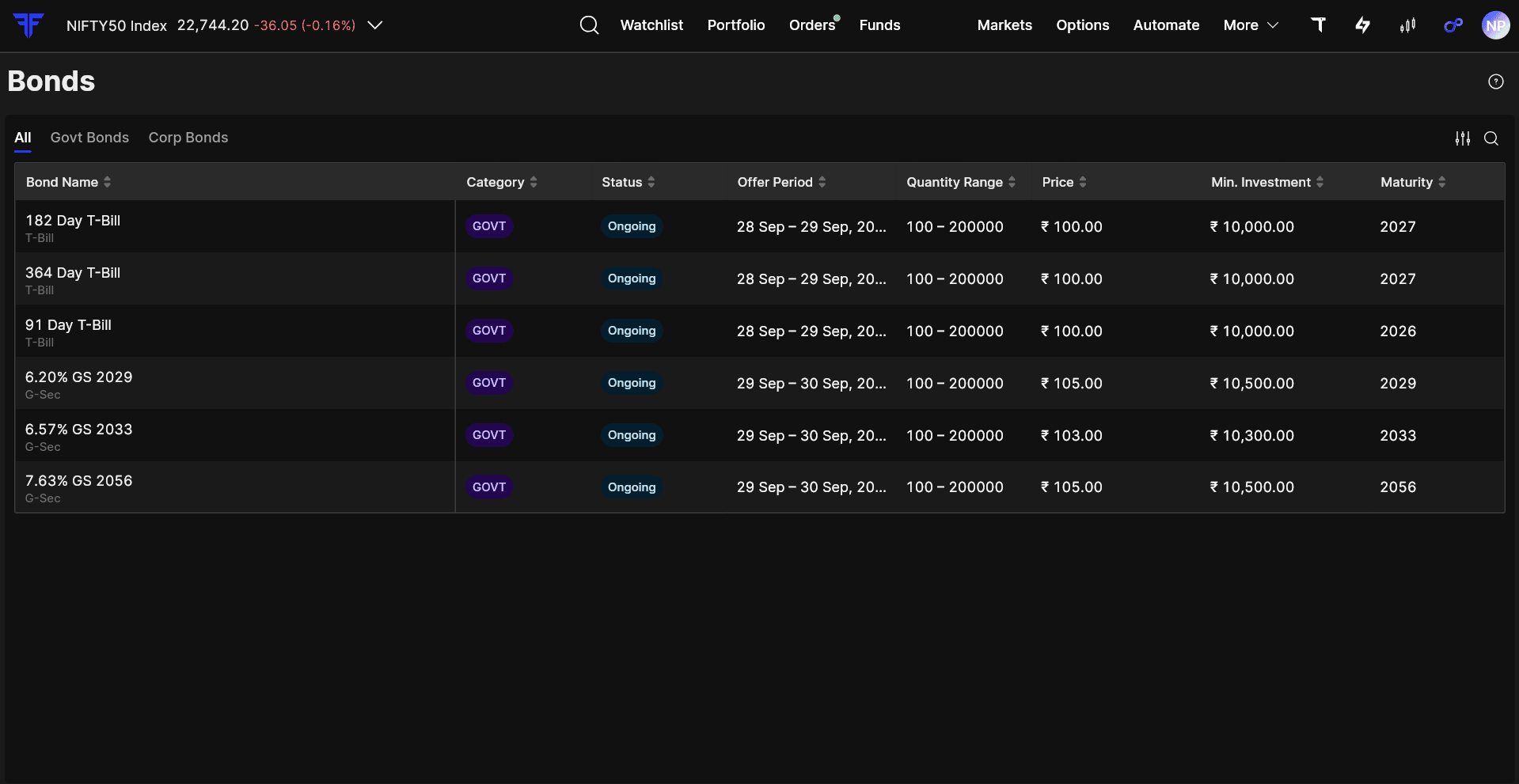
You can now explore and invest in Government and Corporate Bonds directly from our platform. You can view the available bonds, check their details, invest, and track your orders from one place.
This brings fixed-income investments closer to the rest of your FYERS portfolio. For instance, if you want to allocate ₹1 lakh to bonds, you can explore the available Government and Corporate Bond options and invest without moving to a separate platform.
Learn more about investing in Government and Corporate Bonds.
Smarter Browser Tabs on FYERS Web
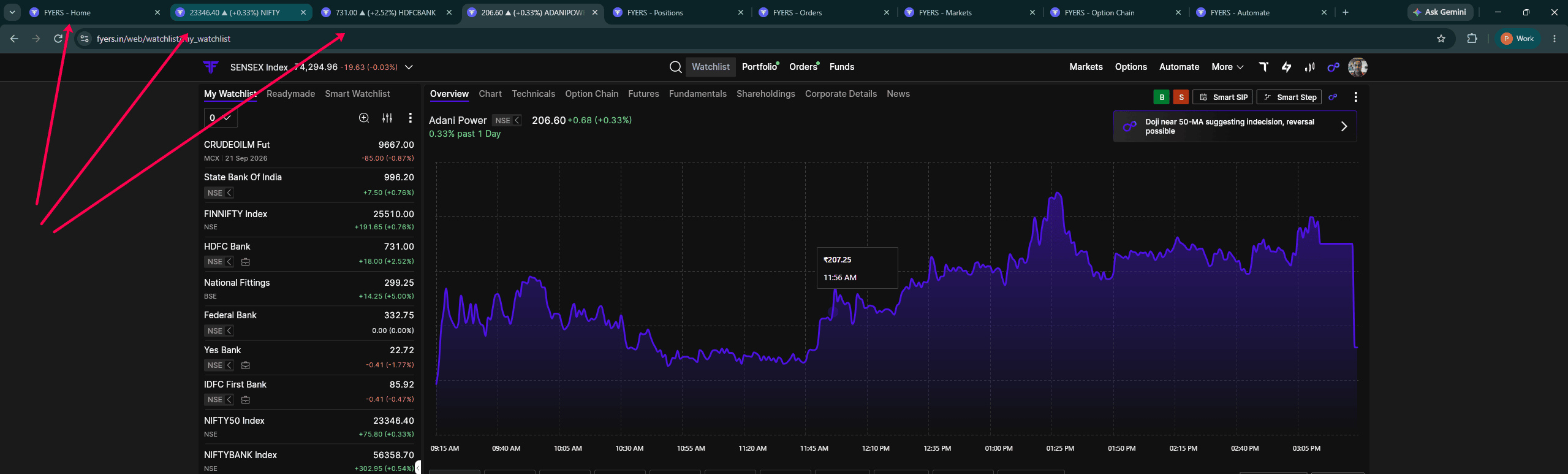
If you keep several FYERS tabs open while trading, identifying the right tab can become difficult. We’ve made a small change to make this easier. Browser tabs now show the section of FYERS you are using, such as FYERS - Positions or FYERS - Automate.
When you have Symbol Details or Charts open, the tab can also show the symbol’s live price and change. So, if you are tracking RELIANCE, HDFCBANK, and NIFTY across three tabs, you can follow their prices from the browser tabs themselves instead of switching between them repeatedly.
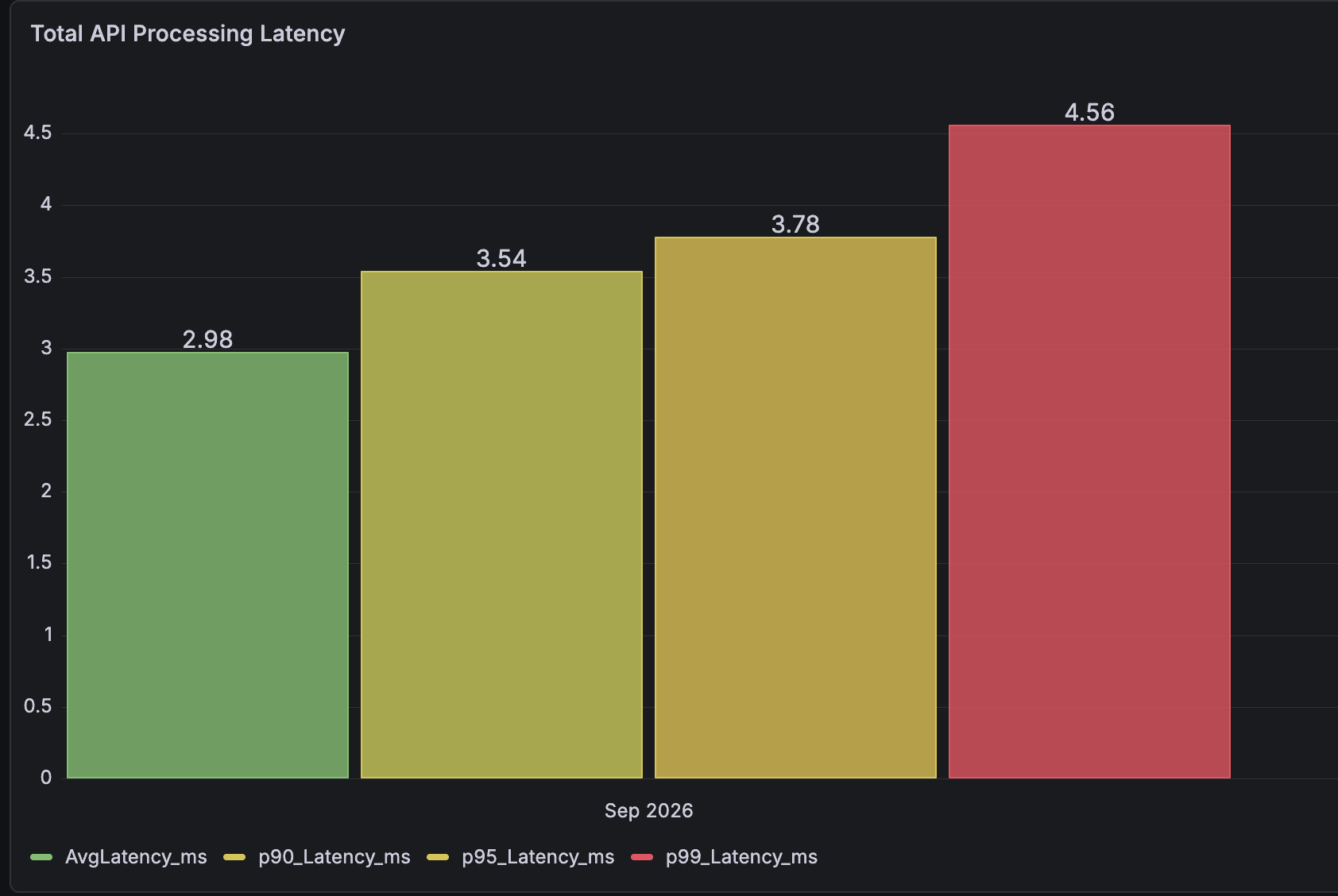
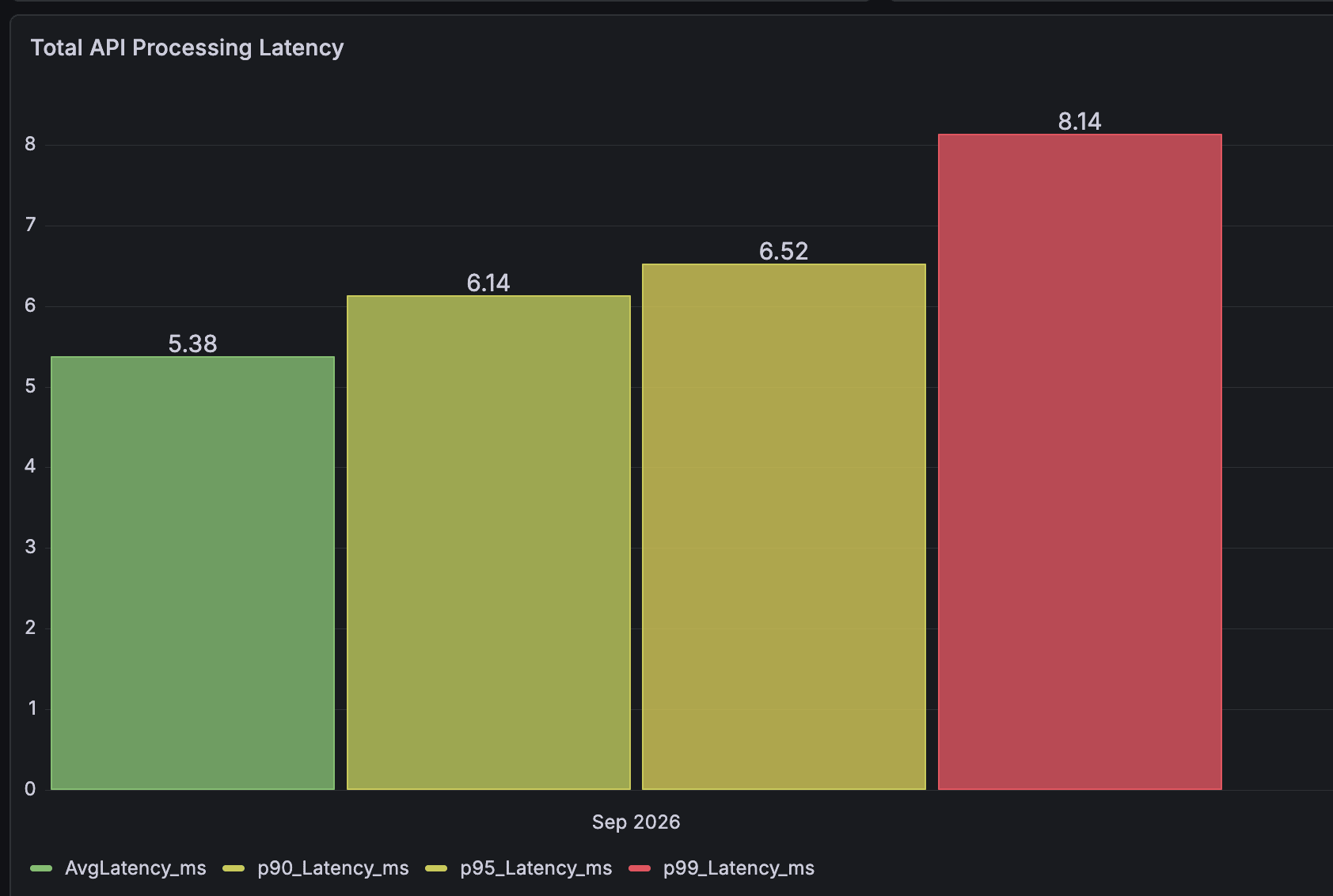
Order Latency | September 2026
Web and App: 4.56 ms at p99
API: 8.14 ms at p99
September Webinars
We continued our webinars through September with sessions covering AI-assisted strategy building, Order Flow, Options Scalper, Bar Replay, volatility strategies, Webhooks, and indicator-based automation. If you missed them live, catch up on the recordings here:
Explore more upcoming and past sessions on the FYERS Webinars page.
September Events
September was also active on the ground, with FYERS participating in events across Chennai, Patna, Bengaluru, Mumbai, and Guwahati.
-
TradeIQ, Chennai | 6 September
-
Shamsh Traders Conclave, Patna | 6 September
-
Traders Conclave - Liquide, Bengaluru | 18 September
-
Algo Circle, BSE Mumbai | 20 September
-
TradeIQ, Guwahati | 27 September
You can find upcoming events and past event galleries on the FYERS Events page.
That wraps up September. Some of these changes are new features, while others are smaller improvements to workflows you already use. We’ll continue working on both, and as always, your feedback helps us decide what needs attention next.