Automate: Build and Execute Rule-Based Workflow on FYERS Web

@yashas @kGRGEpOlJ1 @krishna_kishore

First of all thanks for making automate. Its clean and easy to use and very easy in making strategies on auto pilot. I have deployed 2 strategies on MCX successfully and are running beautifully.

Now, I want to deploy 3rd strategy on NIFTY where i am making synthetic futures buy/sell from webhook.
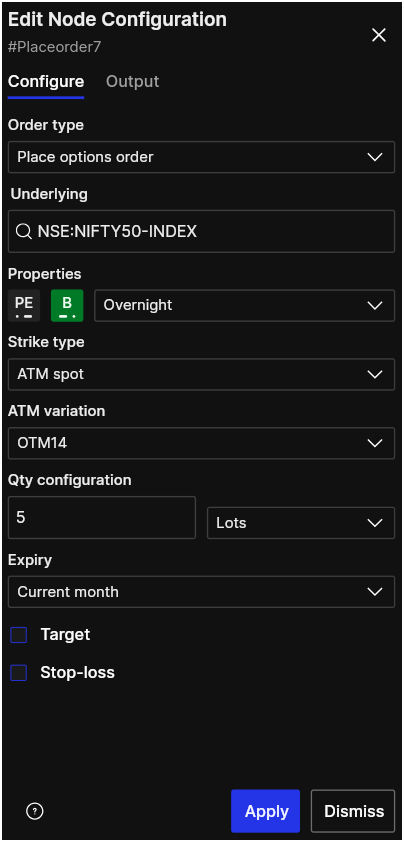
Here i want a feature you can say if in place order node in AUTOMATE is there any possibilty to add strike selection from ATM to multiple of 100 because at multiple of 50 there is liquidity issue in monthly options.

If feature of selecting a strike can be added it will be very very helpfull.

Thanks

1 Like

Heyy @105557186860428191981, you can get started with Automate by creating your strategy using triggers, conditions, and actions. Once your automation is ready, you can use the Backtest feature to test it on historical data before deploying it live. If you’re new to Automate, you can also refer to our support articles and our YouTube videos to get started.

If you don’t have access to the Backtest Beta yet, just share your Client ID via DM, and we’ll help activate it for you. Happy automating!

Hey @113069658958905361467 happy to read your post. Thank you! Feedback noted.

Pls follow our blog, articles and playlists on Fyers platforms YT channel

Hi @102697379657957698438 Please reach out to support, watch videos on Fyers platforms YT channel are read our dedicated support articles.

If all that is too cumbersome, attend our webinars. You can track and register for upcoming webinars here - Stock Market Webinars & Trading Sessions | FYERS

@yashas @krishna_kishore @kGRGEpOlJ1

Hi everyone

I’ve run into a specific limitation that breaks reversal-style strategies (where a position can flip between long and short based on incoming webhook signals). Sharing this in case others hit the same issue, and in case the team can look into it.

Setup:

  • An automation with a recurring Start trigger (e.g., “Every 1 minute”).

  • Two webhook-triggered branches (Buy and Sell), each going through a “Square off automation positions” node before placing a new order.

  • This is meant to reverse the position on every signal: if currently short, a Buy signal should square off the short and open a fresh long, and vice versa.

The issue:

When a full “run” of the automation completes (i.e., a webhook branch has fired and finished), the automation’s Start trigger spawns a new fresh run within about a minute — this happens automatically, even without any manual Stop/Start. In this new run, the “Square off automation positions” node no longer has any memory of the position opened in the previous run. Its internal count comes back as 0, even though the account still has an open position from that earlier run.

Concretely:

  1. Buy signal arrives → Square off finds nothing to close (count 0) → opens +1.

  2. Some time later (once the automation has cycled to a fresh run), a Sell signal arrives → Square off again reports count 0, even though the account is still holding +1 from step 1 → it does NOT close the existing +1, it just places a fresh -1.

  3. Net result: the account nets out to 0 (flat) instead of the expected -1 (a full reversal). The strategy’s intended position is now wrong, silently.

I verified this by deliberately holding a position from the previous day (unaffected — square-off correctly recognized and closed it when no restart had happened overnight), versus a position opened and left for a while within a run that had cycled/restarted — which the automation failed to recognize when the reversal signal came.

Impact: For any reversal-based automation relying on “Square off automation positions” with a recurring schedule, positions can silently end up flat or unbalanced whenever a new run spawns between the entry signal and the reversal signal — which, in live trading, is essentially guaranteed to happen sooner or later given unpredictable gaps between signals.

Suggested fix: The “Square off automation positions” tracking should persist across automation runs for the same automation (i.e., it should reflect the account’s actual current open position tagged to that automation, not just orders placed within the current run). Alternatively, please document this limitation clearly so users don’t build reversal logic on top of it without knowing the risk.

Workaround we’re currently using: avoid Square-off nodes entirely and instead chain a fixed sequence of Webhook → Place order (fixed quantity/side) → Continue legs in one long sequential automation, so no position-tracking logic is needed at all. This works but is clunky and caps the number of reversals per day to however many legs you pre-build.

Would appreciate it if the team could confirm whether this is expected behavior or a bug, and whether there’s a setting I am missing that preserves square-off tracking across runs.

Thanks!
Hi @102697379657957698438, as discussed over the call, I hope your queries have been addressed. If you face any difficulties while building your automation, feel free to reach out to us through the Community or Support, we’ll be happy to assist you. Also, be sure to join our upcoming webinars to learn more about Automate and explore its features in depth.

Started testing Automate. need Backtest Beta access. Client ID : XY00224.
Or let me know where to apply.

If the action is executed and stop loss condition is executed ,will the fyers automate keep on running throughout the day again if the conditions meet or will be closed and we have to start automate again?

@gautham_pai1 Can be either/or depending on how you design your automation workflow.

@100297971031155955054 Recently published a post on the available indicators for automation. Will introduce more soon.

@102426389886064633250 Can do in future but most clients we spoke to are interested in real-trading capabilities than simulation. Btw, backtesting is in beta. Check it out.

Hey @23E636Da3a, Have you raised a ticket regarding this?

@114353267891543136204

  1. The Automation should be able to apply to our watchlist, stocks universe like F&O , Nifty 50, Nifty Next 50and allow entry in cash.
    Response: Great feedback! We’ll make this happen very soon.

  2. Under Portfolio Check Section: Currently The position check/book is based on the amount and thats not good. it should be based on the risk to reward basis. we should be able to set the RR like 1:1, 1:2, 0.5:2 ect.
    Response: This is a very nuanced user-specific feedback because measuring RR is subjective. Are you suggesting RR computation based on Target & SL? That’s one way to look at it but subjective definitions are hard to define using automate.

  3. Need Indicators/HT confirmations before execution.
    Response: We recently introduced indicators for automate. However, if you feel like you want more than is currently available, you could use TradingView webhooks. This way you can connect to automate and execute your logic through tradingview integration.

4)For stocks we have currently GTT to buy automatically based on “desired price”. for this need automation to allow to buy stocks based on indicators. Say for example if RSI <30 = Buy mentioned quantity. this can be one time trigger or multi trigger based on candle close. this settings should be flexible to define. This future no platform has. you can be the First.
Response: This is already available. You can create recurring schedule or one time schedule based on one time or repetitive orders even without GTT order type. Hope this clarifies.

Since you seem to be a serious user, please consider going through our YT channel, FYERS Platforms for long-format videos and register for upcoming webinars here.

Started already via Automate. need Backtest Beta access. Client ID : FAC75700

Hi Team, Range breakout Strategy , Do we have option to set the SL based on candle , like if range breakout upside and order triggered with ATM strike then SL should be based on the Candle low. also provide me backtest access Client ID : DB00793

Hi Team,
could you please enable backtesting for me, i am working on a strategy, needs to check how it works.
this is my ID : XS62509

Tried it today ,condition stopped after executing although other conditions were running, if it meets all the parameters again will the same condition executed or will be stopped for the day.

Hi Team,

Please enable backtesting for me Client ID-YK02434

Hi sir please enable backtesting to fyers I’d XR09549