Can we add multiple stocks in one go in watchlist instead of add one by one adding of stocks?
Hi @rajiv_thakkar,
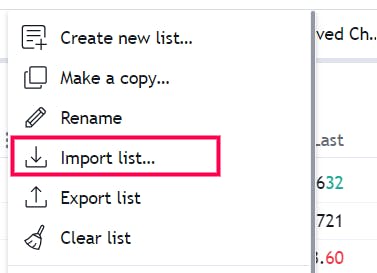
You can import multiple scrips at once to your watchlist using the import list feature. Please refer to the screenshot for reference.
Hi Rajiv,
Here’s a little tip to make your experience on our mobile app smoother. To add multiple stocks to your watchlist without the hassle of doing it individually, pop open the global search in any watchlist. You’ll spot a “+” icon by the instruments in ‘Recent searches’. Give it a tap, and they’re added to your watchlist! The same trick works when you’re on the hunt for a specific instrument.
Also, you can swiftly add a curated selection of instruments to your watchlist with our pre-defined lists.
Hello mam, i tried Using Import list feature, but symbols weren’t added. Format of the Symbol was NSE:infy but it didn’t got added. It showed me an error about format. Please guide on the correct format.
Hi @vivek_chawla,
You must import the watchlist in CSV format. However, you can simplify the process by exporting the file from your watchlist, add your preferred scrip to the same file, and importing it seamlessly.
Hello Mam, i did export the existing watchlist and it uses ‘.txt’ Format and ‘.csv’ doesn’t work for me. Adding further, every symbol is accompanied by the category it belongs to, i would like to request a change, if we can just use NSE:infy as a valid symbol instead of NSE:infy -EQ. As majority of traders use screeners and they provide TradingView Supported NSE:infy and not NSE:infy - EQ, and just to point out TradingView allows adding Multiple symbols by Clicking on “+” symbol and separating each symbol using comma (‘,’)please forward this to the relevant team. Thank you for your prompt reply, appreciate it.
Your feedback is duly noted, @vivek_chawla. I will notify the concerned team to look into it and take it up if it is feasible. Thanks!
if u import from chartink.
then just paste this formula to excel
=CONCAT(“nse:”,C3,“-eq,”)
where C3 = script name Colum
then just copy & paste in fyers watchlist & press enter, ignore error. u successfully added watch list.