


Most traders manage risk during the trade, but review it after the day is already over.
By then, all that remains is a final P&L figure. It tells you what you ended with, not how much you were exposed, when risk peaked, or when things went upside down. Without that context, every review is incomplete.
The Positions P&L Curve on FYERS fills that gap. It shows the full intraday movement of your P&L, minute by minute, so you can understand how risk and returns actually played out during the session.
https://www.youtube.com/watch?v=siPihI_016s
The heart of this feature is the P&L chart. Instead of a static number, you see a live curve that updates every minute throughout the trading session.
The visual makes the reality of your trading hard to ignore. If you end the day at -₹10,000, it might look like a quiet session. But the curve could show that you were up ₹25,000 earlier in the morning and gave it all back later.
By hovering over any point on the curve, you can see the exact time and your P&L at that moment, split between realised and open positions.
Sometimes, your P&L does not tell the full story on its own. If the market dropped sharply and your portfolio followed, that is not necessarily a mistake. It is just correlation. Overlaying a benchmark like NIFTY 50 on your curve lets you separate skill from movement, so you can see whether your trades drove the outcome or the market simply carried you along.
Below the chart, you will find your positions table, showing both open and closed trades for the day. This is where you can filter out the noise.
Using the checkboxes next to each symbol, you can select specific positions. For example, you might choose only your NIFTY option trades. When you do this, an additional P&L line appears on the chart showing the cumulative performance of just those selected positions.
Your total P&L remains in the background as a reference. This makes it easy to see whether your day was affected by one specific position or whether losses came from multiple smaller mistakes.
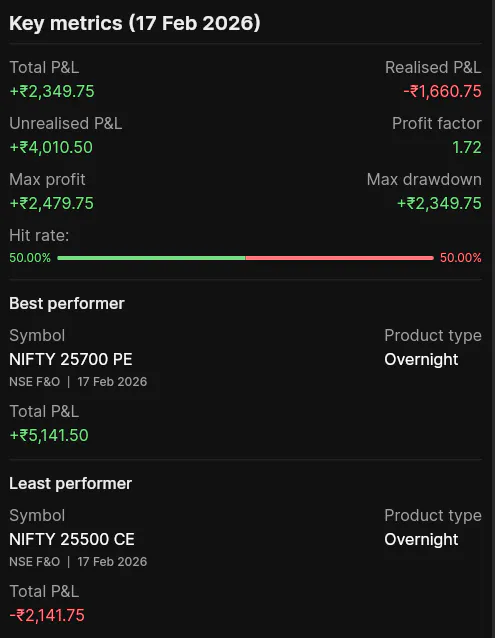
On the right side, you will see a Key Metrics panel that provides a real-time health check of your trading session.
It highlights the numbers that actually help you improve. You can see your Max Profit, which shows the highest point your P&L reached during the day, along with your Max Drawdown, which captures how much you slipped from that peak.
The panel also tracks your Hit Rate, showing the balance between winning and losing trades, and identifies your best and worst performing symbols at a glance. These metrics update live, giving you an honest view of your performance while the market is still open.
Smart Exit is integrated directly into this view. You can set a profit target or a stop loss for your day in absolute rupee terms.
Once enabled, these levels appear as horizontal lines on your P&L curve. If your curve touches either level, the system can automatically close your positions. This allows you to enforce discipline at the portfolio level, without having to react emotionally during volatile moments.
Trading feedback is useful only if you revisit it. The date picker allows you to go back to any previous trading day and review the P&L curve along with the decisions you made.
If you want to share your performance with a mentor or on social platforms, you can generate a shareable link to your P&L curve. This creates a clean snapshot that includes your curve and key metrics, which you can share on WhatsApp, X, or Telegram. You can choose whether to show your name or remain anonymous.
Start Using It
We did not build this to give you another chart to look at. We built it because clear feedback is essential for improvement.
Log in to FYERS Web or App and open the Positions P&L Curve during your next trading session.
