


If you trade options actively, you’ve probably faced this: you spot an opportunity, start adding each leg one by one, and by the time the last order is added, the price has already moved. Most multi-leg strategies lose time in execution, not analysis.
Basket Mode on FYERS fixes this by bringing strategy creation and execution into the Options Chain. You can now plan and place from one screen with fewer steps and more control.
Basket Mode sits at different positions on the Options Chain across platforms.
On the App, it appears at the bottom of the Options Chain. Turn it on and checkboxes appear next to each strike. Tap a strike to see a small pop-up that asks whether you want to Buy or Sell the contract and what quantity you’d like to add.
On Web, Basket Mode is located at the top of the Options Chain. Hover over a strike to view the Buy/Sell options, and clicking on it will add the selected strikes to the basket.
Once confirmed, the strike is marked on the chain, and a counter shows how many legs have been added.
Open the counter to view all the legs together. Here, you can review, adjust quantities, check margin, and place the entire strategy in one go. Everything happens on the same screen where you already analyse the market, keeping the process fast and simple.
App:
Web:
Most trading decisions happen on the Options Chain. Earlier, order placement was done elsewhere. That split added time and introduced errors like mismatched expiries or quantities. Basket Mode keeps selection, sizing, review, and placement in one flow. It reduces clicks, keeps context, and makes the outcome predictable.
Basket Mode introduces a few powerful tools that remove manual steps and keep your strategies consistent.
Straddle Mode makes creating straddles faster and cleaner. Once you select a strike, the app gives you the option to Add Buy or Add Sell. On Web, you can do the same directly from the chain. Selecting either automatically adds both the Call and Put legs for that strike to your basket. The full structure appears instantly, ready for review or adjustment before execution.
App:
Web:
The multiplier helps you adjust the size of your strategy instantly. You can increase it to add more lots or reduce it to lower your position size. All legs update together with a single change, keeping your setup consistent and saving time.
App:

Web:
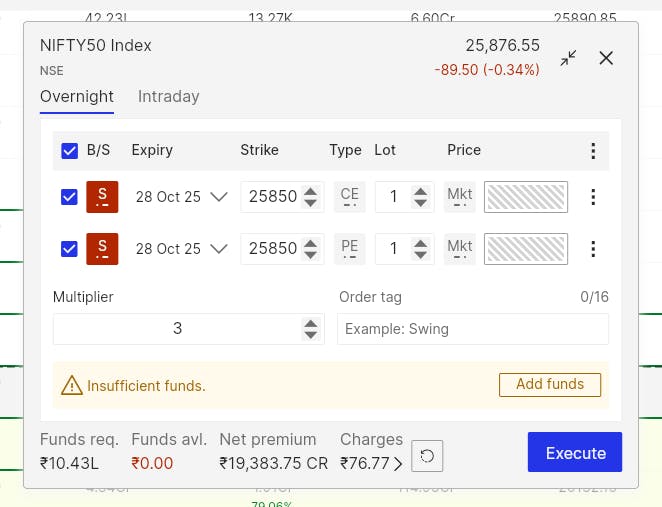
The multi-order view displays your total Net Premium so you can see the cash impact upfront. A value ending with CR indicates a net credit, where you receive premium. DR indicates a net debit, where you pay premium. For example, ₹15,000 CR means a credit setup, while ₹10,000 DR means a debit setup. It’s a quick snapshot that helps confirm your strategy type before you place the order.
Some strategies are worth keeping. Save them to My Baskets to deploy again later without rebuilding. Name your basket, open it when conditions match your plan, and place the order in seconds. You can also make quick edits before execution.
The multi-order view is your final checkpoint. All legs appear together with their strike, expiry, side, quantity, and order type. You can switch between Intraday and Overnight, choose Market or Limit, and edit or remove any leg.
Margin required, available funds, and charges are shown in one place so there are no surprises.
If your balance is short, the order window highlights the shortfall and allows you to add funds instantly. When you execute, all legs are placed together. If any leg needs attention, the reason is shown clearly so you can fix and retry without leaving the screen.
Take a Bull Put Spread on NIFTY. Turn on Basket Mode and tap the 25800 Put strike. Select Sell, and it will be marked as S on the chain. Then tap the 25700 Put strike and select Buy. It will be marked as B.
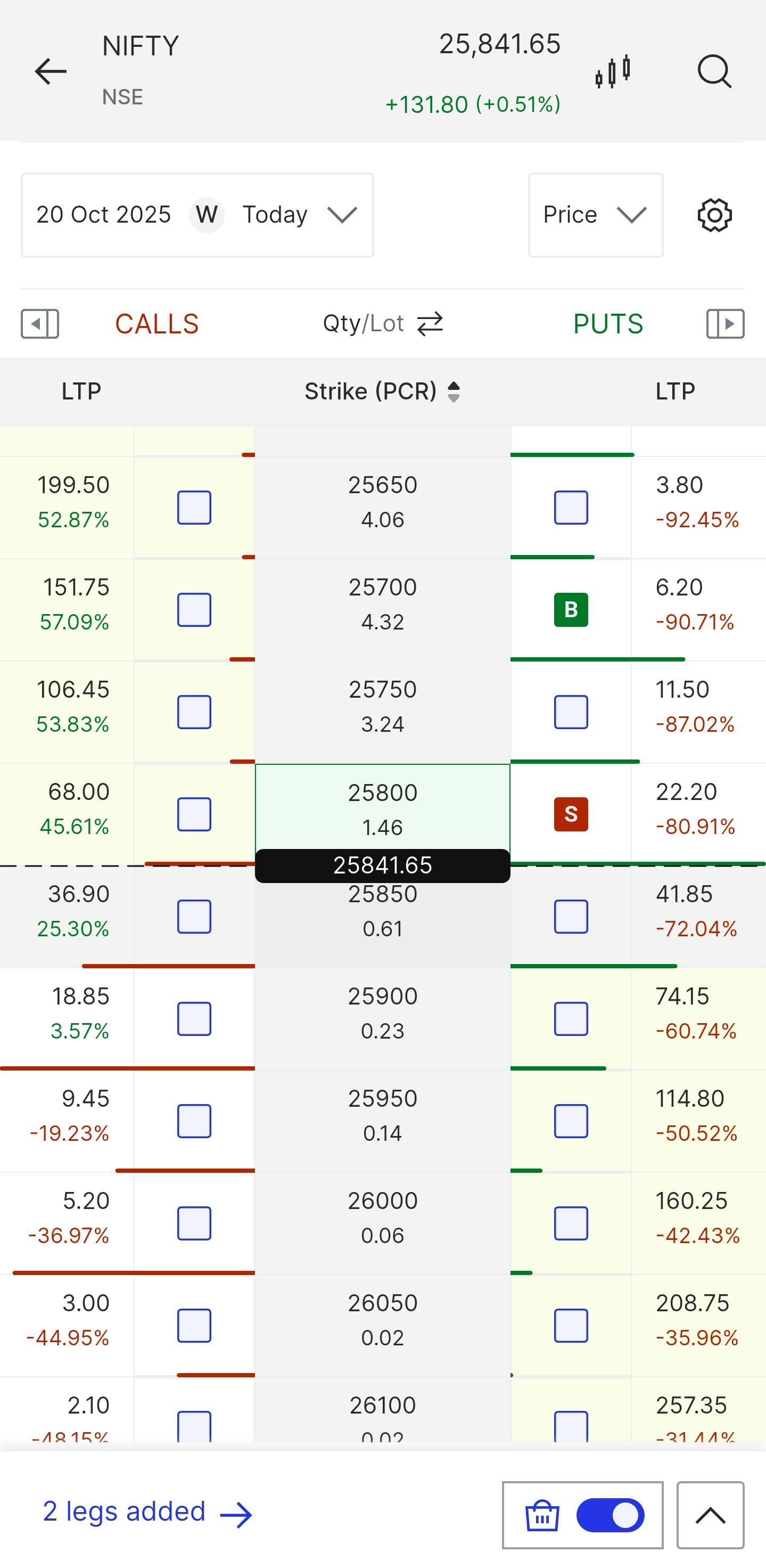
The counter at the bottom now shows two legs added. Tap it to open the multi-order view. Review expiries, quantities, Net Premium, and margin. Place the order, and both legs are executed together from the Options Chain in one seamless step.
Basket Mode is made for traders who act quickly and value accuracy. It keeps strategy creation simple and reduces the steps between idea and order. Every feature is designed to help you execute faster and trade confidently on both web and mobile.
For more details on Basket Mode and other Option Chain features, visit the FYERS Support Portal.
Basket Mode is available on the FYERS App and FYERS Web. Open the Options Chain, turn on the basket toggle, and build your next strategy in one seamless flow.
