Every trader has done this at some point.
You open a chart after the market closes, look at a move you missed or got wrong, and think:
I should have entered here. I should have exited there. OrI should have kept a wider stop-loss.
The problem is not the review. The problem is that you are reviewing with the answer already in front of you.
Hindsight makes everything look obvious. The entry, the stop-loss, the exit, the reversal. Clean and clear because the move is already complete.
That is not how trading actually works.
In the market, you are making decisions one candle at a time. You do not know what the next candle looks like. You are deciding whether to enter, wait, hold, or exit without any of that clarity.
Bar Replay on FYERS is built around that gap.
It lets you go back to a historical chart and replay the move candle by candle, the way it actually unfolded. You can use your indicators, place a simulated trade, manage a stop-loss and target, and review what happened. If you want to try a different decision, you can replay the same move again.
It is paper trading, but on historical charts.
https://www.youtube.com/watch?v=oQ24N3rVlQc

What is Bar Replay?
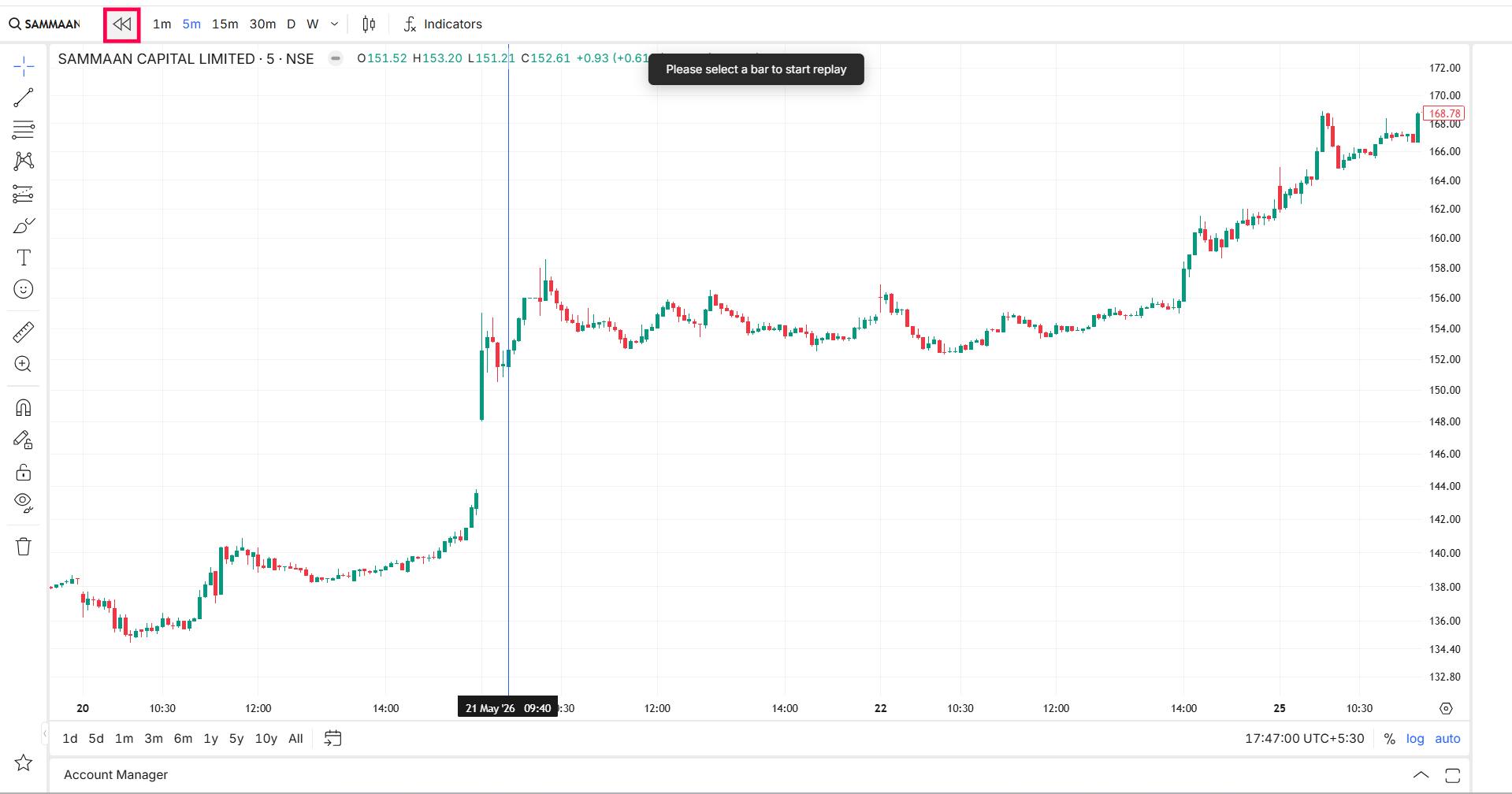
Bar Replay lets you pick any point on a historical chart and watch the market unfold from there, one candle at a time.
The candles that follow your chosen starting point stay hidden until the replay reaches them. You are not looking at a completed move. You are watching it happen.
While it is running, you can pause and study a candle, move forward candle by candle, or adjust the speed to move through quieter sections faster. You can place simulated Buy or Sell trades, set a stop-loss and target directly on the chart, and use Reverse Position if your view changes mid-move.
At the end, you get a summary of the simulated trades you took. And if you want to test a different approach, you can go back and replay the same move again.
Why looking at historical charts is not the same thing
Historical charts are useful. Studying past moves, identifying patterns, and understanding price action is part of how traders improve.
But there is a built-in problem: when you look at a finished chart, you already know the ending.
That shapes everything. A breakout looks cleaner. A reversal looks easier to catch. A stop-loss placement looks more obvious. You are not actually making the decision, you are just confirming what already happened.
Bar Replay takes the ending away.
You start from a specific candle, and everything after it is hidden. The move unfolds one candle at a time. You decide whether to enter, where to place your stop-loss, when to exit, and whether to hold or get out, all while the future is still hidden.
That is a different kind of practice.
How to start
Open any chart on Fyers Web or the Fyers App. Click the Bar Replay icon, select the candle where you want the replay to begin, and the chart starts moving from there.
Use the same indicators you normally rely on
Before starting the replay, you can add whichever indicators you use in real trading. Moving averages, RSI, MACD, Supertrend, VWAP, volume, whatever your usual setup looks like.
This matters because you are not practising on a stripped-down chart you would never actually use. You are practising with the same context you have when you trade live.
Control the pace
Once the replay starts, you are in control of how fast it moves.
Slow it down when a setup is forming. Move candle by candle through a key moment. Speed it up through quieter sections. Pause when you need to think.
This works well for studying breakouts, reversals, gap moves, volatile sessions, setups that failed, or trades where the stop-loss got hit. You can spend as much or as little time as a particular moment deserves.
Place a simulated trade
While the replay is running, you can place a simulated Buy or Sell trade with a quantity of your choice.
This is not a real order. But the decision still has to be yours, made at that point in the replay, before the next candle forms.
That is what makes it different from reviewing. You are not saying “I would have bought here” after the fact. You are actually deciding to buy here, while the next candle is still hidden.
Set stop-loss and target on the chart
After entering a trade, you can set your stop-loss and target directly on the chart using drag and drop.
As the replay continues, you can watch how the trade plays out. Did the target get hit first? Did the stop-loss get triggered? Did you hold too long or exit too early?
This is the part that covers the full trading decision, not just finding an entry.
Reverse Position
Trades do not always go the way you expect. A breakout fails. A support breaks. A reversal runs out of steam.
If your view changes while the replay is running, you can use Reverse Position. Your current simulated trade closes and the opposite position opens immediately.
Review the trades you took
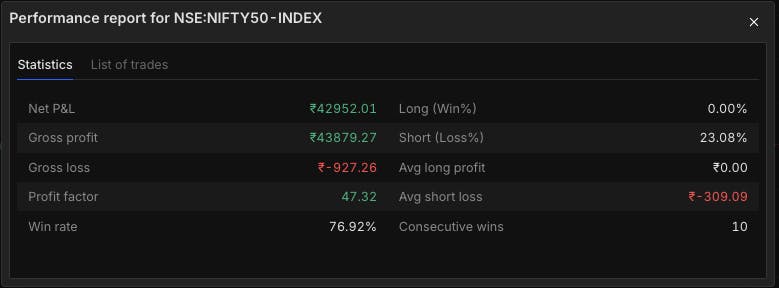
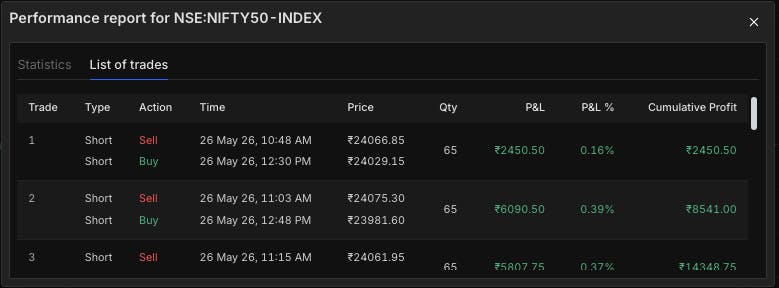
At the end of the replay, you get a summary of everything you did: where you entered, where you exited, how the stop-loss and target held up.
This is where the useful questions come up. Was the entry too early? Was the stop-loss placed too close? Was the target unrealistic? Should the trade have been avoided altogether?
And if you want to try something different, you can replay the same move with a different approach.
Overall P&L
List of trades
Try Bar Replay on FYERS
If you already review charts after the market closes, Bar Replay takes that one step further. Instead of only seeing what happened, you can replay the move, trade it, manage the risk, and review the result.
Bar Replay is live on FYERS Web & App. Try it out and let us know what you think in the comments.