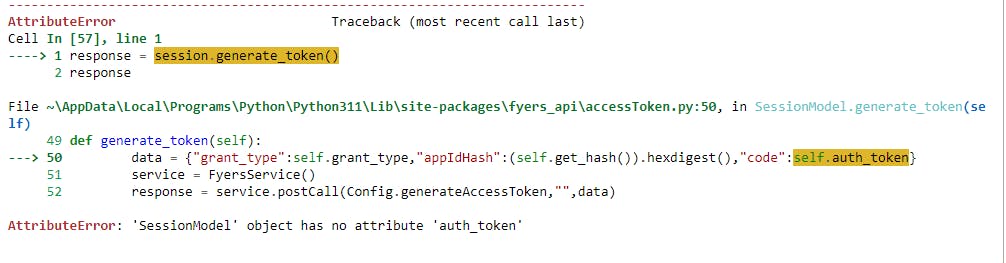
As I am following the API doc of fyers, all the code is successful but I am unable to generate the access token after the code given below
session.set_token(auth_code)
response = session.generate_token()
access_token = response[“access_token”]
Hi @yGbfQ6hvlb ,
Can you please print the value of response you are getting and share the same over here. That would help us debug the issue at a much faster rate and will be able to give some insights,
The keyerror though here refers to you arent able to get that so the key_error.
If would be great if you can have that in a try except block which help you figure out things ans also the proper error response.
Thanks and Regards,
Piyush Kapse
Hi Piyush,
Thanks for the reply, I tried once again now I am able to log in to Fyers. The issue is with auth code which is available for few minutes so I need to revoke the app and run the code again to get the access token. If there is an issue I will inform you through here. thank you
Great to Hear that @yGbfQ6hvlb ,
Will be all ears,
Thanks
def login(self):
        cwd = os.chdir(root)
        with open('fyers.txt', 'r') as file:
            self.token=[file.read](http://file.read)()
        now=[dt.datetime.now](http://dt.datetime.now)()
        with open("date_entry.txt", "r") as file:
            try:
                accessTime = dt.datetime.strptime([file.read](http://file.read)(), "%d %b %Y %a %I %M %p")
            except Exception as e:
                if "does not match" in str(e):
                    accessTime=now-dt.timedelta(days = 2)

        if [now.day](http://now.day) > [accessTime.day](http://accessTime.day) or self.token=="":
            session = accessToken.SessionModel(client_id=self.clientId, secret_key=self.secretKey, redirect_uri=self.redirectUrl,
                                           response_type='code', grant_type='authorization_code', state='abcdefg')
            response = session.generate_authcode()

            options = webdriver.ChromeOptions()
            #options.add_argument("--disable-notifications")
            #options.add_argument('--headless')
            driver = [webdriver.Chrome](http://webdriver.Chrome)('chromedriver.exe', options=options)
            driver.get(response)

            driver.find_element_by_id('fy_client_id').send_keys(self.username)
            driver.find_element_by_id('clientIdSubmit').click()
            time.sleep(2)
            driver.find_element_by_id('fy_client_pwd').send_keys(self.password)
            driver.find_element_by_id('loginSubmit').click()
            time.sleep(2)
            for i,r in enumerate([self.pin](http://self.pin)):
                driver.find_element_by_xpath(f"/html/body/section[8]/div[3]/div[3]/form/div[2]/input[{i+1}]").send_keys(r)
            driver.find_element_by_id('verifyPinSubmit').click()
            time.sleep(5)
            parsed = urlparse(driver.current_url)
            auth_code = parse_qs(parsed.query)['auth_code'][0]
            session.set_token(auth_code)
            response = session.generate_token()
            self.token = response["access_token"]
            with open('fyers.txt', 'w') as file:
                file.write(self.token)
            self.dateTimeEntry()
            [logger.info](http://logger.info)('Got the new fyers access token since the accessToken is from previous day!!!')
        else:
            [logger.info](http://logger.info)('old accessToken reused!!!')
        self.fyers=fyersModel.FyersModel(client_id=self.clientId, token=self.token, log_path=os.getcwd())
        [logger.info](http://logger.info)("fyers Object Created Sucessfully") if self.fyers != None else [logger.info](http://logger.info)("fyers Object Not Created")
Dont ask me doubts.i cant teach you python..use at your own risk.This works for the new updated login of fyers with pin
You can use this script to generate the token: