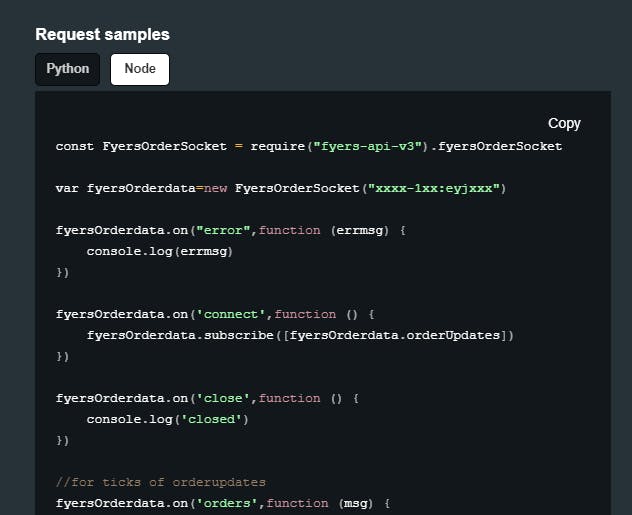
Node Js Order Socket not working

Hi Team,

I am getting the following while using Fyers order socket

trying to reconnect  5
Error: Unexpected server response: 403
    at ClientRequest. (E:\Algos\Fyers V3\node_modules\ws\lib\websocket.js:896:7)
    at ClientRequest.emit (node:events:527:28)
    at HTTPParser.parserOnIncomingClient (node:_http_client:631:27)
    at HTTPParser.parserOnHeadersComplete (node:_http_common:128:17)
    at TLSSocket.socketOnData (node:_http_client:494:22)
    at TLSSocket.emit (node:events:527:28)
    at addChunk (node:internal/streams/readable:315:12)
    at readableAddChunk (node:internal/streams/readable:289:9)
    at TLSSocket.Readable.push (node:internal/streams/readable:228:10)
    at TLSWrap.onStreamRead (node:internal/stream_base_commons:190:23)
closed
max autoconnect tries exceeded

Hi @narasa_reddy

Looks like you are using auth code as a access token.

Please make sure when you are trying to fetch data from socket you are using access token.

I am sure I am not, because I can acces market data web socket and place order APIs with same token

I used the following code to generate auth_code

import { fyersModel as FyersAPI } from "fyers-api-v3";
import open from "open";
import "dotenv/config";

const fyers = new FyersAPI();
fyers.setAppId(process.env.APP_ID);
fyers.setRedirectUrl(process.env.REDIRECT_URL);

const generateAuthcodeURL = fyers.generateAuthCode();

open(generateAuthcodeURL)
    .then(() => {
        console.log(`Opened ${generateAuthcodeURL} in your default web browser.`);
    })
    .catch((error) => {
        console.error("Error occurred:", error);
    });

And then using this auth code, generate the accessToken with the following code

import { fyersModel as FyersAPI } from "fyers-api-v3";
import "dotenv/config";

const fyers = new FyersAPI();

fyers.setAppId(process.env.APP_ID);
fyers.setRedirectUrl(process.env.REDIRECT_URL);

fyers
    .generate_access_token({ secret_key: process.env.SECRET_KEY, auth_code: process.env.AUTH_CODE })
    .then((response) => {
        console.log(response);
    })
    .catch((error) => {
        console.log(error);
    });

With this accessToken I can place order, get order book and can initiate marketData web socket. The only problem is with the orderWebsocket.

Code I used for marketWebSocket which worked perfectly fine is as follows

import "dotenv/config";
import { store } from "../../store/store.js";
import { fyersDataSocket as DataSocket } from "fyers-api-v3";
import { UPDATE_MARKET_DATA } from "../../store/actions.js";

const marketDataWebSocket = (symbol) => {
    const niftyPriceSocket = DataSocket.getInstance(process.env.ACCESS_TOKEN, "./");

    niftyPriceSocket.on("connect", function () {
        niftyPriceSocket.subscribe([symbol]);
    });

    niftyPriceSocket.on("message", function (message) {
        if (message.symbol === symbol) {
            store.dispatch({ type: UPDATE_MARKET_DATA, payload: { symbol: symbol, data: message } });
        }
    });

    niftyPriceSocket.connect();
    niftyPriceSocket.autoreconnect();

    return;
};

export { marketDataWebSocket };
But the following order socket code is not working.import { fyersOrderSocket } from "fyers-api-v3";
import "dotenv/config";

const orderSocket = () => {
    const skt = new fyersOrderSocket(process.env.ACCESS_TOKEN, "./");

    skt.on("error", function (errmsg) {
        console.log(errmsg);
    });

    skt.on("general", function (msg) {
        console.log(msg);
    });

    skt.on("connect", function () {
        skt.subscribe([skt.orderUpdates]);
        console.log(skt.isConnected());
    });

    skt.on("close", function () {
        console.log("closed");
    });

    skt.on("orders", function (msg) {
        console.log("orders", msg);
    });

    skt.on("trades", function (msg) {
        console.log("trades", msg);
    });

    skt.on("positions", function (msg) {
        console.log("positions", msg);
    });

    skt.autoreconnect();
    skt.connect();
};

export { orderSocket };

Note: I am calling these sockets from other functions.

Can you check what’s wrong with the orderSocket.
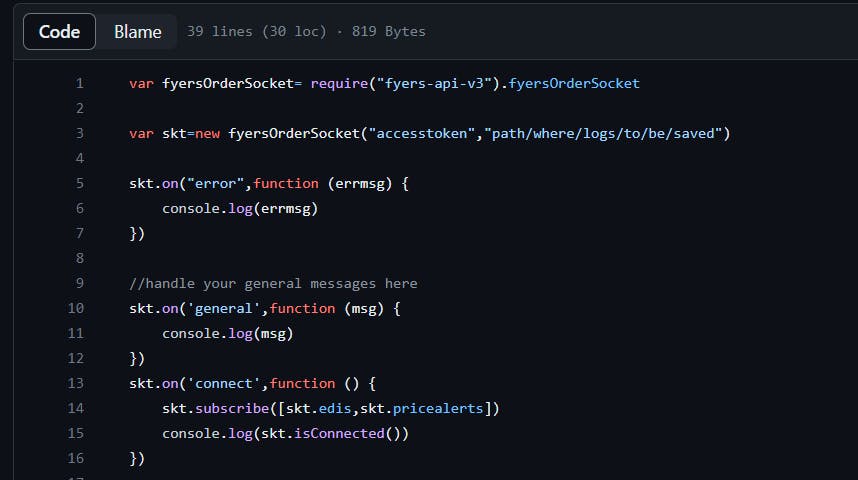
Hi @narasa_reddy

Can you check this part code. as I checked it is working fine for me

var fyersOrderSocket= require("fyers-api-v3").fyersOrderSocket

var skt=new fyersOrderSocket("7NPSDDRhX3S-100:eydfdfdfdf","path/where/logs/to/be/saved")

skt.on("error",function (errmsg) {
    console.log(errmsg)
})

//handle your general messages here
skt.on('general',function (msg) {
    console.log(msg)
})
skt.on('connect',function () {
    skt.subscribe([skt.orderUpdates])
    console.log(skt.isConnected())
})

skt.on('close',function () {
    console.log('closed')
})

//handle your order messages here
skt.on('orders',function (msg) {
    console.log("orders",msg)
})

//handle your trade messages here
skt.on('trades',function (msg) {
    console.log('trades',msg)
})

//handle your positions messages here
skt.on('positions',function (msg) {
    console.log('positions',msg)
})

skt.autoreconnect()
skt.connect()

Hey Pankaj, I used the exact same code and still getting the same error as mentioned above.

hi @narasa_reddy

Then it is environment specific. Please try in another env.
As it is working fine and you also said that data websocket is working for you.

Hi Pankaj,

If I have had any issue in the environment no sockets or apis should have worked.

As I am facing issues with only fyersOrderSocket, I think there should be some issue on the fyers end.

I can see in the nodeJs package code, apiService endpoints are working fine and hsm_package which contains the marketData websocket is also working fine. The only issue is with the orderSocket.

I can see you have different approaches of initialising orderSocket in different places. Which one should we use?

@Z4PBvkQGyF Can you respond on this??

Ok @narasa_reddy
I will check and update you

Hi @narasa_reddy
You are using OnOrders Websocket right ?

Below code you try once as it is working.
Your access token format will be APPID-100:accesstoken .

Check and let me know

var fyersOrderSocket= require("fyers-api-v3").fyersOrderSocket

var skt=new fyersOrderSocket("AppId-100:accestoken","./")

skt.on("error",function (errmsg) {
    console.log(errmsg)
})

//handle your general messages here
skt.on('general',function (msg) {
    console.log(msg)
})
skt.on('connect',function () {
    skt.subscribe([skt.orderUpdates])
    console.log(skt.isConnected())
})

skt.on('close',function () {
    console.log('closed')
})

//handle your order messages here
skt.on('orders',function (msg) {
    console.log("orders",msg)
})

//handle your trade messages here
skt.on('trades',function (msg) {
    console.log('trades',msg)
})

//handle your positions messages here
skt.on('positions',function (msg) {
    console.log('positions',msg)
})

skt.autoreconnect()
skt.connect()

access token format which I gave previously was wrong, kindly update the docs in github sample code.

https://github.com/FyersDev/fyers-api-sample-code/blob/sample_v3/v3/node/websocket/data_socket/data_websocket.js

It is mentioned as just accessToken for both orderSocket and MarketData socket which created ambiguity.

Hi @narasa_reddy
is it fine now for you?

Yes it is