Why there is difference in “Instant Order Placement” in Fyers and Dhan.
In Fyers if we use Instant Order Placement option then the order will automatically executes in market even if we select limit order. But, where as in Dhan we can place limit order while Instant order placement enabled. In Dhan instant order placement can be used to place order either limit or market without clicking on confirm always but the same is not with Fyers, here they changed Instant order placement as market order by default.
Even i checked in original Tradingview and found Dhan and original Trading view Instant order placement features are same, only Fyers have modified the feature and made it as default market order.
Both being Tradingview platforms why the features are not same?
Placing orders quickly and easily is made convenient with our Instant Order Placement feature. We have designed it to default to market orders, ensuring a simple and straightforward process for traders. However, we understand that some traders may prefer the option to place limit orders instead. That’s why we have added a checkbox that lets traders select whether they want to place market orders or limit orders by default.
To enable this checkbox, follow these simple steps:
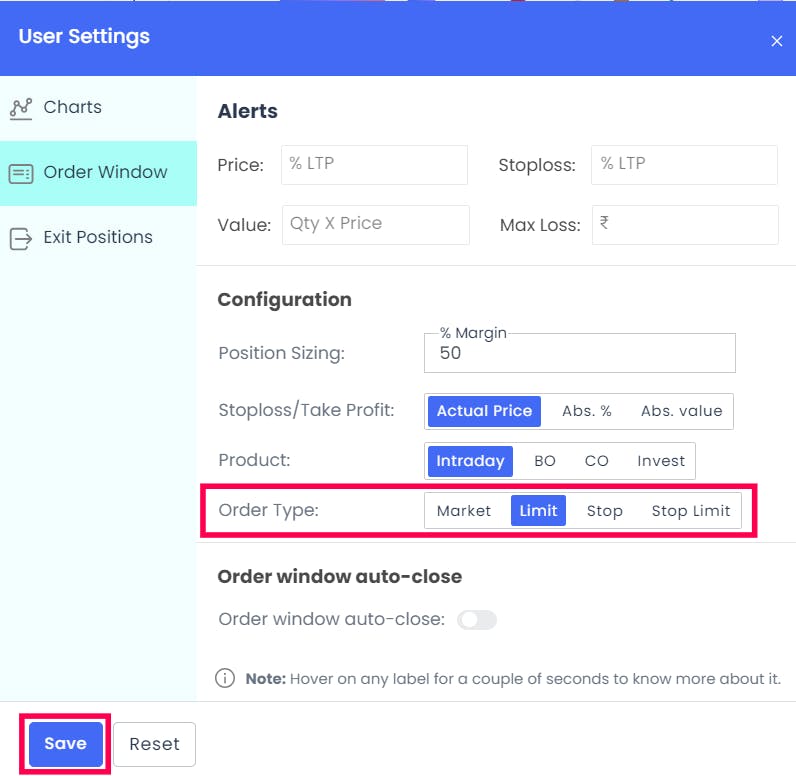
Click on the “User Settings” icon located in the top right corner of your screen.
Click on the “Orders Window” tab.
Under “Order Type,” select the “limit” option and save your preferences.
Once you have enabled this checkbox, the Order Placement feature will place limit orders by default. If you want to place a market order instead, simply uncheck the checkbox anytime.
Yes! When you set the order type and save it, it will automatically become the default selection in the order panel. Refer to the screenshot for your reference.
Today i have tried and placed order in a single click without the need to open order winow. But what i have observed is while trailing Stop Loss it is still asking for “Modification Confirmation” even though instant order place is enabled.
Can you please guide me how can skip “Modification Confirmation” as today i missed some points of profit because of confirmation window.
Today i placed an order and kept SL above my buy price when the position is in profit, after some time market became some volatile and there was a sudden increase in profit due to volatility, but when i tried to trail the profit further from initial one it has asked to “confirm my modification”, by the time i click on confirm trade closed at my initial SL and missed extra profit which i intend to book just because order did not get modified instantly.
So, can you please guide me how to skip confirmation window in order to capture quick moves in trailing, being a scalper i want to trail my profits instantly, always clicking on confirmation will resulting in missing out profits which i desired to book.
I hope you understood what i meant to say and please guide me accordingly.
Note: placing order while “Instant order placement” enabled, not only order placement, even trailing SL shall also be modified instantly without asking for confirmation as in original trading view, hope you will make changes accordingly.
I am looking for the same. @shruthi_shetty I followed the process you mentioned and it still places a market order instead of a limit order. I am using the Web1.5 version. Does it still work the way you mentioned?
I agree with @114203460071616055976 .. Steps I followed are.
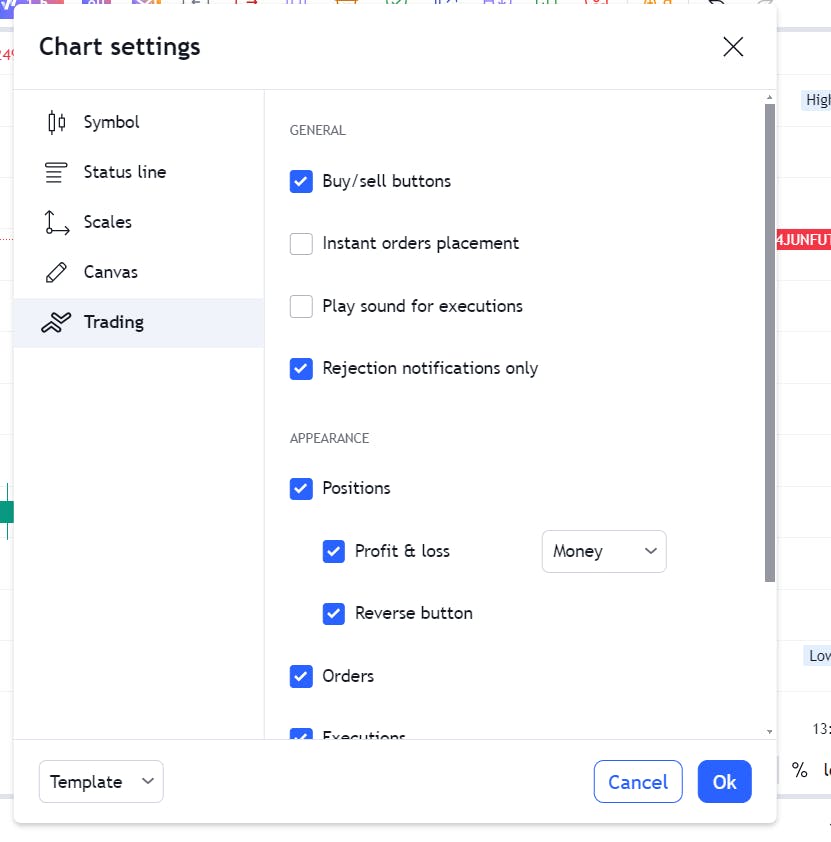
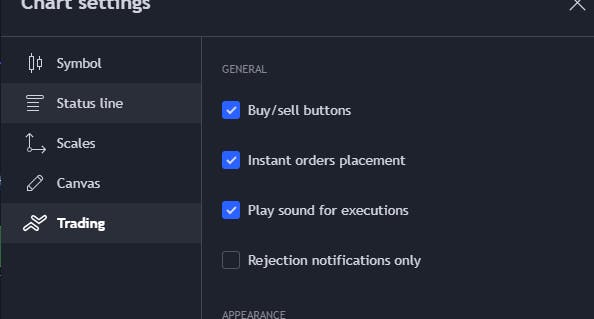
Select instant order placement from chart settings. then in user settings I selected limit order and click save. Now when I click on buy icon or buy or sell button which is on top left corner of chart. On click of both the buttons order getting executed with market price…
@shruthi_shetty kindly know are we missing something or is this a bug?
Hi @tJaLPDReFA, Kindly disable the instant order placement in the chart settings and check. If it’s enabled, then all orders will be placed as market orders.
Hi @shruthi_shetty
As mentioned if instant order placement is untick, order popup will be open. I don’t want to do that. Also if “Instant order placement” is not checked then I cannot add quantity from chart itself.
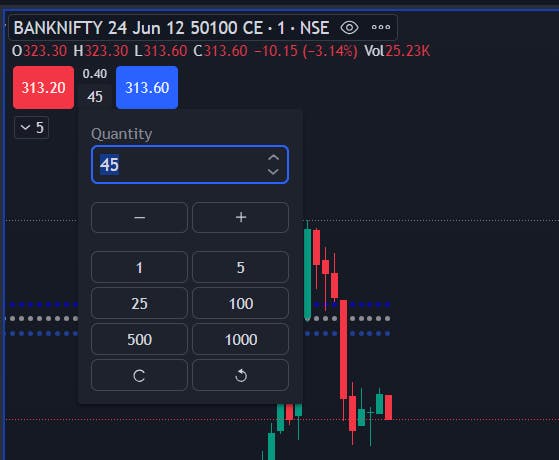
See attached image. This will be hidden.
What I want is, I can add or remove quantities from this popup but also I should get limit order option.
So after adding this quantities, Instead of direct market order which is currently happening, I must have option to select limit order or market order.
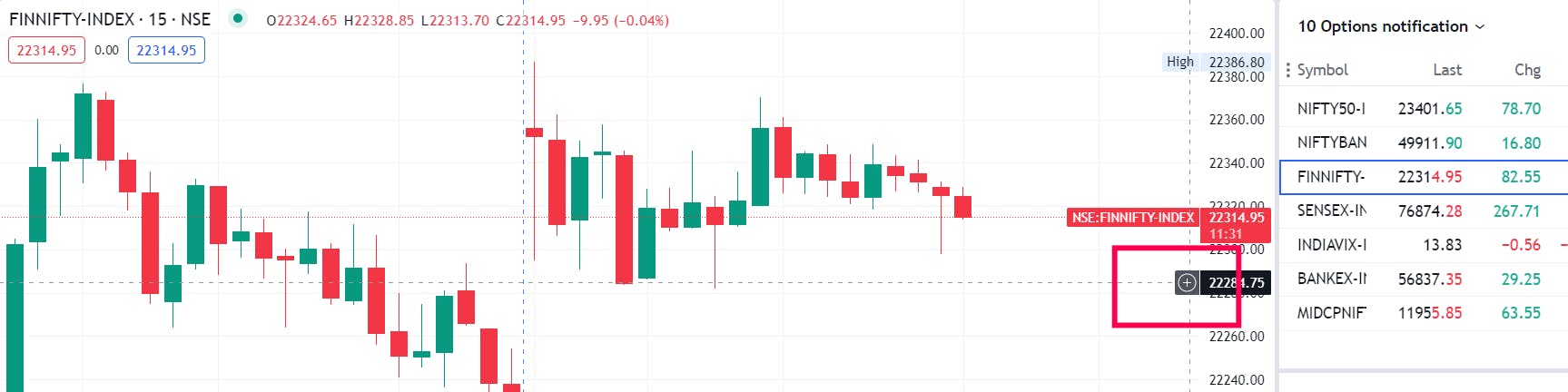
@tJaLPDReFA If you enable instant order placement, all orders will go through as market orders only. I recommend that for limit orders just click on the “+” sign below the market orders, and your orders will go through without opening the order window.
Thanks for the reply @shruthi_shetty. This is for all, I will summarize the conversation and how you can make use of market and limit order. without opening popup or confirmation box.
Assume you want do Instant order placement, then you need to select market from user settings and from chart settings > trading > Instant order placement.
As shown below image 1.
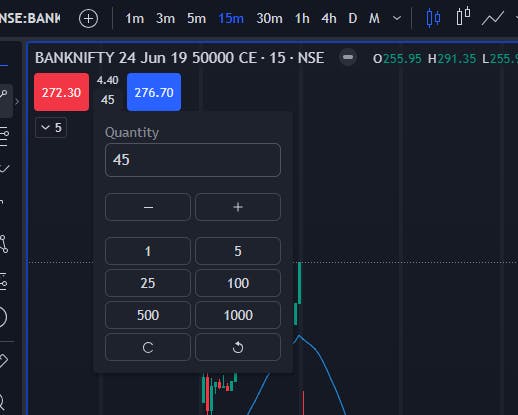
Then when you tick all above and open chart you will see Buy and sell buttons with quantities. So after adding quantities if you click on price or Blue color button Buy order will be placed with the market price. For ex. after clicking on blue button 50000 CE will be triggered with 276.70 price with 45 quantities. See below image 2
But If you want to execute a order with limit without popup then you need to click on “+” icon with the limit order with same quantities. and once buy or sell order given it will executed without popup.
See image 3. as shown in below image Limit order will be executed with 45 quantities at 250.35 price.