How to generate a detailed PnL with expenses historically. If I go to global PnL, I need to do one day at a time. I am looking at getting the entire details exported to do my analyses. Thanks for the help
Hey @ajit_kumar,
- Go to ‘My Account’.
- Click on ‘Reports’ and select ‘P&L Dashboard’.
- In the Global P&L Statement page, select your preferred segment.
- Select the chosen timeframe and you’ll get your P&L report.
- Click on the Filter icon and choose your parameters:
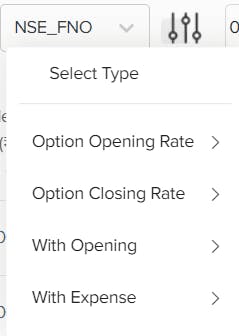
Note: The transaction costs will be displayed in the last few entries of the report. We’re thinking of displaying it in a fixed space so you wouldn’t need to scroll down till the end.
Hope this helps.
Thanks Tejas for the quick response. my query was that is it possible to generate a month report with every days transaction itemized. in this case, I need to go to a particular day and then export, go to next day export, append etc…one report which can be exported with days transaction with expenses which can be analyzed using pivot tables.
@tejas_khoday Could you please ask one of your staff to prepare a documentation page / include a link on the site on what the different menu settings on the myaccount page means and when its used, option opening rate , option closing rate, with opening ( its all too confusing). There is no much clarity on these things elsewhere on any other broker sites either. Thanks
Well I spoke to the support staff. So there is no option to get itemized data unless you go to each day and export. That’s really cumbersome