If you trade options, you already know this. Having a market view is only the beginning.

You may believe the market will stay range-bound. You may expect a breakout. You may want to trade volatility. You may want to take a defined-risk position instead of buying or selling a single option.
But once the view is clear, the next question begins.
Which strategy fits this view?
Which strikes should you choose?
What is the risk?
Where are the breakevens?
How will the payoff look?
How will you manage the position after execution?
This is where options trading becomes more than just clicking Buy or Sell.
A strategy is not just a set of legs. It is a plan. And if the plan is not clearly visible before execution, managing it after execution becomes difficult.
That is why we built Strategy Builder on FYERS.
A place where you can build options strategies, visualise the payoff, understand the risk, execute the position, and manage it as one combined strategy.

From market view to strategy
Most traders do not begin with a strategy name. They begin with a view.
The market may look range-bound.
The index may look bullish but with limited upside.
Volatility may look high.
A breakout may be expected after consolidation.
The challenge is converting that view into a structure.
Strategy Builder is built to make that process clearer. Instead of placing legs one by one without seeing the full picture, you can build the strategy first and understand how it behaves before you execute.
You can use Strategy Builder in three ways.
Build from scratch
If you already know what you want to create, you can start from scratch.
Choose the underlying, select the expiry, and add legs one by one. For every leg, you can choose whether it is a Buy or Sell, select the strike, set quantity, and shape the strategy exactly the way you want.
This is useful when you already have a structure in mind.
For example, you may want to create your own spread, adjust strikes manually, add a hedge, or build a custom multi-leg setup based on your view.
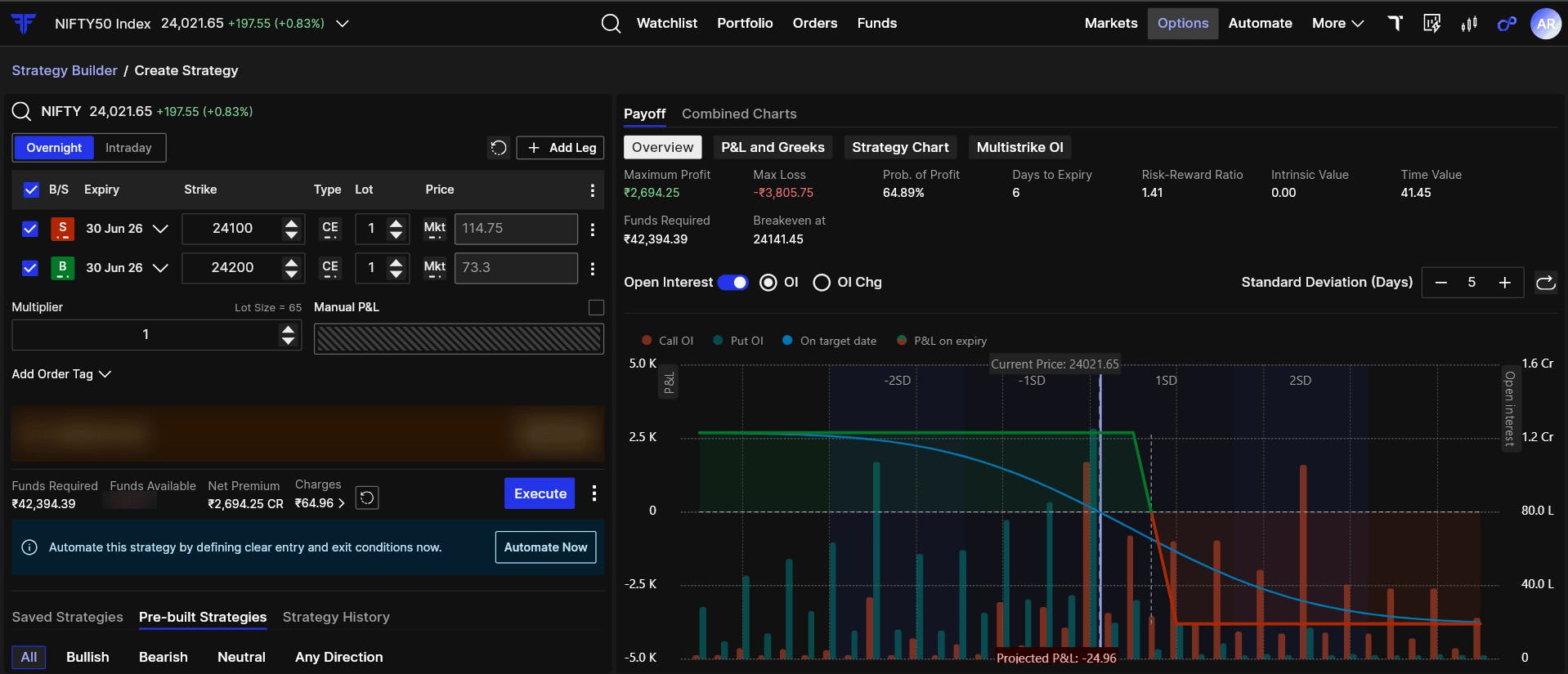
As you keep adding legs, the full strategy updates visually. This helps you avoid building blindly. You are not just looking at individual orders. You are seeing the combined position taking shape.
Use pre-defined strategies
If you want to start with a commonly used options strategy, you can choose from pre-defined strategies.
For example, you can start with strategies like:
- Iron Condor
- Short Straddle
- Short Strangle
- Bull Call Spread
- Bear Put Spread
- Long Straddle
- Long Strangle
The basic structure is created for you. From there, you can adjust the strikes, expiry, quantity, or hedges before execution.
This saves time, especially when you already know the kind of setup you want but do not want to manually add every leg.
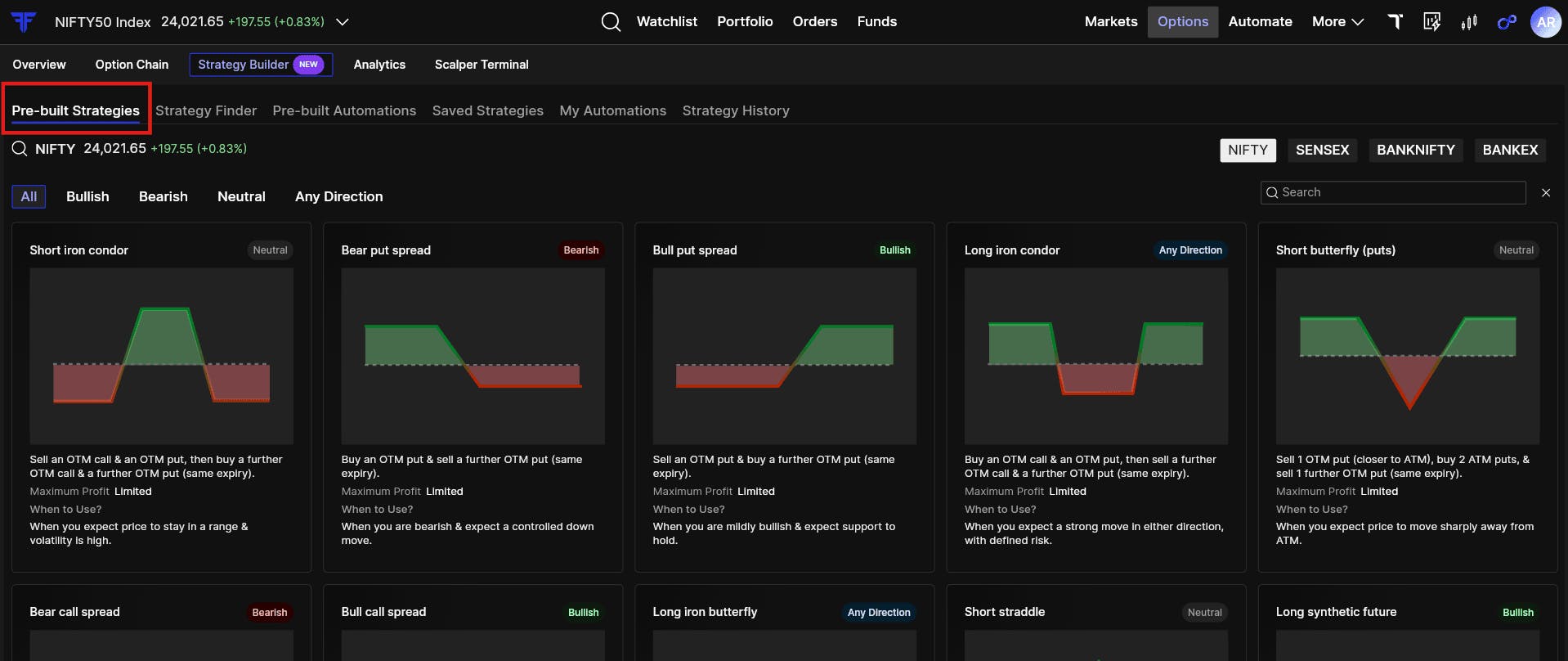
The important part is that nothing is forced. The pre-defined strategy only gives you a starting structure. You still remain in control of the final setup.
Find strategies based on your view
Sometimes, you know your view but are not sure which strategy fits it best.
That is where Strategy Finder helps.
Instead of starting with a strategy name, you can start with your market outlook. For example, your view could be:
- Bullish
- Bearish
- Range-bound
- Volatility-based
- Limited risk
- Defined reward
Based on the selected view, you can explore strategies that may fit that situation and compare their payoffs before deciding.
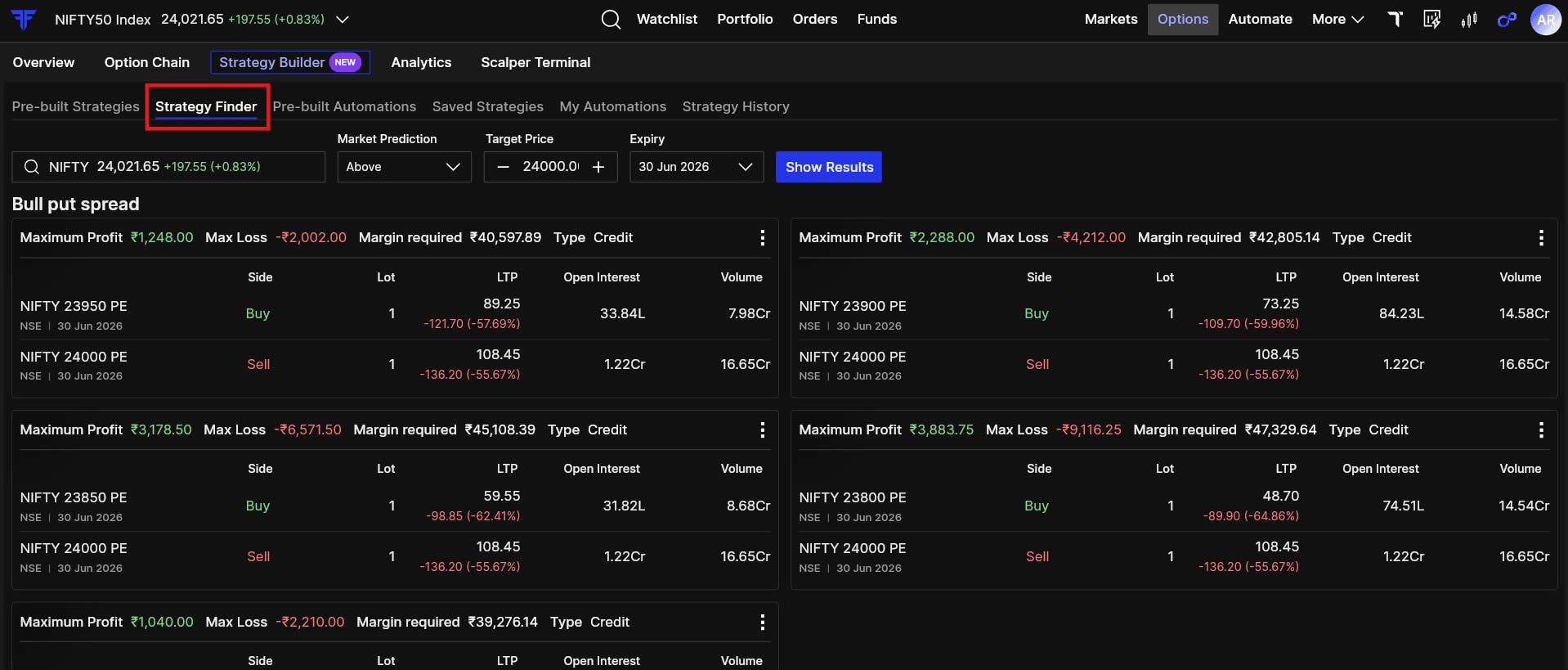
This makes Strategy Builder useful not just for execution, but also for decision-making. It helps you move from “I think the market will behave this way” to “This is the structure I want to trade.”
See the payoff before you place the trade
In options, the same market view can be traded in many ways.
A bullish view can become a long call, a bull call spread, a short put spread, or even part of a larger multi-leg strategy. Each one behaves differently.
That is why payoff matters.
In Strategy Builder, once your legs are added, you can see the payoff chart of the full strategy. This helps you understand:
- Where the strategy can make money
- Where losses can begin
- Where the breakevens are
- Whether risk is capped or open
- How the strategy behaves across different price levels
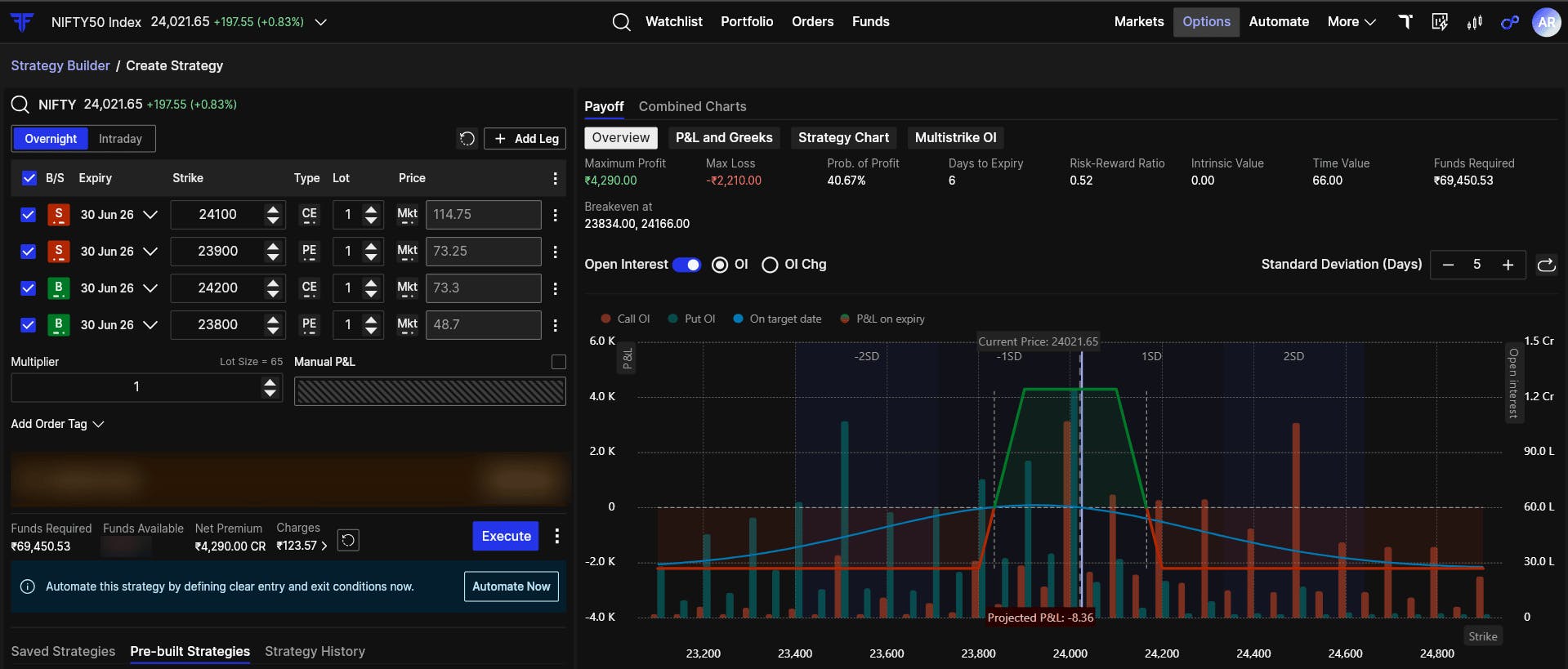
This is where clarity improves.
Instead of placing a trade and then calculating risk separately, you can see the shape of the trade before execution. You can adjust strikes, change quantities, add or remove legs, and immediately see how the payoff changes.
A strategy should be understood before it is placed. The payoff chart helps you do that.
Understand the strategy as one position
A multi-leg strategy should not be evaluated leg by leg alone.
If you build an Iron Condor, the question is not just how each Call or Put is moving separately. The real question is how the full strategy is behaving.
Strategy Builder shows the combined picture.
You can view the legs, payoff, P&L, Greeks, and strategy behaviour together. This helps you understand the position as one strategy instead of mentally piecing together multiple orders.
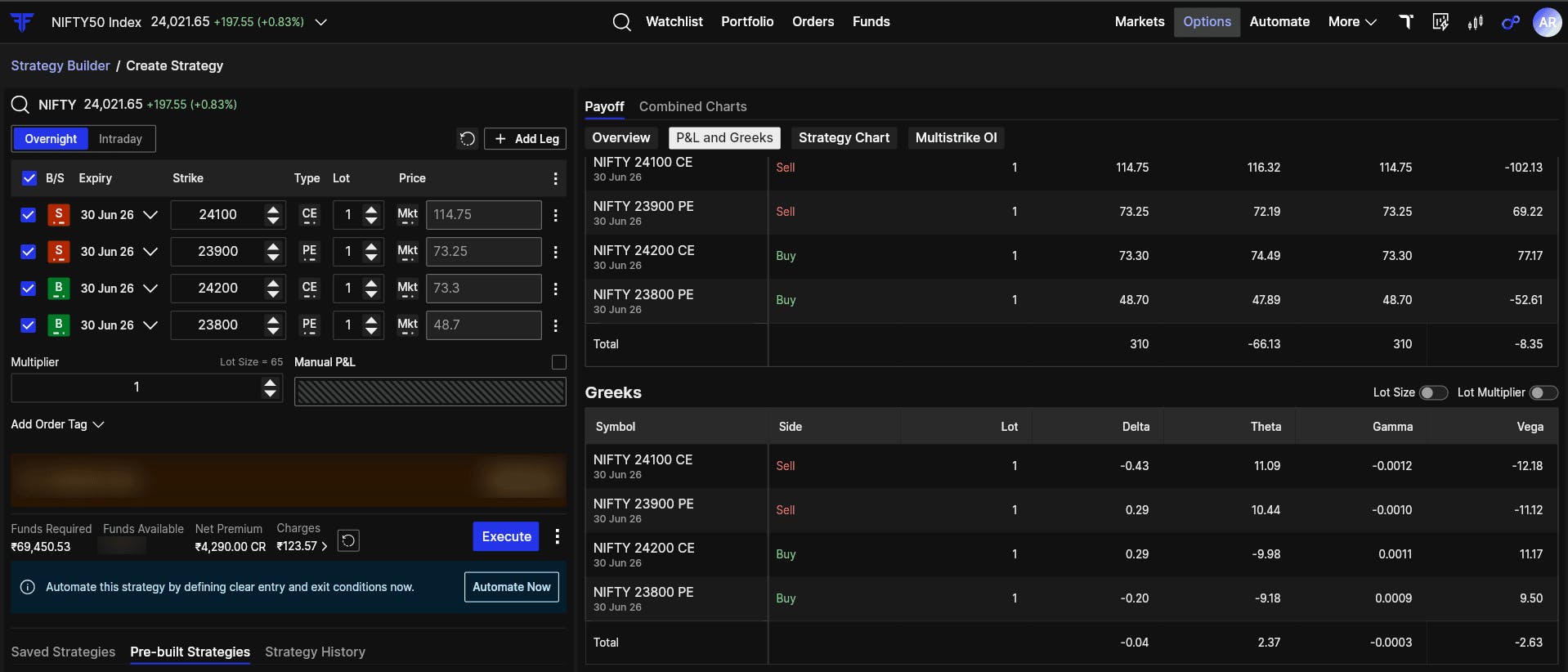
Greeks help you understand how the strategy may respond to price movement, time decay, and volatility. This is especially useful when you are comparing different strategies or adjusting a setup before execution.
For example, two strategies may look similar from a direction point of view, but their risk, reward, and sensitivity can be very different. Strategy Builder helps make those differences visible.
Track the combined strategy chart
After execution, the work is not over.
Most platforms help you place a multi-leg strategy. But after that, traders often have to track each leg separately. This can make the position harder to manage, especially when the strategy has multiple legs and the market is moving quickly.
Strategy Builder helps you track the strategy as one combined position.
With the combined strategy chart, you can monitor the total premium of the strategy instead of switching between individual legs. This is useful because the strategy’s actual behaviour comes from the combined movement of all legs together.
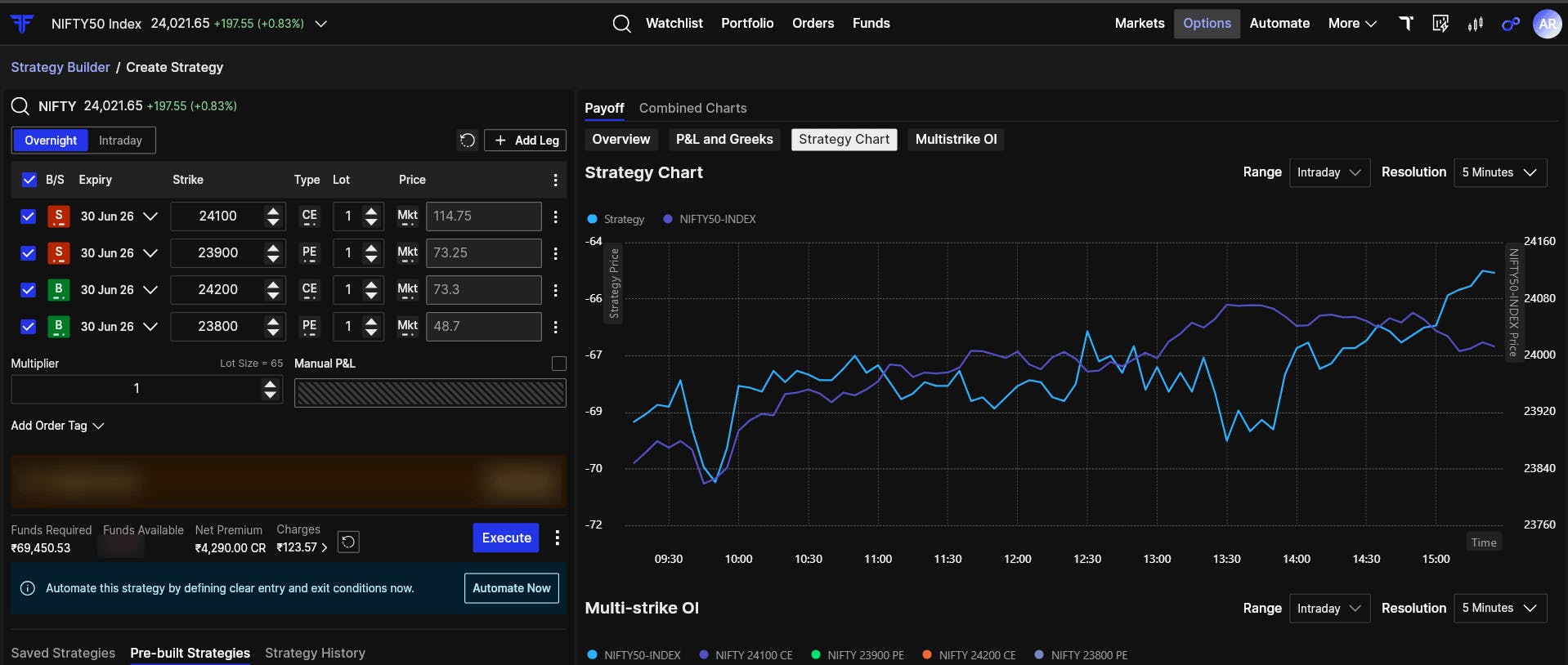
For example, in a Short Straddle, the Call and Put may move differently during the day. Looking at only one leg can give an incomplete picture. The combined chart helps you see what is happening to the full strategy.
This makes tracking cleaner. It also keeps your focus on the plan, not on individual leg noise.
Example: Building an Iron Condor on NIFTY
Let’s say you expect NIFTY to stay within a range.
Instead of selling a naked Call or Put, you decide to create an Iron Condor because you want a defined-risk strategy.
You select Iron Condor from the pre-defined strategies.
Right away, the structure is created with four legs:
- Sell one lower Put
- Buy one further lower Put
- Sell one higher Call
- Buy one further higher Call
Now you can adjust the strikes based on your range view.
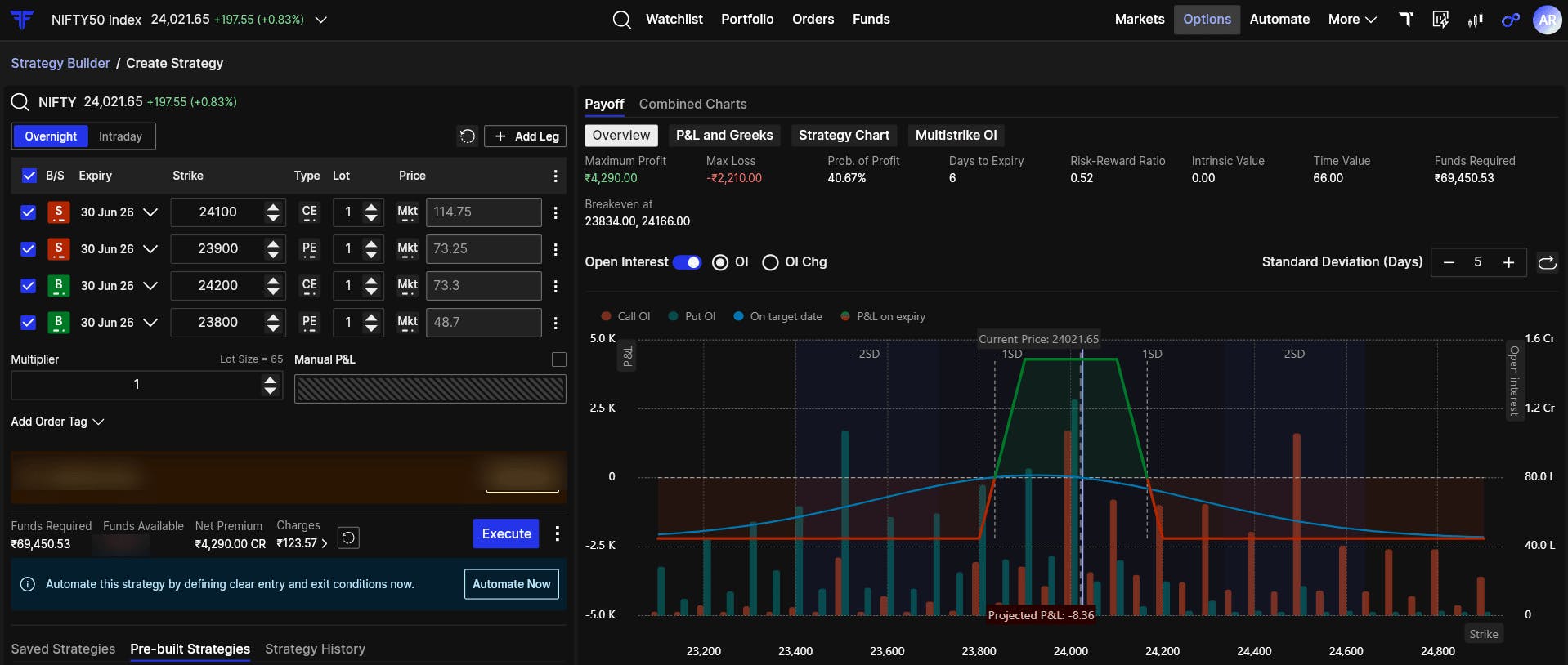
Before placing the trade, you can check the payoff chart.
You can see the range where the strategy can remain profitable. You can see where losses begin. You can also see how the risk is capped because of the hedge legs.
This is the point of Strategy Builder.
You are not just placing four orders. You are building one strategy, checking how it behaves, and then deciding whether it fits your plan.
Execute from the same flow
Once the strategy is ready, you can execute it directly from Strategy Builder.
Before execution, you can review the full structure, including strikes, expiry, buy/sell legs, and quantity. This reduces the chances of placing legs incorrectly or missing the full picture.
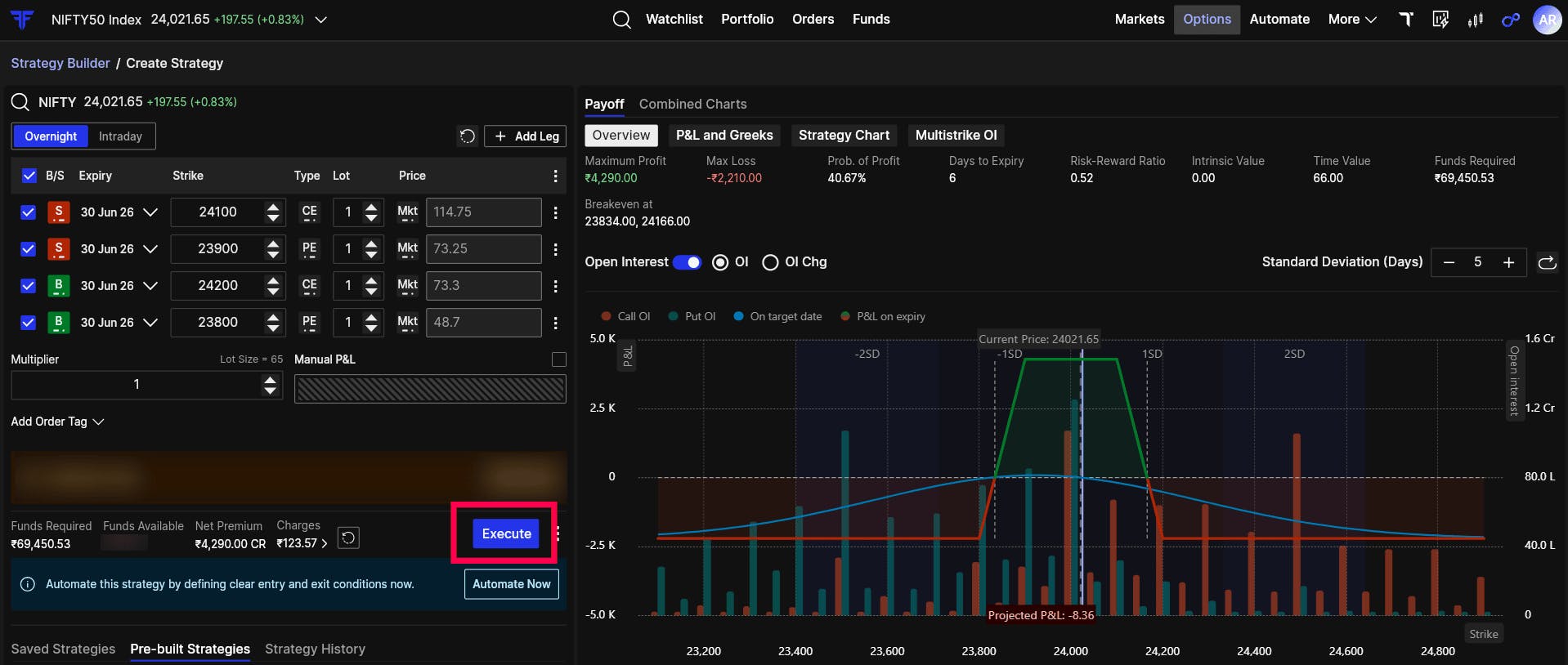
Execution should not feel separate from planning. The same flow that helps you build and visualise the strategy also helps you place it.
Automate the strategy, not just the order
This is where Strategy Builder becomes more powerful.
On many platforms, the workflow ends once the strategy is executed. After that, you have to manually track the legs, watch the P&L, and decide when to exit.
On FYERS, you can go a step further with strategy-level automation.
You can define how the strategy should enter, how it should exit, and when it should stop.
Let’s continue with the Iron Condor example.
You may want the strategy to run only if a condition is met. For example:
Enter the Iron Condor only if NIFTY crosses above 25,500.
If that condition is not met, the strategy will not execute.
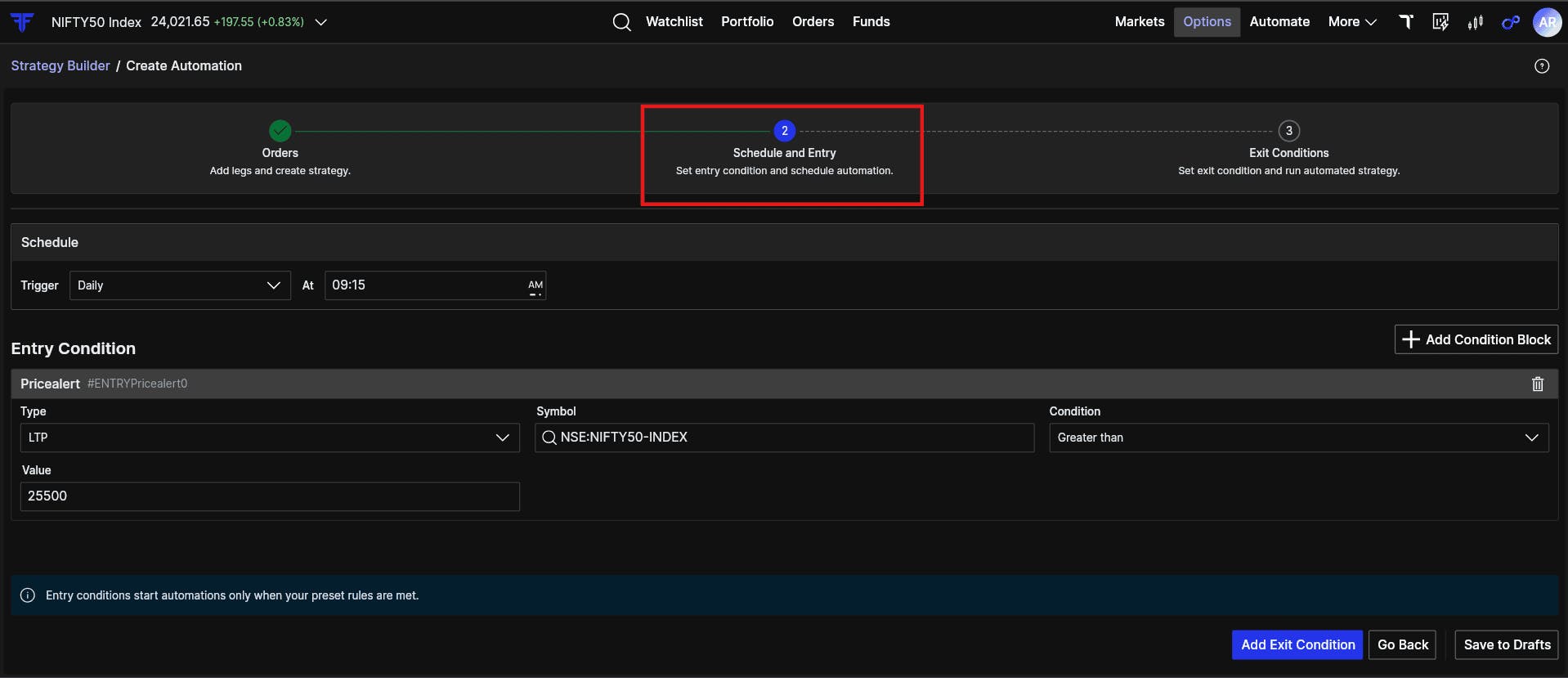
This helps you avoid entering just because the clock says so. The strategy can wait for your condition.
Define exit conditions at strategy level
Exit is where many traders lose discipline.
A strategy may have multiple legs, but the actual decision is usually based on the total outcome. You may want to exit when the full strategy reaches a certain profit or loss.
With Strategy Builder and Automation, you can define exits at the strategy level.
For example:
- Exit if total strategy profit reaches ₹5,000
- Exit if total strategy loss reaches ₹2,000
- Stop the automation for the day once exited
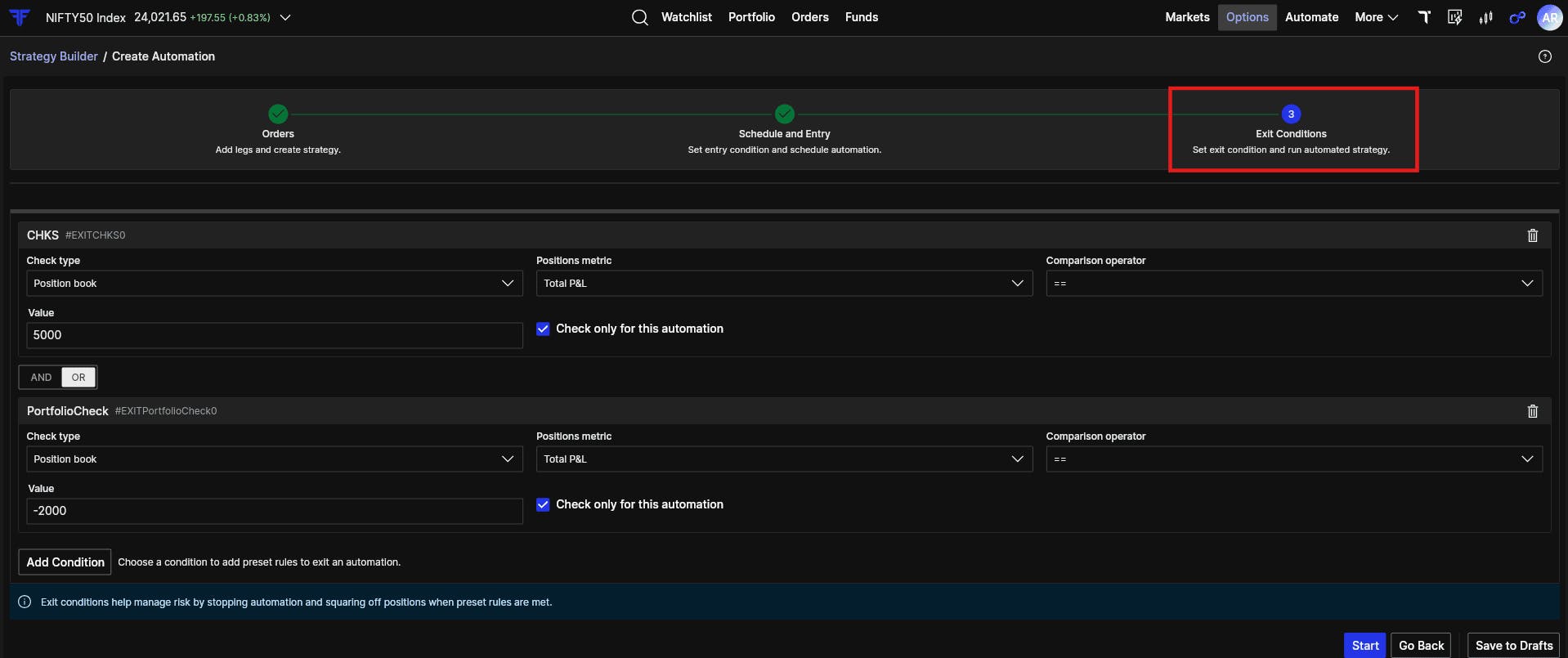
You are no longer managing each leg independently. You are managing the trade the way you planned it.
This is useful because most strategies are designed as combined positions. The exit logic should also respect that.
Monitor from My Automations
Once the automation is saved and active, you can monitor it from My Automations.
You can see whether the strategy is waiting for entry, active, exited, or stopped based on your conditions.
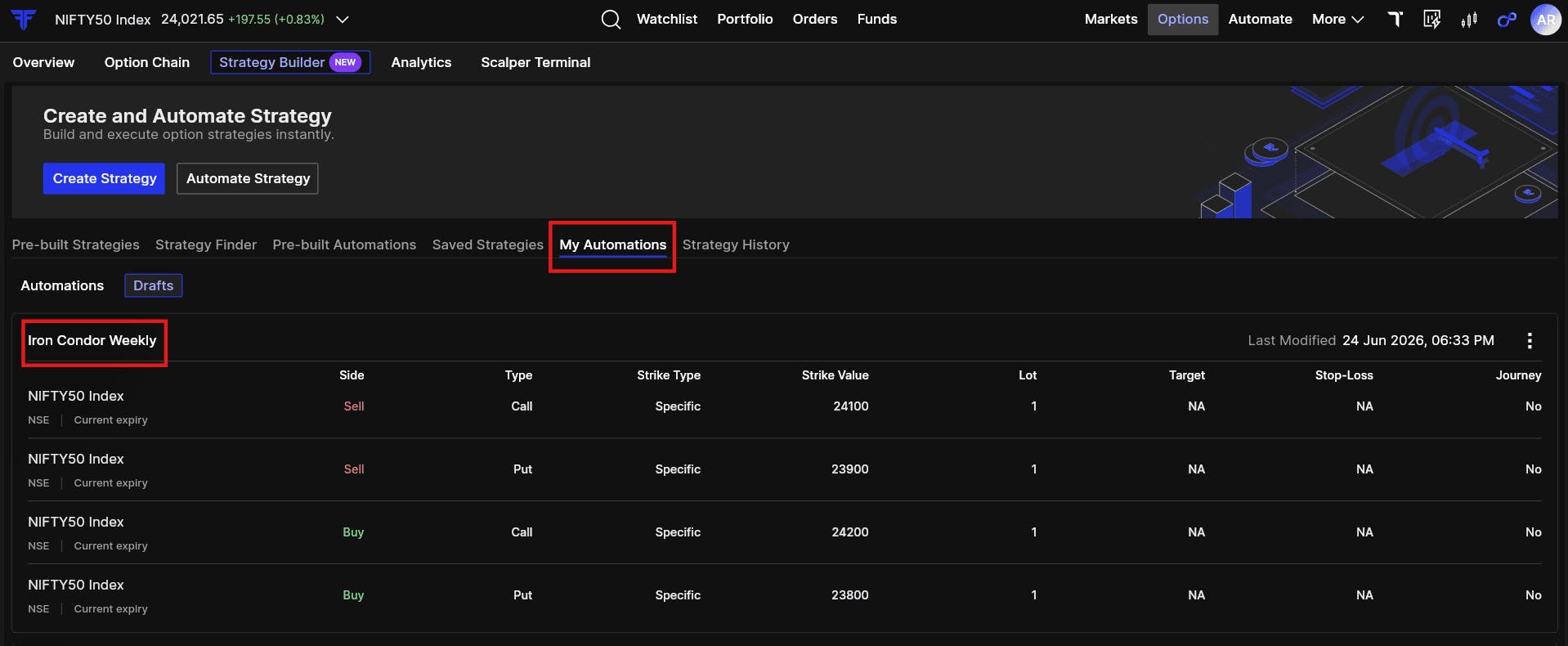
This gives you a cleaner way to track systematic options strategies without constantly rebuilding the logic in your head.
Built for the full options workflow
Strategy Builder is not just a place to create multi-leg orders.
It is built for the full strategy workflow:
- Build the strategy
- Visualise the payoff
- Understand risk and breakevens
- Review P&L and Greeks
- Execute the position
- Track it as one combined strategy
- Automate entry and exit conditions
Options trading needs clarity before execution and control after execution. Strategy Builder brings both into the same workflow.
The next time you have a market view, do not jump straight to individual orders.
Go to FYERS Web or App → Options → Strategy Builder.
Build the strategy. Check the payoff. Understand the risk. Execute with clarity. And manage it systematically.
Try Strategy Builder on FYERS today.